When a Direct Lake report is slow, people open the semantic model first. They check relationships, rewrite DAX, look at the capacity metrics. In my experience, the cause usually sits one layer down, in how the Delta tables under the model were written.
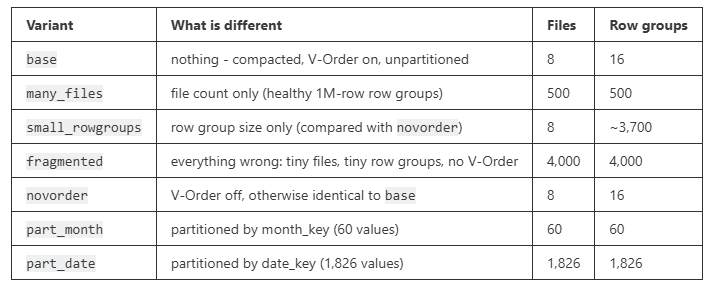
That sounds like a bold claim, so I wanted to test it properly. I took one dataset of 500 million rows and wrote it to seven Delta tables. Each table differs from a baseline in exactly one way: the number of files, the row group size, V-Order, or partitioning.
Then I ran the same queries against all of them through one Direct Lake on OneLake model. For every table, I measured cold and warm query times, what each write did to the Parquet files, and what stayed in memory afterward.
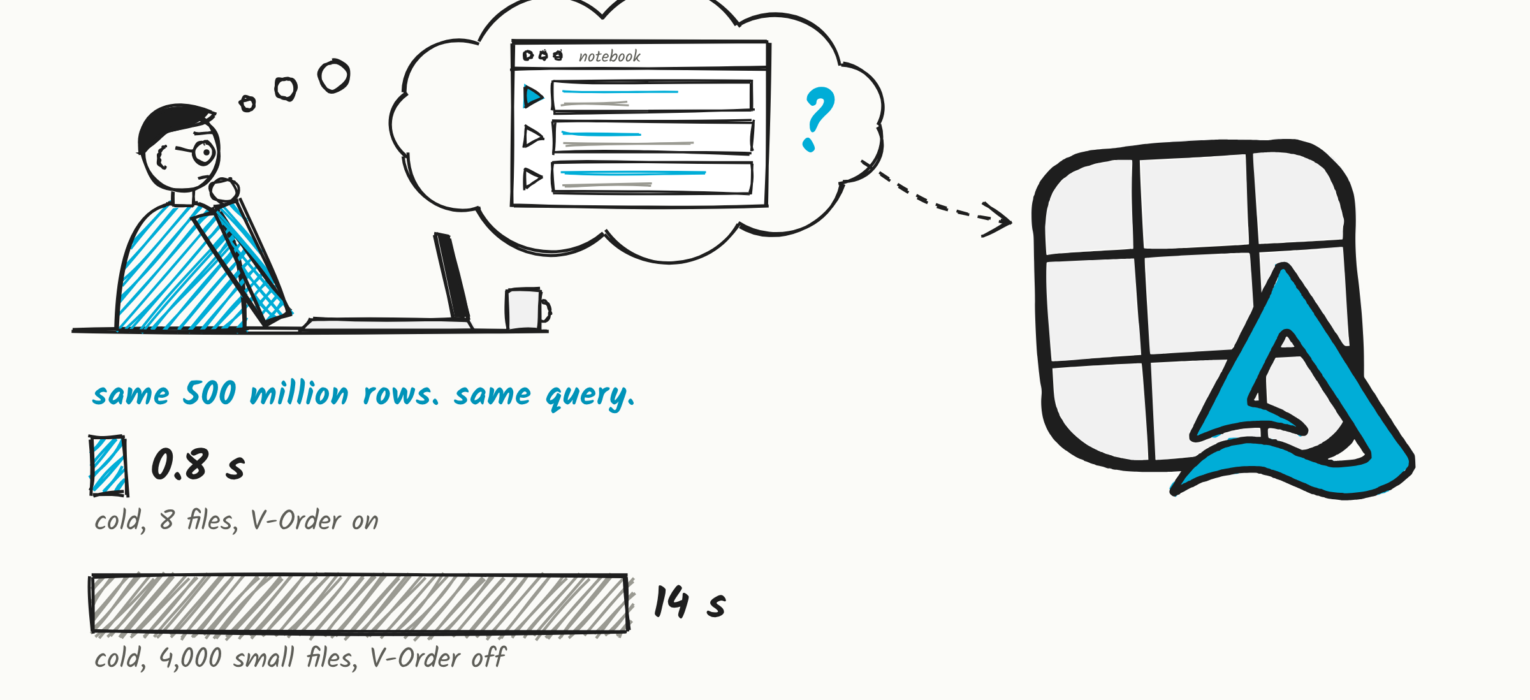
The short version: once the data is in memory, every one of those tables answers in under half a second. The cold query, the one that loads the data into memory, ranges from 0.8 to 14 seconds, and how the table was written decides where it lands.
This article walks through what I measured and why it happens. If you need a refresher on the basics, I covered them in 50 shades of Direct Lake. The difference between Direct Lake on OneLake and Direct Lake on SQL is in A tale of two Direct Lakes. Everything below applies to both flavors, because both read the same Parquet files.
The promise and experiences from the field
Let me start with what Direct Lake promises:
- One copy of the data. The semantic model reads the Delta tables in OneLake directly. There is no import, and no second copy to keep in sync.
- Import speed. Once the data is in memory, queries run on the same VertiPaq engine as an import model. Same engine, same speed.
- No refresh pipeline. A Direct Lake refresh is a metadata operation called framing. It takes seconds and copies nothing.
And here is what I see in the field. The first queries of the day are slow, and someone always pays that cost. Visuals fail because a table crossed a capacity guardrail. And the one that confuses teams the most: a report gets slower after an ETL change that didn’t change a single number in the data.
In all three cases, the model is not where the problem lives. The problem is how the tables underneath it were written. Before I show you the numbers, we need four concepts, because every result later in this article is explained by one of them.
Two flavors, two failure modes
Direct Lake comes in two flavors, and they behave differently. I covered the differences in detail in A tale of two Direct Lakes, so here is only what matters for performance.
| Direct Lake on SQL | Direct Lake on OneLake | |
|---|---|---|
| Sources | single SQL analytics endpoint | one or more Fabric items |
| Falls back to DirectQuery? | yes: on guardrails, T-SQL views, unsupported features | never |
| How it fails | a sudden latency cliff when a query switches engines | gradual degradation through file layout, transcoding cost, and memory |
| Where you see it | query plans in Performance Analyzer or DAX Studio | segment residency and Delta table history |
This article is about the second failure mode, and it applies to both flavors, because both read the same Parquet files. Everything I measured ran on Direct Lake on OneLake, so there was never a fallback to blur the numbers.
Framing: the model reads a version, not a table
Framing is what Direct Lake calls a refresh, and it loads no data. It reads the Delta log, sees which Parquet files belong to the latest version of each table, and points the model at that version. It also decides which of the column segments already in memory are still valid. Because it is metadata only, it is fast and cheap: in my tests, a reframe of the whole model took about 15 seconds, for nine fact tables and roughly 3.5 billion rows.
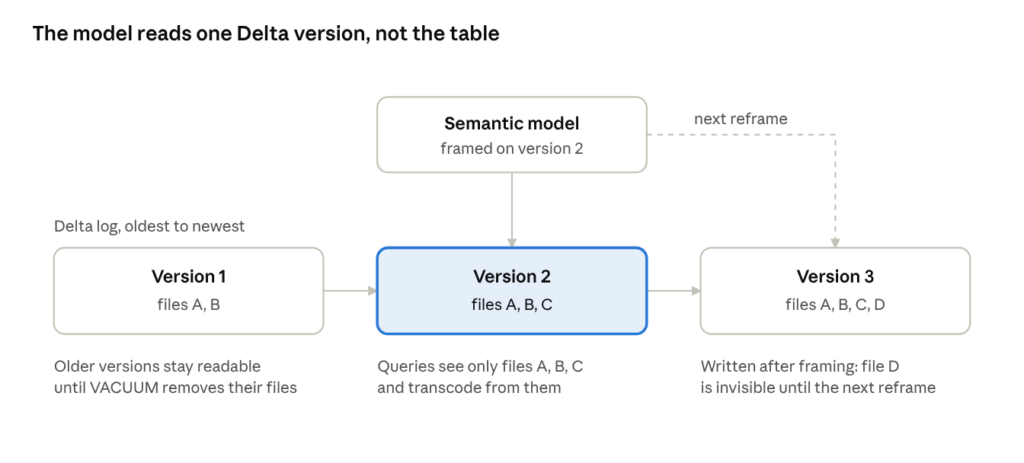
Two details of this are important for the next part.
First, each table in the model is bound to the files of one specific Delta version, not to the table as it is right now. Files written after the last framing are invisible to the model until the next one. If you ever wondered why your report doesn’t show the rows your pipeline just loaded, this is why.
Second, framing is the moment when your write pattern decides whether the warm cache survives. A segment built from a file that is still part of the new version stays in memory. A segment built from a file that is gone has to be loaded again.
Transcoding: where the time goes
If framing loads no data, when does the data get into memory? On first touch. When a query needs a column that isn’t in memory yet, Direct Lake reads that column’s chunks from the Parquet files and converts them into VertiPaq column segments. This conversion is called transcoding, and it is the cost of a cold query.
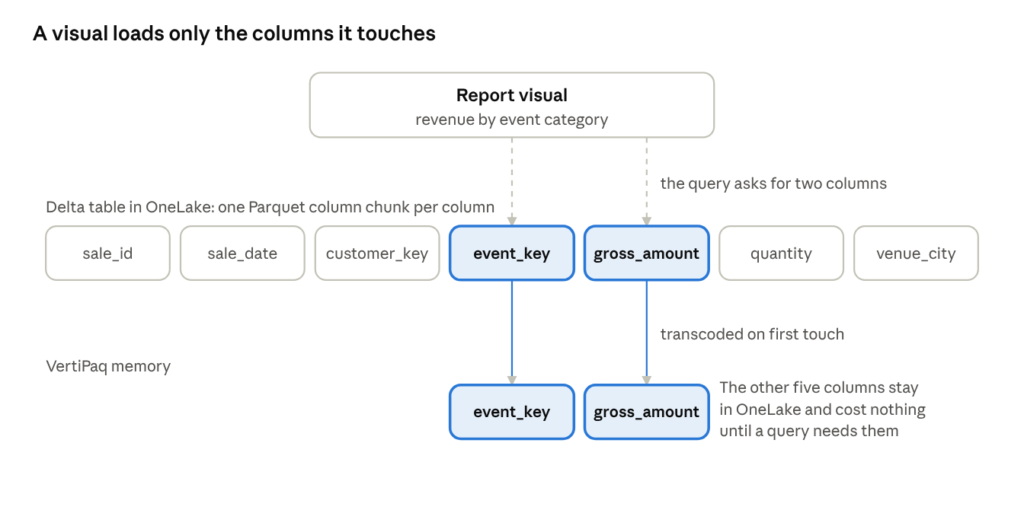
Transcoding happens per column and on demand. A visual that shows revenue by event category needs the revenue column, plus the key that joins the fact table to the event dimension, plus the category column from the dimension. Everything else stays on disk. So the width of your table is not the problem. The width of your queries is.
This is also why almost every number in this article is a cold number. When I say a table is 17 times slower, I mean transcoding took 17 times longer. Once the segments are in memory, the layout of the table no longer matters, and you’ll see that soon.
What removes a column from memory
A column that has been loaded into memory is called resident. It stays in memory until one of three things happens:
- The model reframes after the Delta table changed. Segments built from files that are no longer part of the table are dropped.
- Nobody uses the column for a while. Columns that are not queried cool down and eventually get evicted.
- The capacity needs the memory. Other models and operations running at the same time can push your segments out.
The second and third are operational. The first is a design decision, and it is the one you control through the way you write your tables. Most of the second half of this article is about it.
The residency ladder
Put framing and transcoding together and you get the mental model for the rest of this article: a ladder with four rungs. Every query ends up on one of them, depending on how much of what it needs is already in memory.
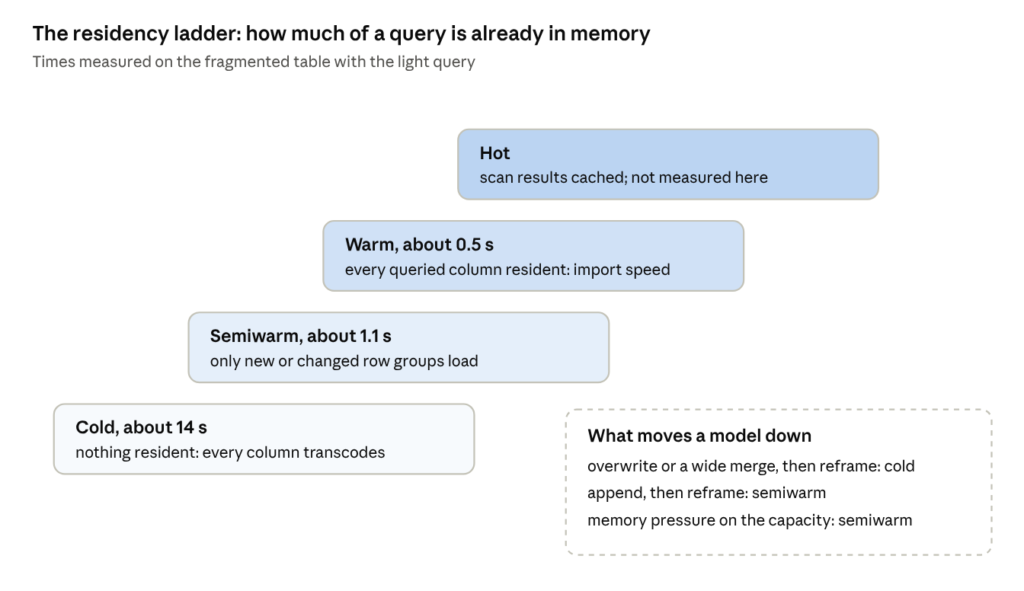
- Cold. Nothing is resident. Every column the query needs has to be transcoded.
- Semiwarm. Most of what the query needs is resident, and only new or changed row groups load. You end up here after an incremental change, and also after memory pressure has evicted part of the model.
- Warm. Every column the query needs is resident. This is import speed.
- Hot. Beyond warm, the engine can cache the results of scans for repeated queries. I didn’t measure this rung: every query I ran was made unique on purpose, so you see the real work and not a cache.
The times on the ladder come from a test I’ll show near the end. In every section below, keep asking two questions: which rung are we on, and what pushed us off it? That is the whole thing. How much time does the model spend climbing, and who pays for the climb?
Row groups, segments and dictionaries
Now the part that connects Parquet to VertiPaq, and explains most of the numbers you’re about to see.
A Parquet file is split into row groups. When Direct Lake transcodes a column, every row group becomes one segment of that column in the model. One-to-one. If your table has 3,392 row groups, every column in the model has 3,392 segments. Microsoft recommends 1 to 16 million rows per row group. Small row groups mean small segments, and many small segments mean more work to load and to scan.
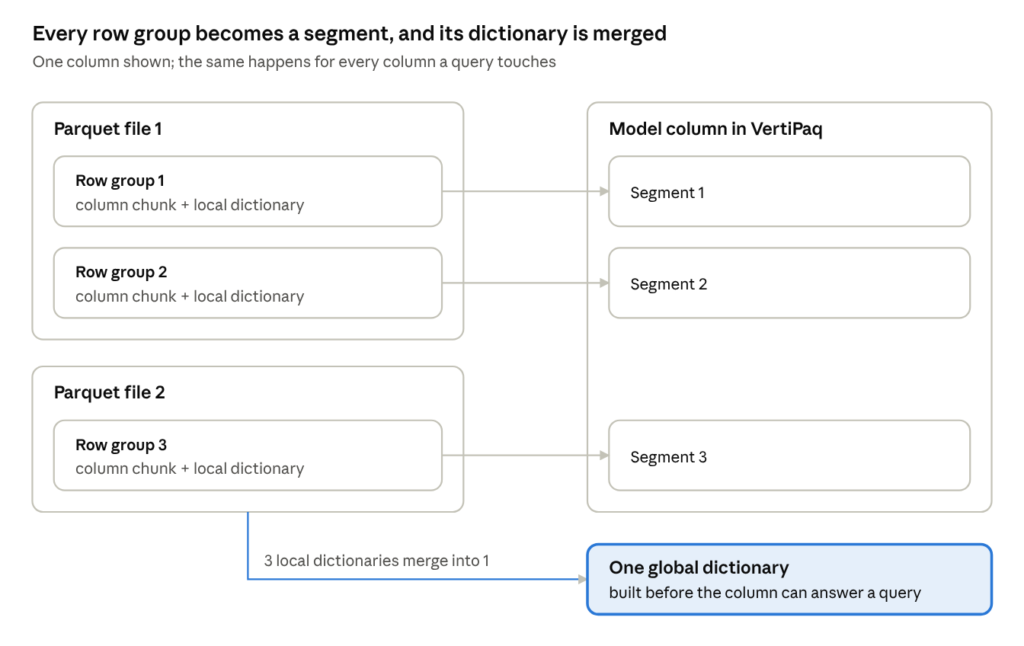
The second half of the picture is dictionaries. Every row group stores its own local dictionary for each column. VertiPaq needs one global dictionary per column, so before a column can answer a query, Direct Lake merges all the local dictionaries into one. More row groups, more dictionaries to merge.
So fragmentation taxes you twice: more segments to load, and more dictionaries to reconcile.
Uniformity matters too. Uneven row group sizes give the engine uneven chunks of work to distribute. Who decides how many row groups you end up with? Your write pattern and your OPTIMIZE cadence. Fabric’s own Spark writer does this well when you let it.
V-Order fits in here as well. It is a write-time optimization that sorts and encodes the Parquet data so that it maps almost directly into VertiPaq’s compressed format. How much that matters surprised me, and I’ll show you the number.
Incremental framing
Incremental framing is the mechanism that makes an append cheap. On a reframe, Direct Lake reads the Delta log and drops only the segments and join indexes whose underlying files changed. The dictionaries are kept, and new values are added to them.
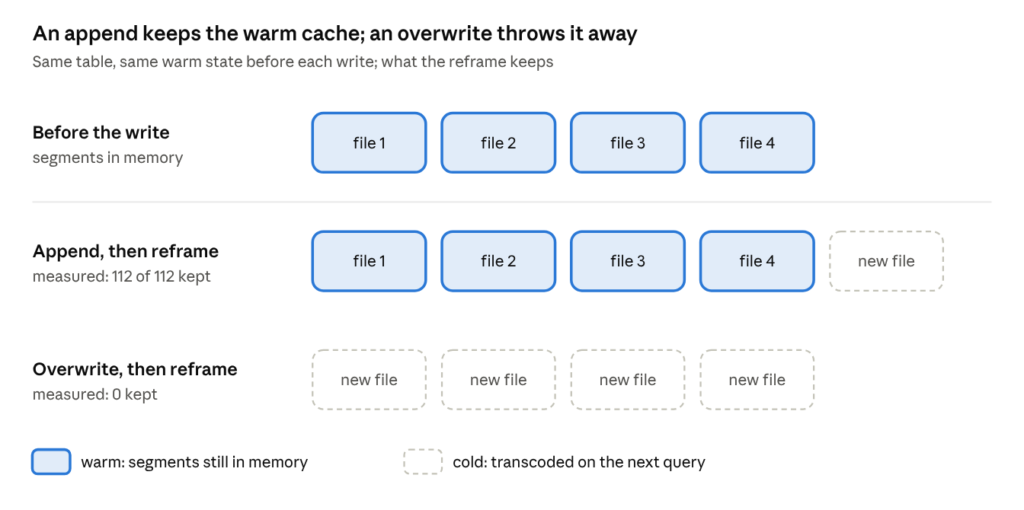
The rule that follows is simple, and the second half of this article depends on it. If your write only adds files, nothing that was warm goes cold. If your write replaces files, everything in those files goes cold.
And Parquet files are immutable. A delete, an update or a merge can’t change a file in place. It writes a new file with the remaining rows, and removes the old one from the table. So “replaces files” covers a lot more writes than you might think.
Update patterns and table maintenance
Put framing and row groups together and you can rank the common ways tables get written, from worst to best for Direct Lake:
| Pattern | What it does to the files | What Direct Lake keeps after a reframe |
|---|---|---|
| Full overwrite | replaces every file | nothing: every segment goes cold |
| Batch delete or update, unpartitioned | rewrites every file that holds a matching row, usually all of them | almost nothing |
| Batch delete or update, partitioned | rewrites only the files in the affected partitions | everything outside those partitions |
| Incremental append | adds new files, touches nothing existing | every warm segment |
| Streaming | adds many small files, often continuously | every warm segment, but the table fragments fast |
Streaming deserves a second look. It is append-only, so it is friendly to the cache. At the same time, every micro-batch writes its own small files with small row groups, which is exactly the kind of table you’ll see me race later. Streaming tables need OPTIMIZE more than any other.
That brings us to maintenance. The two commands people mention together have very different effects on Direct Lake:
- VACUUM removes files that no table version references anymore. It doesn’t make Direct Lake faster or slower. It can break it, though, and I’ll come back to that.
- OPTIMIZE merges small files into larger ones. That directly changes cold performance, because it changes the number of files and row groups.
How often should you optimize? Rarely for tables that receive large, clean batches. Often for tables where small files pile up quickly: streams and frequent small appends. And leave the default row group size alone, as the defaults end up in the recommended range. For large fact tables, the pattern I recommend is append-only writes plus OPTIMIZE on a schedule. The numbers below show why.
The pruning myth
One thing to unlearn before you see the numbers. Direct Lake does not skip files or row groups. The Learn article says it plainly: Direct Lake doesn’t use Delta or Parquet statistics for file or row group skipping. There is no partition pruning and no min/max skipping. When a query needs a column, transcoding reads that column from every row group in the table.
If you come from Spark, this is the instinct that doesn’t transfer. In Spark, partitioning by date makes a query for last week read last week’s files. In Direct Lake, partitioning doesn’t make a DAX query read less.
So is partitioning useless? For read speed, yes. It earns its keep somewhere else: it limits how many files a delete, a merge, or an OPTIMIZE has to rewrite. We’ll get to the measurements of both sides.
The test: one baseline, one variable per table
The dataset is fictional ticket sales: 500 million rows, 12 columns, generated deterministically so every table holds exactly the same rows. Each table changes one thing against the baseline, so every difference in the results has one explanation.
| Table | What is different | Files | Row groups | Rows per row group |
|---|---|---|---|---|
| base | compacted, V-Order on, unpartitioned | 8 | 16 | 31.3M |
| many_files | file count only, healthy row groups | 500 | 500 | 1.0M |
| small_rowgroups | row group size only (compare with novorder) | 8 | 3,392 | 147K |
| fragmented | everything wrong: tiny files, tiny row groups, no V-Order | 4,000 | 4,000 | 125K |
| novorder | V-Order off, layout identical to base | 8 | 16 | 31.3M |
| part_month | partitioned by month (60 values) | 60 | 60 | 8.3M |
| part_date | partitioned by date (1,826 values) | 1,826 | 1,826 | 274K |
All measurements ran on an F256 capacity. A cold measurement means a clearValues refresh followed by a full refresh, then the two dimension tables loaded once, so the first fact query doesn’t pay for them.
I used three reference queries. The light one touches three columns, two of which are numeric. The medium one adds three string columns and four measures, so seven columns have to load. Finally, the heavy query adds a DISTINCTCOUNT on the 2M+ customer_key column:
Light query
EVALUATE
SUMMARIZECOLUMNS (
    dim_event[event_category],
    "revenue", SUM ( fact[gross_amount] ),
    "tickets", SUM ( fact[quantity] )
)
Medium query
EVALUATE
SUMMARIZECOLUMNS (
    'Sales'[venue_city],
    'Sales'[ticket_type],
    'Sales'[payment_method],
    "revenue",   SUM ( 'Sales'[gross_amount] ),
    "tickets",   SUM ( 'Sales'[quantity] ),
    "avg_price", AVERAGE ( 'Sales'[unit_price] ),
    "orders",    COUNTROWS ( 'Sales' )
)
Heavy query
EVALUATE
SUMMARIZECOLUMNS (
    fact[venue_city],
    fact[ticket_type],
    fact[payment_method],
    dim_date[year],
    "revenue",   SUM ( fact[gross_amount] ),
    "tickets",   SUM ( fact[quantity] ),
    "avg_price", AVERAGE ( fact[unit_price] ),
    "customers", DISTINCTCOUNT ( fact[customer_key] )
)
For inspection I used three tools: Delta Analyzer from semantic-link-labs for files and row groups, DESCRIBE HISTORY in Spark for what each write removed and added, and the DAX function INFO.STORAGETABLECOLUMNSEGMENTS() for what is resident in memory and how warm it is.
My first round of numbers was wrong
I started with a third, heavier query that adds a distinct count over a column with two million values. Cold, it took around 150 to 230 seconds on every table, and warm it came back in 1.4 seconds. That looked like a perfect cold-versus-warm story.
But, it wasn’t. When I made every run unique, by adding a filter that changes on each call, the “warm” run took about 150 seconds too. The 1.4 seconds came from a cache answering a repeated query, not from VertiPaq scanning resident data.
So every timing in this article comes from a query wrapped in a filter that changes on each call: CALCULATETABLE ( <query>, 'Event'[event_key] <> -n ). If you benchmark Direct Lake yourself, do the same, or you will measure a cache instead of your table.
Files, row groups and V-Order
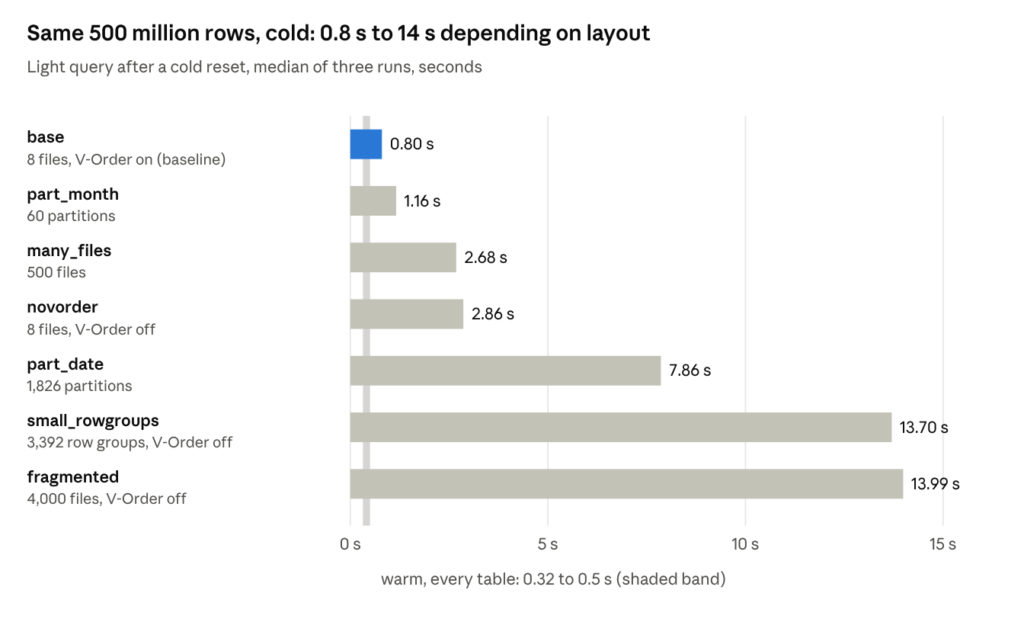
Once warm, every table answered the light query in 0.3 to 0.5 seconds. The whole difference is transcoding, the price of getting data into memory.

Files. With healthy row groups and V-Order on, going from 8 files to 500 made the cold query 3.4 times slower. At 4,000 small files without V-Order, it was 22.5 times slower! Every file has to be opened and read, and every row group adds a segment and a dictionary to merge.
Row groups. The small_rowgroups and novorder tables have the same 8 files, the same rows, and no V-Order. The only difference is 3,392 row groups of 147,000 rows against 16 of 31 million. Cold, that made the query 3.7 times slower on identical data.
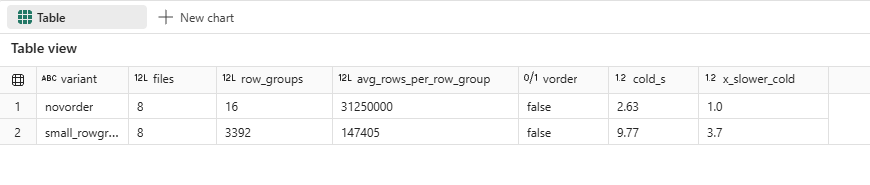
You won’t usually get that shape from Fabric Spark. To produce it, I had to switch off the native execution engine for that one write, because its writer ignored my row group size setting. Small row groups come from tables written elsewhere: shortcuts to other engines, pyarrow, delta-rs, streaming micro-batches. Check the row groups of any table you didn’t write yourself.
The opposite end is harmless. The baseline’s row groups hold 31 million rows, above the 16 million Microsoft recommends, and it was the fastest table in the test. The range is guidance, while the damage happens at the small end.
V-Order. This result surprised me most. The base and novorder tables have identical files and row groups; only the V-Order property differs. Without V-Order, the cold light query was 4 times slower, and the medium query with its string columns 7 times slower (4.50 against 0.66 seconds).
Afterwards, both models held exactly the same 112 segments across the same 7 columns. V-Order changed how long it took to get the data into memory, not what ended up there.

OPTIMIZE and V-Order are query performance features, not housekeeping.
Your dev dataset hides this
I built every variant twice, at 10 million and at 500 million rows, with identical schema. At 10 million rows, the fragmented table answered the light query in 1.50 seconds against 0.81 for the baseline. That’s 1.9 times slower, and 1.5 seconds is the kind of number nobody complains about.
At 500 million rows, the same layout was 17.5 times slower. Same schema, same query, same capacity. The only thing that changed was the row count, and with it the number of files, row groups and dictionaries the engine had to deal with.
Why does this matter? Because most of us develop against a sample. If your dev lakehouse holds a fraction of production, a layout problem shows up as a rounding error in dev and as a performance incident in production. If you want to see what your layout costs, test it at the size it will run at.
Partitioning: wrong reason, right tool
Since Direct Lake doesn’t prune, partitioning can’t make a query faster by reading less. The measurements agree. The table partitioned by month took 1.16 seconds cold against 0.80 for the baseline, and the order flipped between runs, so I consider that noise.
The table partitioned by date took 7.86 seconds. Partitioning by a column with 1,826 values produced 1,826 files of 274,000 rows each, and you pay for those small files on every cold query. A sensible partition key costs you nothing on read, and a high-cardinality one fragments the table.
So why partition at all? Because of what happens when you write. Parquet files are immutable: a delete doesn’t remove rows from a file, it rewrites every file that held a matching row. I deleted one day of sales, 274,138 rows (0.05% of the table), from all three tables, then reframed the model:
| Table | Files before | Files removed | Files added | Delete took | Warm segments before and after | Retained |
|---|---|---|---|---|---|---|
| base | 8 | 8 | 16 | 3 to 4.5 minutes | 112 to 0 | 0% |
| part_month | 60 | 1 | 1 | 30 to 40 seconds | 480 to 473 | 99% |
| part_date | 1,826 | 1 | 0 | 3 to 4 seconds | 14,608 to 14,600 | 100% |
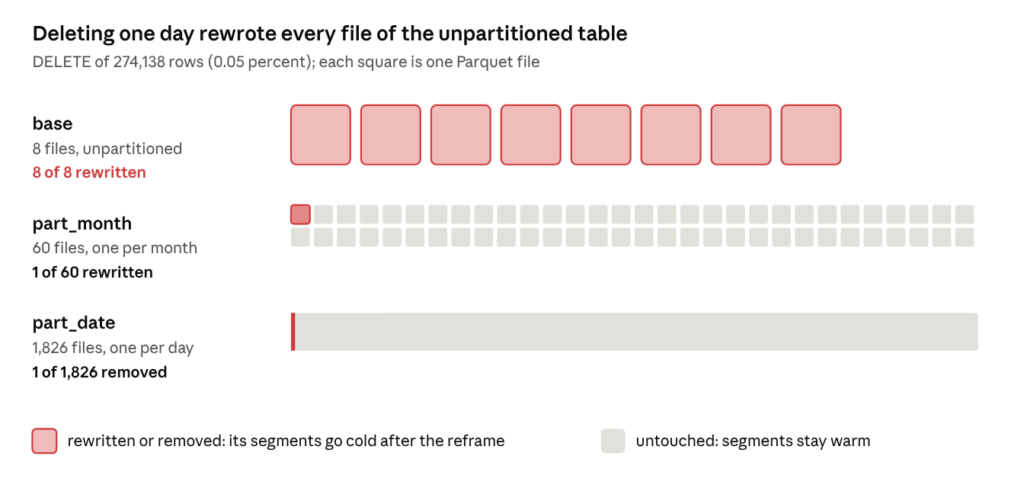
0.05% of the rows deleted, 100 percent of the cache gone. In the unpartitioned table, every file held rows from that day, so every file was rewritten, and the reframe kept nothing. The month partition rewrote one file and kept everything else warm. The date partition simply removed its file, which is the one thing it does well.

The delete times vary between runs (across four runs, the base delete took between 151 and 263 seconds), but the order never changed. The base table is also slow to rewrite for a reason worth knowing: its 8 large files mean the rewrite runs as 8 parallel tasks, while most of the capacity sits idle. Files that make a table fast to read can make it slow to rewrite.
So, the takeaway here is: Partition for blast radius, not for pruning. Microsoft’s guidance is a partition column with fewer than 100 to 200 distinct values. A raw date key fails that test after half a year. A derived month key gives you 60 values over five years.
Every write is a cache decision
The delete test generalizes. I warmed the baseline table, wrote to it in three different ways, reframed, and checked what was still in memory. Before each write, the medium query had loaded 112 segments across 7 columns.
| Write | Delta records it as | Files removed | Files added | Warm segments retained |
|---|---|---|---|---|
| Append one day (550K rows) | WRITE | 0 | 8 | 112 of 112 (100%) |
| Merge, update 1% of rows | MERGE | 8 | 33 | 0 (0%) |
| Overwrite with identical data | CREATE OR REPLACE TABLE AS SELECT | 8 | 17 | 0 (0%) |
The merge and overwrite runs used a query that warmed one more column (128 segments), so compare the percentages, not the counts.
Append only adds files, so incremental framing keeps every warm segment. Only the new rows are cold, and the next query loads just those.
Merge touched 1 percent of the rows and invalidated the entire cache. Every one of the 8 files held at least one matched row, so every file was rewritten. Fewer, larger files help here: the fewer files your matched rows are spread over, the fewer get rewritten.
Overwrite with the same data changed nothing logically and everything physically. Look at the operation Delta recorded: CREATE OR REPLACE TABLE AS SELECT. That is what a nightly full load is: a new table every night, and a cold start for whoever opens the report first in the morning.

One side effect of the append is worth noticing. 550,000 rows arrived as new small files, each with its own small row groups, and the number of files changes from run to run. Do that every night for a year without OPTIMIZE and you have built the fragmented table from the previous section. Fragmented tables usually come from a year of nightly loads, not from one bad decision.
Your orchestration pattern is a performance decision, not only a correctness decision.
Residency, temperature, and the ladder
You can watch all of this happen with INFO.STORAGETABLECOLUMNSEGMENTS(). For every column segment, it tells you whether it is resident in memory and how warm it is.
From a cold state, I ran a query that asks for one column, gross amount. Afterward, two columns were resident, each at temperature 0.97: gross amount and event key. Event key loaded because my cache-busting filter runs through the relationship to the event dimension, and relationship columns load with the query.
Then I ran the seven-column query. Seven columns were resident. The two columns touched twice sat at 1.9, the five touched once at 0.97, and the five columns nobody asked for had no temperature at all. Direct Lake loads per column and warms per access. A column nobody queries costs nothing, no matter how many rows the table has.
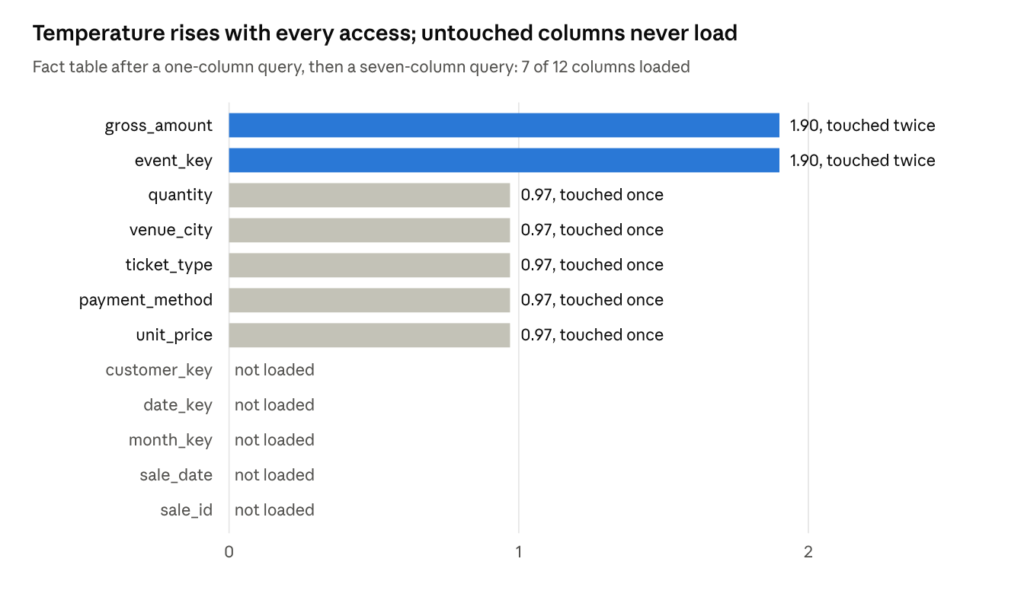
The same function makes the cold, semiwarm, and warm states visible. On the baseline table, transcoding is too cheap to separate them in time, so I ran this sequence on the fragmented table:
| State | How we got there | Light query |
|---|---|---|
| Cold | after clearing the model | about 14 seconds |
| Semiwarm | append one day, then reframe | about 1.1 seconds |
| Warm | one more query | about 0.5 seconds |
Cold, the query transcoded 12,000 segments: 3 columns times 4,000 row groups. After the append and the reframe, before any query ran, 12,000 of 48,096 segments were still resident. Incremental framing had kept every warm segment and added only the new row groups. The semiwarm query then loaded just 24 new segments, which is why it was twelve times faster than cold.
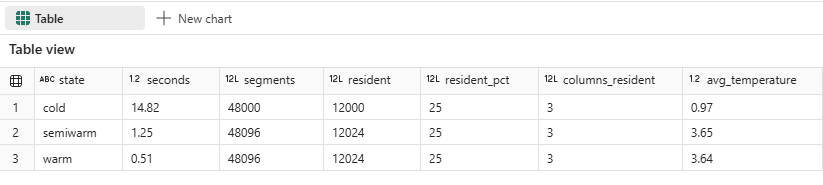
I didn’t measure a hot state. Every query I ran was made unique on purpose, so no cache could answer it.
One more number belongs here, because it puts everything else in proportion. On the best-laid-out table in the test, adding a distinct count over a column with two million values turned a 0.8-second cold query into 127 seconds. The column you put in a query can cost more than any layout mistake under it. Cardinality is a design decision too.
The VACUUM “headache”
Remember that a framed model points at the files of one specific Delta version? That is also where VACUUM can hurt you. VACUUM doesn’t affect Direct Lake performance, but it can break the model.
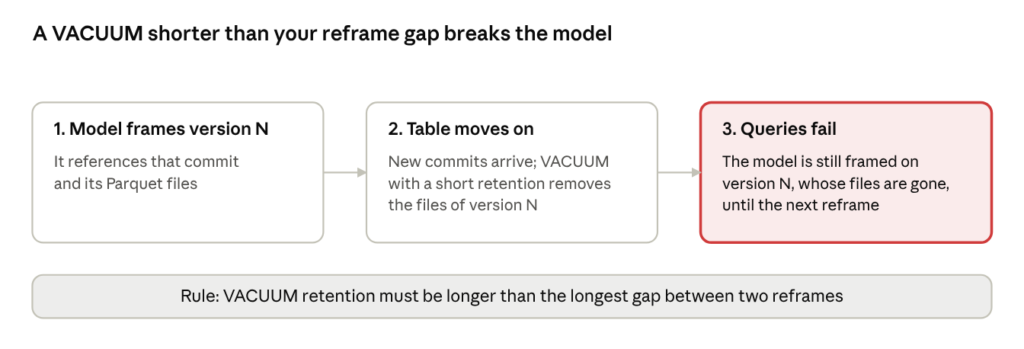
The default VACUUM retention of seven days is safe if you reframe daily. An aggressive retention setting combined with a slow refresh cadence is how visuals break on a Monday morning after a quiet weekend. Microsoft’s query performance article warns about exactly this: the Delta table has to keep the framed version until the model is framed again.
Two “invisible” caveats
Two more costs don’t show up in any of the layout numbers above.
Memory pressure. Everything a query touches has to fit in memory as column segments and join indexes. When the capacity runs short, segments are unloaded, and the model drops back down the ladder to semiwarm. The next query pays to load them again. Wide tables, high-cardinality string columns, and an undersized capacity all push you in this direction.
The fallback, on Direct Lake on SQL only. Supporting DirectQuery fallback means the engine has to build hybrid query plans that can run either way. According to Microsoft’s query performance guidance, that has a cost even when no query ever falls back. If you don’t need fallback, disable it. With Direct Lake on OneLake, there is no fallback and no tax to pay.
A checklist for your own lakehouse
Design
- Partition only by a column with fewer than 200 distinct values. Derive a month key, never partition by a raw date.
- Keep cardinality in check, in your tables and in your measures.
Write
- Append where you can. Keep merges narrow, so matched rows touch as few files as possible.
- Don’t fully overwrite a large fact table as a routine load.
Maintain
- Run OPTIMIZE with V-Order on a cadence that matches how often you write. Tables that receive frequent small appends need it most.
- Keep VACUUM retention longer than the gap between reframes. A framed model references the files of one Delta version, and Microsoft warns that queries fail if those files are vacuumed before the next reframe.
Verify
- Check files and row groups with Delta Analyzer, especially for tables written by anything other than Fabric Spark.
- Check residency with
INFO.STORAGETABLECOLUMNSEGMENTS(), cold and warm. - Test at production scale. At 10 million rows, the fragmented table was 1.9 times slower than the baseline (1.50 against 0.81 seconds), slow enough to miss. At 500 million rows, the same layout was 17.5 times slower.
The semantic model gets the blame because it is where the slowness shows up. But a model can only be as fast as the tables it reads. Before you rewrite another measure, run DESCRIBE HISTORY on the fact table behind it and look at what your last load did to its files.
Thanks for reading!
Thanks to Claude for creating these nice-looking diagrams and visuals.
Sources
- Understand Direct Lake query performance, Microsoft Learn
- 50 shades of Direct Lake
- A tale of two Direct Lakes in Microsoft Fabric
- Demo notebook to replicate queries
Last Updated on November 1, 2026 by Nikola