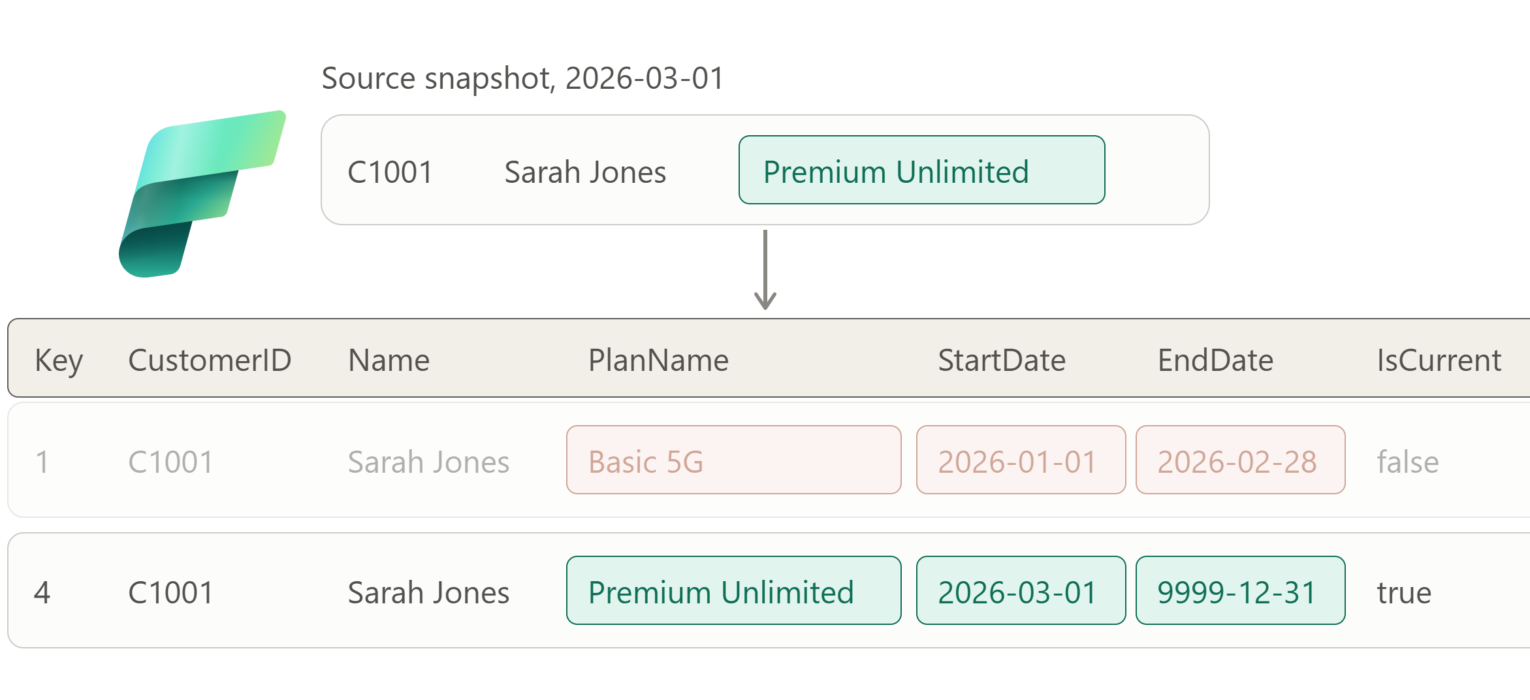
Slowly Changing Dimensions (SCD) are one of the fundamental concepts in dimensional modeling. If you are not sure what dimensional modeling is, I suggest you first check the series of articles I wrote on data modeling some time ago.
And, when it comes to SCD in particular, SCD Type 2 is rightly considered “the queen” of the SCDs for analytical workloads. Without going into details (since the main goal of this article is to show you HOW to implement the SCD Type 2 in Microsoft Fabric), I’ll just briefly introduce the general concept behind the SCD Type 2.
What is SCD Type 2?
SCD Type 2 maintains full history by creating a new record for every change, while keeping old records intact. This allows historical point-in-time analysis. Let’s illustrate this approach using a very simple example of the customer’s address change.
Imagine that we have a customer, Sarah Jones, who entered our system on January 1st, 2024. Sarah lives in California.
| CustomerKey | CustomerID | Name | Location | StartDate | EndDate | IsCurrent |
| 1 | C12345 | Sarah Jones | California | 2024-01-01 | 9999-12-31 | 1 |
Beginning this year, Sarah moved to New York, so we need to update her record in our system accordingly:
| CustomerKey | CustomerID | Name | Location | StartDate | EndDate | IsCurrent |
| 1 | C12345 | Sarah Jones | California | 2024-01-01 | 2025-12-31 | 0 |
| 2 | C12345 | Sarah Jones | New York | 2026-01-01 | 9999-12-31 | 1 |
Watch out what happened to the initial Sarah’s entry – we’ve updated the EndDate value to the date before the actual record’s start date, as well as the IsCurrent value to reflect this change. Please notice that the business key (natural unique identifier from the source system) didn’t change, but we can guarantee uniqueness in our dimensional model with the surrogate key (CustomerKey as a unique identifier, which doesn’t have any business meaning).
Now, when someone wants to analyze, let’s say, total sales for 2025 based on customers’ location, Sarah’s orders will be correctly allocated to California. If we simply overwrote the previous location with the new one, we would have lost the history tracking, and Sarah’s orders would have been allocated to whatever location she currently has stored in the system.
Ok, now that you know the basics of the SCD Type 2 concept, let’s jump straight into action!
Business scenario: Telco customer tracking
We are working for TelcoConnect, a global telecommunications provider. Our task is to ensure that every customer plan change, address update, or status change over time is properly recorded in the system. The business plans to use this data to analyze customer churn analysis (which customers were on and when they left), revenue forecasting, ensure regulatory compliance, and marketing campaign effectiveness.
The source system (CRM) exposes a daily snapshot of the customer table with these attributes:
- CustomerID – business key
- CustomerName
- PlanName – tracked, Type 2
- City – tracked, Type 2
- Status – tracked, Type 2 (Active, Suspended, Churned)
Not every attribute deserves Type 2 treatment. A typo fix in CustomerName should not create a new version of the customer. We will treat CustomerName as a Type 1 attribute inside a Type 2 dimension (overwrite in place, across all versions) and track only PlanName, City and Status.
Designing the dimension table
Before writing any code, four decisions have to be made. Every SCD Type 2 implementation that goes wrong in production goes wrong because one of these was made implicitly.
- Surrogate key generation. At the moment of writing, Fabric Data Warehouse supports IDENTITY columns (bigint only, no seed or increment). Values are unique but not guaranteed to be sequential or gap-free because ranges are allocated across distributed compute nodes. That is fine for a surrogate key, because nothing in a star schema should depend on key ordering. In a Lakehouse you generate the key yourself (shown later).
- EndDate convention. Two options: inclusive EndDate (2025-12-31 for a version that ended before 2026-01-01) or exclusive EndDate (2026-01-01, equal to the next version’s StartDate). This article uses the inclusive convention because it reads naturally in a BETWEEN predicate. Whichever you choose, use it everywhere and document it. Mixing conventions produces off-by-one-day errors that are very hard to spot.
- Change detection. Comparing tracked columns one by one works, but becomes cumbersome with NULLs and wide dimensions. A common alternative is to serialize the tracked attributes deterministically and store a row hash. Then change detection becomes one comparison. The important part is not only the hash algorithm, but also producing an unambiguous input representation: normalize NULLs explicitly and make sure the encoding cannot confuse different combinations of attribute values.
- Granularity of change. With DATE columns, the model supports one effective version per customer per day. This is slightly different from saying that the source can change only once per day: if another snapshot for the same effective date arrives with different values, you have to decide whether it corrects/replaces that day’s state or represents another state that must be retained. The implementation below assumes one authoritative snapshot per customer per effective date. If multiple intraday states matter, use DATETIME2 for StartDate and EndDate instead.
- Source key uniqueness. SCD Type 2 assumes that each source snapshot contains at most one state per business key for the chosen grain. Validate that assumption before modifying the dimension. Duplicate business keys in staging are a data-quality problem, not something the SCD load should silently resolve.
Now, action please! Let’s create our target table:
CREATE TABLE dbo.DimCustomer
(
    CustomerKey     BIGINT IDENTITY NOT NULL,
    CustomerID      VARCHAR(20)     NOT NULL,
    CustomerName    VARCHAR(100)    NOT NULL,
    PlanName        VARCHAR(50)     NOT NULL,
    City            VARCHAR(50)     NOT NULL,
    Status          VARCHAR(20)     NOT NULL,
    RowHash         VARBINARY(32)   NOT NULL,
    StartDate       DATE            NOT NULL,
    EndDate         DATE            NOT NULL,
    IsCurrent       BIT             NOT NULL
);
RowHash covers only the Type 2 attributes (PlanName, City, Status). CustomerName is deliberately excluded.
Fabric Warehouse note: although SHA2_256 produces a 32-byte hash, HASHBYTES() is typed as VARBINARY(8000) by the engine. Since RowHash is defined as VARBINARY(32), the examples below explicitly use CONVERT(VARBINARY(32), HASHBYTES(...)) to avoid an unsupported implicit narrowing conversion.
A staging table receives the daily snapshot from the source:
CREATE TABLE dbo.StgCustomer
(
    CustomerID      VARCHAR(20)     NOT NULL,
    CustomerName    VARCHAR(100)    NOT NULL,
    PlanName        VARCHAR(50)     NOT NULL,
    City            VARCHAR(50)     NOT NULL,
    Status          VARCHAR(20)     NOT NULL
);
Let’s populate the table with the initial snapshot, on January 1st, 2026:
INSERT INTO dbo.StgCustomer VALUES
('C1001', 'Sarah Jones',    'Basic 5G',          'Vienna',   'Active'),
('C1002', 'Marko Petrovic', 'Premium Unlimited', 'Salzburg', 'Active'),
('C1003', 'Anna Mueller',   'Family 4',          'Graz',     'Active');
Option 1: T-SQL in Fabric Data Warehouse
Why not just MERGE?
Fabric Data Warehouse supports the MERGE statement, so the first instinct is to write the whole SCD Type 2 load as one MERGE. It doesn’t work, and it is worth understanding why.
A single source row for a changed customer needs two actions on the target: update the current version (close it) and insert a new version. MERGE joins source to target and, for each source row, executes exactly one action: the matching WHEN clause fires once. A changed customer needs two actions on the target: close the current row (UPDATE) and add a new row (INSERT). One source row, one action. There is no clause that says “when matched, update this row and also insert another one”.
Concretely, if you write:
MERGE dbo.DimCustomer AS d
USING dbo.StgCustomer AS s
   ON d.CustomerID = s.CustomerID AND d.IsCurrent = 1
WHEN MATCHED AND d.RowHash <> <new hash> THEN
     UPDATE SET EndDate = ..., IsCurrent = 0
WHEN NOT MATCHED BY TARGET THEN
     INSERT (...) VALUES (...);
Sarah’s changed row hits WHEN MATCHED, gets closed, and that’s it. The NOT MATCHED branch never fires for her because she did match. After the statement, Sarah has zero current versions. You still need a second INSERT.
Apparently, you can force it with some tricks (union the source with itself and use a fake merge key that never matches), and that is exactly what we will do in the Spark variant, because Delta MERGE is the only option there. In T-SQL, there is no reason to do that, as two plain statements in one transaction are simpler, easier to read, and easier to debug.
The load procedure
CREATE PROCEDURE dbo.usp_LoadDimCustomer

    @EffectiveDate DATE

AS

BEGIN

    -- Validate source grain before touching the dimension

    IF EXISTS

    (

        SELECT CustomerID

        FROM dbo.StgCustomer

        GROUP BY CustomerID

        HAVING COUNT(*) > 1

    )

        THROW 50002,

              'Staging contains multiple rows for the same CustomerID.',

              1;

    -- @EffectiveDate is the business/source validity date, not necessarily

    -- the date on which this procedure happens to execute.

    BEGIN TRANSACTION;

    -- Step 1: close current versions whose tracked attributes changed

    UPDATE d

    SET    d.EndDate   = DATEADD(DAY, -1, @EffectiveDate),

           d.IsCurrent = 0

    FROM   dbo.DimCustomer AS d

    JOIN   dbo.StgCustomer AS s

           ON s.CustomerID = d.CustomerID

    WHERE  d.IsCurrent = 1

      AND  d.RowHash <> CONVERT(VARBINARY(32),
            HASHBYTES('SHA2_256',
            CONCAT(ISNULL(s.PlanName, ''), '|',
               ISNULL(s.City, ''),     '|',
               ISNULL(s.Status, '')))
);

    -- Step 2: insert a new current version for every source row

    --         that has no current version in the dimension

    --         (brand new customers and customers closed in step 1)

    INSERT INTO dbo.DimCustomer

        (CustomerID, CustomerName, PlanName, City, Status,

         RowHash, StartDate, EndDate, IsCurrent)

    SELECT

        s.CustomerID,

        s.CustomerName,

        s.PlanName,

        s.City,

        s.Status,

        CONVERT(VARBINARY(32),
            HASHBYTES('SHA2_256',
                    CONCAT(ISNULL(s.PlanName, ''), '|',
                            ISNULL(s.City, ''),     '|',
                            ISNULL(s.Status, '')))
        ),

        @EffectiveDate,

        '9999-12-31',

        1

    FROM   dbo.StgCustomer AS s

    WHERE  NOT EXISTS

           (SELECT 1

            FROM   dbo.DimCustomer AS d

            WHERE  d.CustomerID = s.CustomerID

              AND  d.IsCurrent  = 1);

    -- Step 3: Type 1 attributes - overwrite across all versions

    UPDATE d

    SET    d.CustomerName = s.CustomerName

    FROM   dbo.DimCustomer AS d

    JOIN   dbo.StgCustomer AS s

           ON s.CustomerID = d.CustomerID

    WHERE  d.CustomerName <> s.CustomerName;

    -- Step 4 (optional): customers that disappeared from the source

    --         Only valid if staging is a FULL snapshot, never for deltas

    UPDATE d

    SET    d.EndDate   = DATEADD(DAY, -1, @EffectiveDate),

           d.IsCurrent = 0

    FROM   dbo.DimCustomer AS d

    WHERE  d.IsCurrent = 1

      AND  NOT EXISTS

           (SELECT 1 FROM dbo.StgCustomer AS s

            WHERE  s.CustomerID = d.CustomerID);

    COMMIT TRANSACTION;

END;
Step 2 does more than you may assume at first glance. Because Step 1 already flipped IsCurrent to 0 for changed customers, the NOT EXISTS predicate picks up both brand-new customers and customers whose old version was just closed. One INSERT covers both cases, and there is no need to track “what did Step 1 touch”.
Step 3 handles the Type 1 attribute. It runs after Step 2, so newly inserted current versions already contain the latest CustomerName. The update therefore matters primarily for older historical versions, where Type 1 semantics require the latest value to overwrite the previously stored one.
This may look strange at first: we’re modifying historical rows inside a Type 2 dimension. That’s intentional. CustomerName is defined as Type 1, so the model deliberately does not preserve its historical values. Only the attributes classified as Type 2 carry history.
Step 4 is the delete handling. Whether a customer who has vanished from the CRM should be closed or left current depends on the business and on whether the staging table is a full snapshot. If you load deltas, step 4 must not exist, because it would close every customer who simply had no change that day.
Run the initial load:
EXEC dbo.usp_LoadDimCustomer @EffectiveDate = '2026-01-01';

SELECT * FROM dbo.DimCustomer ORDER BY CustomerID, StartDate;

CustomerKey values are guaranteed to be unique, but they are not guaranteed to be sequential or gap-free. Therefore, don’t be surprised if the generated keys aren’t 1, 2, 3, and never attach business meaning to their order.
Second load: the changes arrive
Snapshot for March 1st, 2026. Sarah upgraded her plan, Marko moved to Linz, Anna is unchanged, and a new customer signed up:
TRUNCATE TABLE dbo.StgCustomer;

INSERT INTO dbo.StgCustomer VALUES
('C1001', 'Sarah Jones',    'Premium Unlimited', 'Vienna',   'Active'),
('C1002', 'Marko Petrovic', 'Premium Unlimited', 'Linz',     'Active'),
('C1003', 'Anna Mueller',   'Family 4',          'Graz',     'Active'),
('C1004', 'Liam OBrien',    'Basic 5G',          'Vienna',   'Active');

EXEC dbo.usp_LoadDimCustomer @EffectiveDate = '2026-03-01';

SELECT * FROM dbo.DimCustomer ORDER BY CustomerID, StartDate;
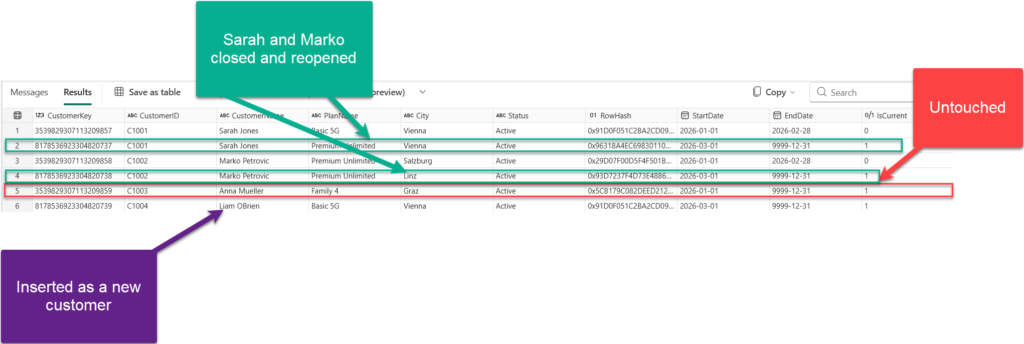
Anna’s row wasn’t touched. Sarah and Marko got closed and reopened. Liam was inserted as a new customer.
Idempotency
Run the same load twice with the same @EffectiveDate and the same staging content. Step 1 finds no hash differences (the current versions already carry the new hashes), Step 2 finds no customers without a current version, and nothing happens. A pipeline retry after a transient failure is safe. This property is worth testing explicitly in every SCD implementation.
One important distinction: retrying the same snapshot is idempotent, but processing two different snapshots with the same @EffectiveDate is not supported by this DATE-based implementation. A changed row already starting on @EffectiveDate would otherwise be closed on @EffectiveDate – 1, producing an invalid interval. In production, either reject this condition, treat the second snapshot as a correction to the same version, or use DATETIME2 and retain both states.
Validation
Fabric Data Warehouse doesn’t enforce the business rule we need here, so we have to validate it ourselves. At minimum, no business key may have more than one current version:
-- must return zero rows
SELECT CustomerID, COUNT(*) AS CurrentVersions
FROM   dbo.DimCustomer
WHERE  IsCurrent = 1
GROUP BY CustomerID
HAVING COUNT(*) > 1;

-- must return zero rows: overlapping or gapped intervals
SELECT a.CustomerID, a.CustomerKey, a.EndDate, b.CustomerKey, b.StartDate
FROM   dbo.DimCustomer AS a
JOIN   dbo.DimCustomer AS b
       ON  b.CustomerID = a.CustomerID
       AND b.StartDate  > a.StartDate
WHERE  a.IsCurrent = 0
  AND  DATEADD(DAY, 1, a.EndDate) <> b.StartDate
  AND  NOT EXISTS (SELECT 1 FROM dbo.DimCustomer AS c
                   WHERE c.CustomerID = a.CustomerID
                     AND c.StartDate > a.StartDate
                     AND c.StartDate < b.StartDate);
Put both queries at the end of the pipeline and fail the run if either returns rows.
Option 2: PySpark and Delta in a Fabric Lakehouse
Now, let’s use the same logic, but a different engine. Two things change:
- Surrogate keys come from a Delta identity column, available since Fabric Runtime 2.0 (Spark 4.1, Delta 4.2), which is generally available and becomes the default runtime in late September 2026.
- Delta MERGE is the primary write primitive, so we use the union trick to get two actions out of one MERGE.
In the Lakehouse implementation, we’ll use the same business scenario as before, but this time we’ll build the SCD Type 2 logic with PySpark and Delta Lake.
The flow is straightforward:
- Create the
dim_customerDelta table with an identity-based surrogate key. - Define a reusable
load_dim_customer()function that encapsulates the SCD Type 2 logic. - Load the initial customer snapshot from January 1st, 2026.
- Replace the staging data with the March 1st snapshot, where some customers changed and one new customer appeared.
- Run the exact same SCD Type 2 logic again.
- Inspect the final dimension and verify that historical versions were preserved correctly.
The interesting part is Step 2. Instead of writing separate code for the initial load and subsequent changes, we’ll define one reusable function that can handle both cases.
For new customers, the function inserts a new current version. For changed customers, it needs to do two things:
- Close the existing current version by setting
EndDateandIsCurrent = false; - Insert a new current version with the updated attributes.
Because Delta MERGE normally allows one action per matched source row, we’ll use a small staging trick: changed customers appear twice in the MERGE source: once with their real business key so the existing row can be updated, and once with a NULL merge key so the new version is forced through the insert branch.
We’ll also keep CustomerName as a Type 1 attribute, meaning it is overwritten across all historical versions instead of creating a new version, while PlanName, City, and Status remain the Type 2 attributes that drive historical changes.
The example also includes a few production-oriented safeguards: duplicate business-key validation, protection against conflicting versions on the same effective date, optional handling for customers that disappear from a full source snapshot, and a deterministic row hash for change detection.
Let’s put it all together.
from delta.tables import DeltaTable, IdentityGenerator
from pyspark.sql import Row, functions as F


# ============================================================
# 1. Create the SCD Type 2 dimension
#    Requires Fabric Runtime 2.0 for Delta identity columns
# ============================================================

spark.sql("DROP TABLE IF EXISTS dim_customer")
spark.sql("DROP TABLE IF EXISTS stg_customer")

(
    DeltaTable.create(spark)
    .tableName("dim_customer")
    .addColumn(
        "CustomerKey",
        "BIGINT",
        generatedAlwaysAs=IdentityGenerator(start=1, step=1)
    )
    .addColumn("CustomerID",   "STRING")
    .addColumn("CustomerName", "STRING")
    .addColumn("PlanName",     "STRING")
    .addColumn("City",         "STRING")
    .addColumn("Status",       "STRING")
    .addColumn("RowHash",      "STRING")
    .addColumn("StartDate",    "DATE")
    .addColumn("EndDate",      "DATE")
    .addColumn("IsCurrent",    "BOOLEAN")
    .execute()
)


# ============================================================
# 2. Reusable SCD Type 2 load function
# ============================================================

def load_dim_customer(effective_date, close_missing=False):

    tracked = ["PlanName", "City", "Status"]

    # Source snapshot with hash over Type 2 attributes
    src = (
        spark.table("stg_customer")
        .withColumn(
            "RowHash",
            F.sha2(
                F.concat_ws(
                    "|",
                    *[
                        F.coalesce(F.col(c).cast("string"), F.lit(""))
                        for c in tracked
                    ]
                ),
                256
            )
        )
    )

    # Validate one source row per business key
    duplicates = (
        src.groupBy("CustomerID")
           .count()
           .filter(F.col("count") > 1)
    )

    if duplicates.limit(1).count() > 0:
        raise ValueError(
            "stg_customer contains multiple rows "
            "for the same CustomerID."
        )

    dim = DeltaTable.forName(spark, "dim_customer")

    current = (
        dim.toDF()
           .filter(F.col("IsCurrent") == True)
           .select("CustomerID", "RowHash", "StartDate")
    )

    # Protect against two different states on the same effective DATE
    same_day_changes = (
        src.alias("s")
        .join(
            current.alias("d"),
            F.col("s.CustomerID") == F.col("d.CustomerID")
        )
        .filter(
            (F.col("s.RowHash") != F.col("d.RowHash")) &
            (F.col("d.StartDate") == F.lit(effective_date).cast("date"))
        )
    )

    if same_day_changes.limit(1).count() > 0:
        raise ValueError(
            f"A different version already exists on {effective_date}. "
            "Use a finer-grained timestamp or treat the new snapshot "
            "as a correction."
        )

    # Existing customers whose Type 2 attributes changed
    changed = (
        src.alias("s")
        .join(
            current.alias("d"),
            F.col("s.CustomerID") == F.col("d.CustomerID")
        )
        .filter(F.col("s.RowHash") != F.col("d.RowHash"))
        .select("s.*")
    )

    # Brand-new customers
    new = (
        src.alias("s")
        .join(
            current.alias("d"),
            F.col("s.CustomerID") == F.col("d.CustomerID"),
            "left_anti"
        )
        .select("s.*")
    )

    # New versions to insert
    to_insert = (
        changed
        .unionByName(new)
        .withColumn("StartDate", F.lit(effective_date).cast("date"))
        .withColumn("EndDate",   F.lit("9999-12-31").cast("date"))
        .withColumn("IsCurrent", F.lit(True))
    )

    # Union trick:
    #   real mergeKey -> close changed current row
    #   NULL mergeKey -> force INSERT of the new version
    staged = (
        changed
        .select("CustomerID")
        .withColumn("mergeKey", F.col("CustomerID"))
        .unionByName(
            to_insert.withColumn(
                "mergeKey",
                F.lit(None).cast("string")
            ),
            allowMissingColumns=True
        )
    )

    (
        dim.alias("t")
        .merge(
            staged.alias("s"),
            "t.CustomerID = s.mergeKey AND t.IsCurrent = true"
        )
        .whenMatchedUpdate(
            set={
                "EndDate":
                    f"date_sub(to_date('{effective_date}'), 1)",
                "IsCurrent":
                    "false"
            }
        )
        .whenNotMatchedInsert(
            values={
                "CustomerID":   "s.CustomerID",
                "CustomerName": "s.CustomerName",
                "PlanName":     "s.PlanName",
                "City":         "s.City",
                "Status":       "s.Status",
                "RowHash":      "s.RowHash",
                "StartDate":    "s.StartDate",
                "EndDate":      "s.EndDate",
                "IsCurrent":    "s.IsCurrent"
            }
        )
        .execute()
    )

    # Type 1 attribute: overwrite CustomerName across all versions
    (
        dim.alias("t")
        .merge(
            src.select("CustomerID", "CustomerName").alias("s"),
            "t.CustomerID = s.CustomerID"
        )
        .whenMatchedUpdate(
            condition="t.CustomerName <> s.CustomerName",
            set={"CustomerName": "s.CustomerName"}
        )
        .execute()
    )

    # Optional disappearance handling
    # Only valid when stg_customer is a FULL snapshot
    if close_missing:

        source_keys = src.select("CustomerID").distinct()

        missing = (
            dim.toDF()
               .filter(F.col("IsCurrent") == True)
               .select("CustomerID")
               .join(source_keys, "CustomerID", "left_anti")
        )

        (
            dim.alias("t")
            .merge(
                missing.alias("s"),
                "t.CustomerID = s.CustomerID AND t.IsCurrent = true"
            )
            .whenMatchedUpdate(
                set={
                    "EndDate":
                        f"date_sub(to_date('{effective_date}'), 1)",
                    "IsCurrent":
                        "false"
                }
            )
            .execute()
        )


# ============================================================
# 3. Initial snapshot: January 1st, 2026
# ============================================================

initial_data = [
    Row("C1001", "Sarah Jones",    "Basic 5G",          "Vienna",   "Active"),
    Row("C1002", "Marko Petrovic", "Premium Unlimited", "Salzburg", "Active"),
    Row("C1003", "Anna Mueller",   "Family 4",          "Graz",     "Active")
]

initial_df = spark.createDataFrame(
    initial_data,
    ["CustomerID", "CustomerName", "PlanName", "City", "Status"]
)

(
    initial_df.write
              .mode("overwrite")
              .format("delta")
              .saveAsTable("stg_customer")
)

load_dim_customer(
    effective_date="2026-01-01",
    close_missing=True
)


# ============================================================
# 4. Second snapshot: March 1st, 2026
#
#    Sarah upgrades her plan
#    Marko moves to Linz
#    Anna is unchanged
#    Liam is new
# ============================================================

second_data = [
    Row("C1001", "Sarah Jones",    "Premium Unlimited", "Vienna", "Active"),
    Row("C1002", "Marko Petrovic", "Premium Unlimited", "Linz",   "Active"),
    Row("C1003", "Anna Mueller",   "Family 4",          "Graz",   "Active"),
    Row("C1004", "Liam OBrien",    "Basic 5G",          "Vienna", "Active")
]

second_df = spark.createDataFrame(
    second_data,
    ["CustomerID", "CustomerName", "PlanName", "City", "Status"]
)

(
    second_df.write
             .mode("overwrite")
             .format("delta")
             .saveAsTable("stg_customer")
)

load_dim_customer(
    effective_date="2026-03-01",
    close_missing=True
)


# ============================================================
# 5. Inspect the resulting SCD Type 2 dimension
# ============================================================

display(
    spark.table("dim_customer")
         .select(
             "CustomerKey",
             "CustomerID",
             "CustomerName",
             "PlanName",
             "City",
             "Status",
             "StartDate",
             "EndDate",
             "IsCurrent"
         )
         .orderBy("CustomerID", "StartDate")
)

After the second load, Sarah and Marko each have two versions. Their January versions are closed on February 28th, while their new versions become effective on March 1st. Anna remains unchanged, and Liam is inserted as a new customer. So, everything is the same as in the Warehouse scenario:)
Why does the union trick work here? Delta MERGE requires that each target row matches at most one source row. A changed customer appears twice in staged: once with a real merge key, which matches and closes the current version, and once with a NULL merge key, which cannot match and is therefore inserted as the new version. An unchanged customer, such as Anna, does not appear in staged at all.
I want to emphasize three things to know about Delta identity columns before blindly relying on them:
- Identity values are unique, but not guaranteed to be consecutive. Just like
IDENTITYin Fabric Warehouse, don’t build any business or processing logic around the key sequence. - Identity columns affect the way the Delta table can be written to. All writers that modify the table need to support the feature, and identity-enabled Delta tables do not support concurrent writes. For an SCD dimension this is usually acceptable, because dimension maintenance should normally have a single writer anyway.
- Identity columns require Fabric Runtime 2.0. If your workspace is still on Runtime 1.3,
IdentityGeneratoris not available. Runtime 2.0 is GA, but may not yet be the default in your workspace. In that case, fall back to the classic pattern: readMAX(CustomerKey), assignrow_number()to the rows being inserted, add the offset, and supplyCustomerKeyexplicitly in theMERGE.
Option 3: Low-code options
Two Fabric features give you SCD Type 2 without writing the logic yourself.
- Copy Job with change data capture – SCD Type 2 (Preview). Fabric Data Factory Copy Job can preserve CDC history using its SCD Type 2 write method. Changed records create new versions, while previous versions are expired using Valid_From, Valid_To, and Is_Current. Source deletes are represented as soft deletes. This is convenient for history-preserving replication, but I wouldn’t automatically treat the resulting table as my final dimensional model. The feature tracks source-row changes according to the replication configuration rather than your dimensional Type 1/Type 2 attribute semantics. It therefore works especially well as a historized landing or Silver-layer table from which you create the curated dimension downstream.
- Dataflow Gen2. Microsoft documents an SCD Type 2 pattern for Dataflow Gen2, with a downloadable Power Query template. It hashes the source, compares it with the existing dimension through joins, and reconstructs the destination from unchanged, updated and new rows. This can be attractive for teams that primarily work in Power Query. However, test query folding carefully as the transformation becomes more complex, particularly around computed hash and surrogate-key steps. Also note that the documented pattern reconstructs the destination table on refresh rather than performing the same targeted row-level update/insert pattern used in the Warehouse and Spark examples above. For larger dimensions, I would usually use Dataflow Gen2 to prepare the change set and hand the actual SCD mutation to a stored procedure or notebook.
Bonus discussion – WHERE should you create SCD 2 (Silver vs. Gold layer)?
If you follow a medallion design pattern to manage your data, one question inevitably comes up:
Should SCD Type 2 be created in Silver or Gold?
For the DimCustomer we’ve built in this article, I would put it in Gold. But with an important distinction here:
Preserving history is not the same thing as creating an SCD Type 2 dimension.
Silver can, and often should, preserve history. For example, your Silver layer might retain CDC events from the CRM, or keep historical snapshots that allow you to reconstruct what each customer looked like on any particular date. That gives you a trustworthy, reusable historical representation of the source.
But look at the decisions we made when creating DimCustomer.
We decided that:
- PlanName, City, and Status are Type 2 attributes;
- CustomerName is Type 1;
- Every dimensional version gets a surrogate CustomerKey;
- Versions use our chosen StartDate/EndDate convention;
- One version is identified as current;
- Fact rows resolve to the CustomerKey that was valid when the business event occurred
Those aren’t simply data-cleaning decisions. They are dimensional-modeling decisions.
That’s why I usually think about the layers like this:
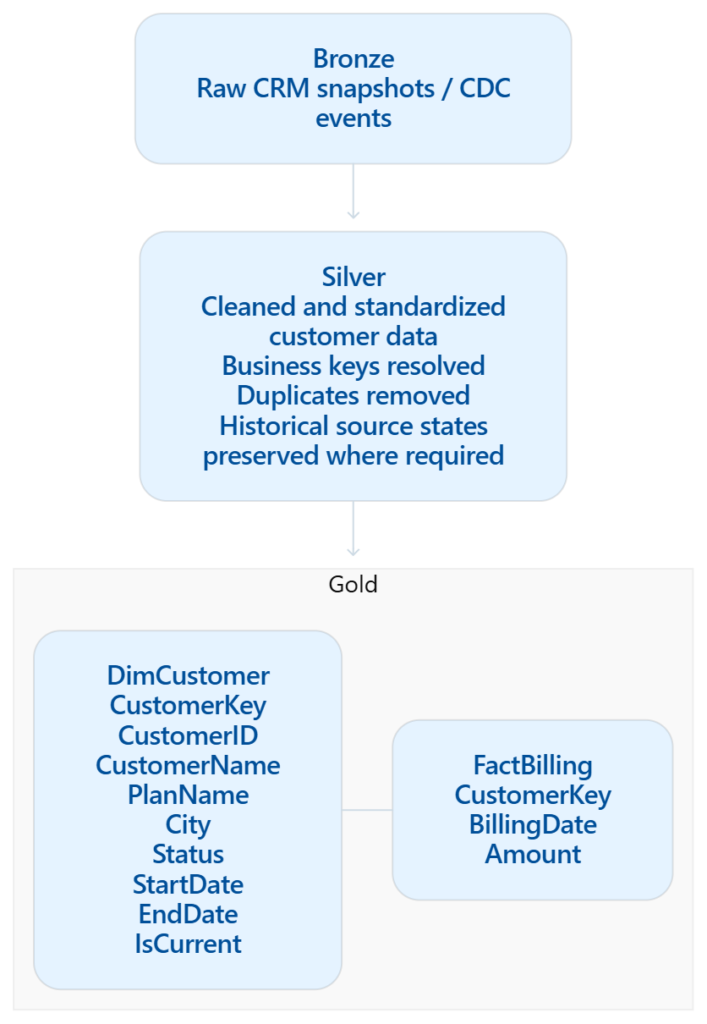
There is a major benefit to keeping those concerns separate. Suppose six months from now, the business tells us that City should never have been tracked historically, but CustomerSegment should have been. If Silver contains only today’s customer state, we can’t reconstruct the dimension correctly. But if Silver preserved the historical source changes, we can rebuild Gold using our new dimensional rules.
That’s why I like this mental model:
Silver preserves what happened in the source. Gold decides what those changes mean analytically.
Of course, there are legitimate exceptions. Some organizations maintain a canonical, historized business entity in Silver that is shared by many downstream products. For example:
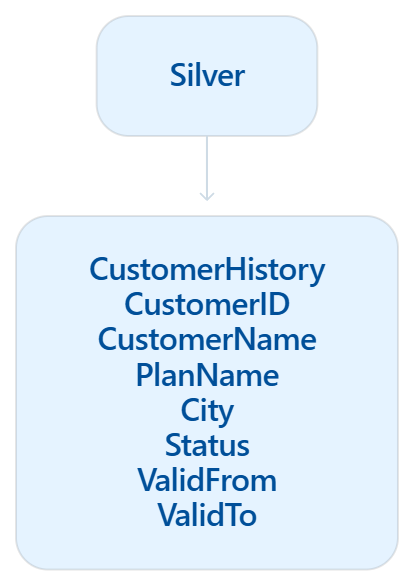
That can make perfect sense, but I would still distinguish that table conceptually from:
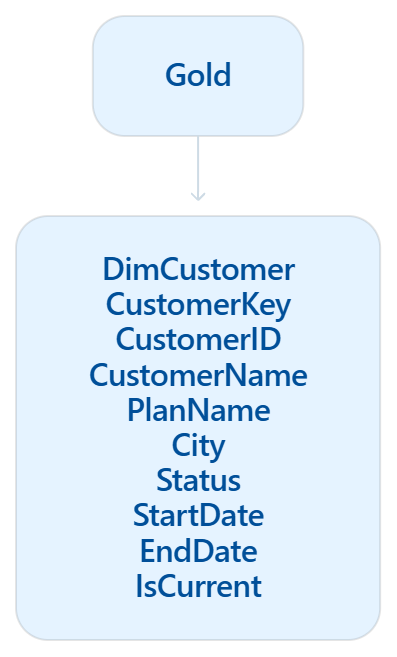
The first describes the history of a business entity, whereas the second applies dimensional semantics to that history.
This distinction is particularly relevant to Fabric’s Copy Job SCD Type 2 capability. Copy Job can preserve source changes automatically using effective dating and an Is_Current flag. That is extremely useful for replication and historization, but it doesn’t necessarily mean that its output is your final analytical dimension. You may still use that history as input to a Gold dimension where you decide which attributes are Type 1, which are Type 2, how surrogate keys work, and how facts resolve against those versions.
So, if someone asks me, “Silver or Gold?” My answer is:
Preserve source history wherever your architecture needs reusable history – often Silver. Create the actual dimensional SCD Type 2 where the dimensional model lives – usually Gold.
Loading the fact table against an SCD Type 2 dimension
The dimension is only half of the story. Every fact row has to carry the surrogate key of the customer version that was valid when the fact happened.
So, let’s write this join:
INSERT INTO dbo.FactBilling (CustomerKey, BillingDate, Amount)
SELECT
    d.CustomerKey,
    b.BillingDate,
    b.Amount
FROM   dbo.StgBilling AS b
JOIN   dbo.DimCustomer AS d
       ON  d.CustomerID  = b.CustomerID
       AND b.BillingDate BETWEEN d.StartDate AND d.EndDate;
The date range predicate is what makes this “as-was” history. Sarah’s February invoice resolves to CustomerKey 1 (Basic 5G), whereas her April invoice resolves to CustomerKey 4 (Premium Unlimited). A late-arriving February invoice loaded in May still resolves to the version that was valid in February, because dimensional key lookup uses the business event date, not the ETL processing date. This is the reason for the inclusive EndDate convention: BETWEEN reads exactly as intended, and adjacent versions never overlap.
Notice that the fact table does not need StartDate, EndDate, or IsCurrent. Once the correct version has been resolved during loading, CustomerKey permanently captures the dimensional context of that business event.
If you instead join on d.IsCurrent = 1, you get “as-is” semantics: every fact is attributed to the customer’s current version, history is lost at the fact level, and you have thrown away most of what Type 2 gives you. There are legitimate reasons to want as-is analysis, but it should be a deliberate choice in the semantic model, not a side effect of the fact load.
A fact row whose BillingDate falls before the customer’s first StartDate finds no match and is dropped by the inner join behind the scenes. Either use a LEFT JOIN with a fallback to a predefined unknown dimension member, or set the StartDate of each customer’s first version to a far-past date such as 1900-01-01 instead of the first-seen date. The unknown member does not have to use CustomerKey = -1; the important part is that it has a stable surrogate key known to the fact-loading process. If you specifically want conventional negative keys such as -1, make sure the surrogate-key generation mechanism you chose allows explicit values.
Semantic model considerations
- Relationship: FactBilling[CustomerKey] to DimCustomer[CustomerKey], one-to-many, single direction. Never relate on CustomerID.
- Distinct customer counts must use CustomerID, not CustomerKey.
DISTINCTCOUNT(DimCustomer[CustomerKey])counts versions, not customers. Sarah counts as two. - Hide RowHash, StartDate, EndDate, and IsCurrent from report users, or expose IsCurrent only as a filter for “current customers” views.
- As-is analysis on top of as-was facts. If users also need to group historical facts by the customer’s current attributes, model this requirement explicitly rather than accidentally joining facts to IsCurrent = 1. One option is to propagate selected current attributes onto every historical dimension version, such as CurrentPlanName or CurrentCity; another is to expose a separate current-customer view/dimension depending on the semantic-model design. The key point is that “as-was” and “as-is” answer different business questions and should not be mixed accidentally.
- Row growth: A Type 2 dimension grows with the number of changes, not the number of customers. A Status attribute that flips between Active and Suspended every few days will multiply your dimension. If an attribute changes extremely frequently, question whether it belongs in this Type 2 dimension at all. Rapid state transitions may be better represented as events in a fact table, or in a separate dimension/mini-dimension, depending on the analytical requirement.
Common pitfalls checklist
Let’s wrap it up with the checklist of common pitfalls:
- Ambiguous hash input. A hash only distinguishes the byte strings you give it. If NULL and empty string are both normalized to ”, they become indistinguishable before hashing. The same problem can occur if your delimiter can appear unescaped inside values. Use an explicit NULL token and an unambiguous serialization convention if those distinctions matter. In this example the tracked source columns are NOT NULL, so the simpler delimiter-based expression is sufficient.
- Case and whitespace. If the source trims or changes case inconsistently, every load produces new versions. Normalize in staging.
- EndDate convention drift. One developer uses inclusive, another exclusive, and the fact load uses BETWEEN. Document it in the table definition.
- Deltas vs snapshots. The delete-handling step is only valid on a full snapshot. Running it on a delta feed closes every customer that didn’t change.
- Non-sequential identity values. Neither Warehouse IDENTITY nor Delta identity columns guarantee gap-free sequences. Do not build logic on key ordering. Do not use MAX(CustomerKey) to find “the latest version”, but rather use IsCurrent or StartDate.
- No enforced uniqueness. Fabric Data Warehouse and Delta tables do not enforce unique constraints. The validation queries are your constraints.
- Type 1 attributes in a Type 2 dimension. They must be excluded from the hash and overwritten across all versions, in a separate step.
- Same-day changes. DATE granularity keeps only the last state of the day. Use DATETIME2 if intraday states matter.
- Time zones. If StartDate comes from the source system’s clock and BillingDate from another system, make sure both are in the same time zone before the range join.
- Initial load StartDate. First-seen date vs 1900-01-01. First-seen date is more honest, but 1900-01-01 makes the fact join never miss. Decide before loading history.
Which option to choose
| Scenario | Recommendation |
|---|---|
| Curated dimensions in a Warehouse, T-SQL team | Option 1, stored procedure, orchestrated by a pipeline |
| Lakehouse-first architecture, Spark team | Option 2, notebook, orchestrated by a pipeline |
| Replicating a CDC-enabled operational table with history | Copy job with CDC, then build the dimension from it |
| Power Query team, small dimensions, no engineering support | Dataflow Gen2 pattern |
| Hundreds of dimensions with the same shape | Option 1 or 2, generated from metadata. The logic above is the template |
Conclusion
SCD Type 2 in Fabric is not particularly hard, but it is unforgiving. The engine gives you useful primitives, such as IDENTITY for surrogate keys, MERGE or standard DML for modifying rows — but the actual dimensional semantics are still yours to define: which attributes are historical, how effective dates work, how deletes are interpreted, how Type 1 attributes behave, how retries are handled, and how the result is validated.
The Warehouse and Lakehouse implementations in this article cover the core production concerns for a daily-snapshot SCD Type 2 pattern while remaining small enough to understand and adapt. The important part is not copying the code verbatim. It is making every one of those modeling decisions deliberately.
Thanks for reading!
Last Updated on September 4, 2026 by Nikola