
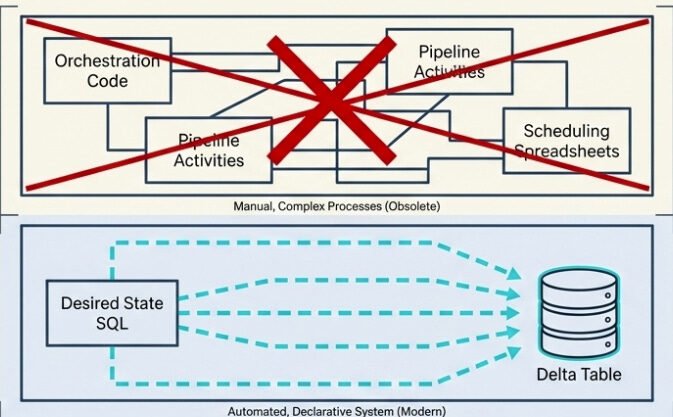
For the longest time, building a medallion architecture in Microsoft Fabric meant stitching together a small orchestra of moving parts: notebooks for the transformations, pipelines for orchestration, schedules for refresh, custom code for data quality checks, and the Monitor Hub for keeping an eye on whether anything actually worked. Every layer worked – until something didn’t, and then you had to figure out which layer broke, why, and which downstream layers got affected along the way.
If you’ve ever tried to debug a silver layer that didn’t update because the bronze notebook failed three hours ago, you know exactly what I’m talking about.
Then, at FabCon Atlanta in March 2026, materialized lake views (MLVs) went generally available. And the story they’re telling is simple: what if your entire medallion pipeline could be a few SELECT statements?
Let me walk you through the whole thing – what they are, how they work, what changed between preview and GA, and where they fit (and where they don’t) in your architecture.
Materialized Lake View – WHAT?
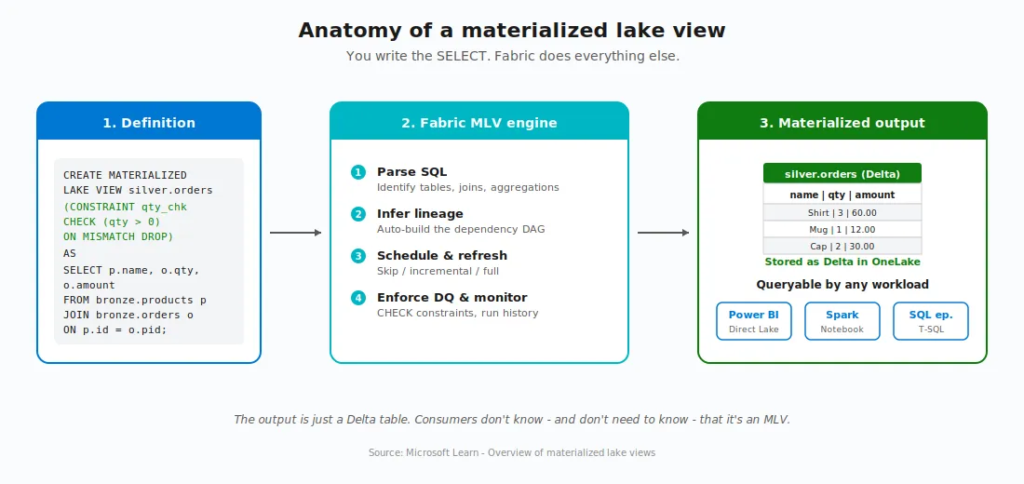
A materialized lake view is a persisted, automatically refreshed view defined in Spark SQL or PySpark. You write a SELECT query that describes the transformation you want, and Fabric takes care of execution, storage, refresh, dependency tracking, and data quality enforcement.
The result is stored as a Delta table in your lakehouse. So downstream consumers, such as Power BI Direct Lake, Spark notebooks, SQL endpoints, can query it just like any other Delta table. No special handling, no different syntax.
To put it in plain English: an MLV is nothing else but a SELECT statement that learned to materialize itself, manage its own dependencies, schedule its own refresh, and check its own data quality.
OK, that’s nice. But what does that actually replace?
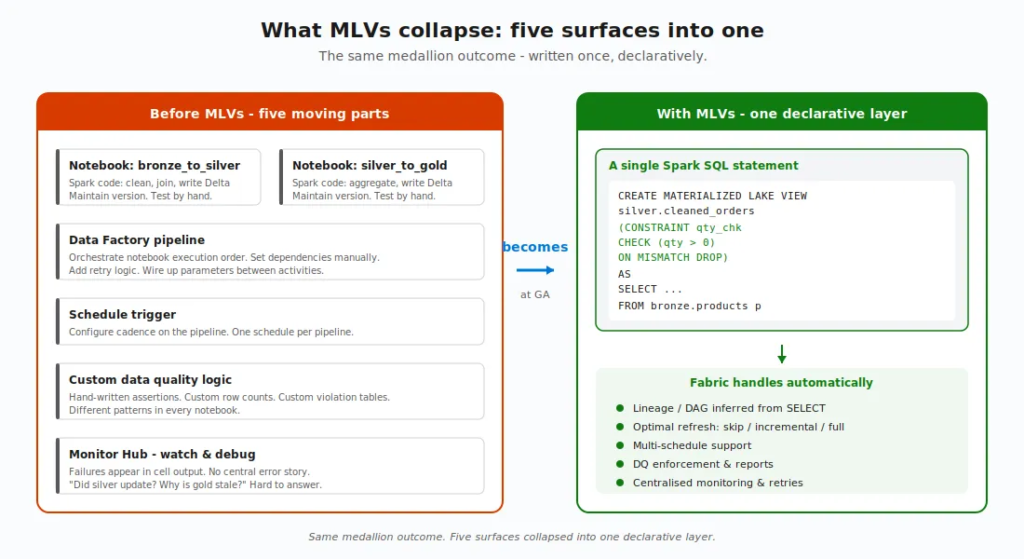
That’s a fair question. Before MLVs, building a single bronze-to-silver-to-gold flow looked roughly like this: you’d write a notebook for each transformation, set up a Data Factory pipeline to call them in the right order, configure schedules, build custom validation logic, and then wire up the Monitor Hub to watch for failures. Five different surfaces, five different things to debug when something breaks.
With MLVs, all of that collapses into declarative SQL. You describe what you want. Fabric figures out the rest.
The four stages of an MLV’s life
Every MLV moves through four stages. According to the Microsoft documentation, understanding them is the foundation for everything else:
- Create – You write the Spark SQL (or PySpark) that defines the transformation. Fabric stores the definition and materializes the initial result as a Delta table.
- Refresh – When source data changes, Fabric chooses the optimal strategy: incremental (process only changes), full (rebuild), or skip (no changes detected).
- Query – Any application or tool reads the materialized result. They don’t know – and don’t need to know – that it’s an MLV.
- Monitor – Refresh history, execution status, data quality metrics, and lineage are all tracked and visualised natively in Fabric.
Now let’s dive into each piece.
Create: the syntax
Here’s the full Spark SQL pseudo-code syntax for creating an MLV, straight from the Microsoft Learn reference:
CREATE [OR REPLACE] MATERIALIZED LAKE VIEW [IF NOT EXISTS]

[workspace.lakehouse.schema].MLV_Identifier

[(CONSTRAINT constraint_name CHECK (condition) [ON MISMATCH DROP | FAIL], ...)]

[PARTITIONED BY (col1, col2, ...)]

[COMMENT “description”]

[TBLPROPERTIES (”key1”=”val1”, ...)]

AS select_statement
A real example – cleaning order data joined from products and orders, with a data quality constraint and partitioning:
CREATE OR REPLACE MATERIALIZED LAKE VIEW silver.cleaned_order_data

(

CONSTRAINT valid_quantity CHECK (quantity > 0) ON MISMATCH DROP

)

PARTITIONED BY (category)

COMMENT “Cleaned order data joined from products and orders”

AS

SELECT

p.productID, p.productName, p.category,

o.orderDate, o.quantity, o.totalAmount

FROM bronze.products p

INNER JOIN bronze.orders o ON p.productID = o.productID
Two things worth flagging right away. First, MLV names are case-insensitive (MyView becomes myview). Second, all-uppercase schema names (like MYSCHEMA) aren’t supported, so use either mixed or lowercase.
You also need a schema-enabled lakehouse and Fabric Runtime 1.3 or higher. If your lakehouse doesn’t have schemas turned on, MLVs aren’t available, that’s the very first prerequisite.
Refresh: the brain of MLVs
Here’s where MLVs stop being clever and start being smart.
When source data changes, Fabric’s optimal refresh engine looks at every MLV in the lineage and asks a series of questions: Did anything actually change? Can I process just the changes? Or do I need to rebuild from scratch?
Three possible outcomes:
- Skip refresh – source data hasn’t changed. Don’t waste compute. Move on.
- Incremental refresh – process only the new or changed rows. Fast, cheap, ideal.
- Full refresh – rebuild the whole thing. Slowest path, used when incremental isn’t safe or possible.
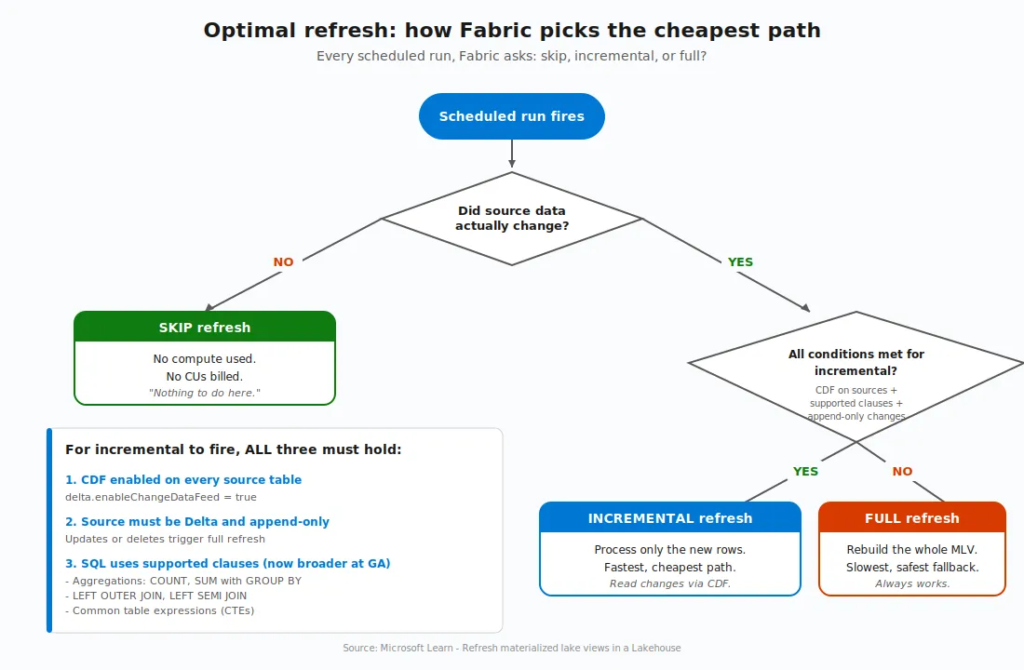
But, and this is important, incremental refresh isn’t free. It has prerequisites:
- The Delta change data feed (CDF) must be enabled on every source table referenced by the MLV (
delta.enableChangeDataFeed=true). - The source must be a Delta table. Non-Delta sources always get a full refresh.
- The data must be append-only. If your source has updates or deletes, Fabric falls back to a full refresh.
- The query must use only supported SQL constructs (more on this in a moment).
Without CDF enabled, optimal refresh can only choose between skip and full. With CDF on, the full incremental path opens up. Enabling CDF on your source tables has no measurable storage or performance impact for append-only workloads, so there’s very little reason not to turn it on:
ALTER TABLE bronze.orders SET TBLPROPERTIES (delta.enableChangeDataFeed = true);

ALTER TABLE bronze.products SET TBLPROPERTIES (delta.enableChangeDataFeed = true);
Can it get better than this? Actually, yes! And, this is where the GA story really begins.
What’s new in GA – The FabCon Atlanta story
MLVs were introduced in preview at Build 2025. Between then and GA in March 2026, Microsoft closed the most important gaps. Five major changes turned MLVs from “interesting” into “production-ready”:
- Multi-schedule support
- Broader incremental refresh coverage
- PySpark authoring (preview)
- In-place updates with Replace
- Stronger data quality controls
Let me take them one at a time.
1. Multi-schedule support
In preview, you could only refresh all MLVs in a lakehouse on a single schedule. Need finance to update hourly, but analytics to update every six hours? You had to work around it with notebooks, which broke dependency awareness, error reporting, and retry logic. Notebook-triggered refreshes don’t surface MLV error details. Failures appear only in cell output, and dependent views have no awareness of them. Errors can persist week after week without anyone knowing the pipeline is broken.
Now you can define named schedules within a single lakehouse, each targeting a specific subset of views. Finance pipeline hourly. Analytics every six hours. Marketing every 15 minutes. All in the same lakehouse, no custom code.
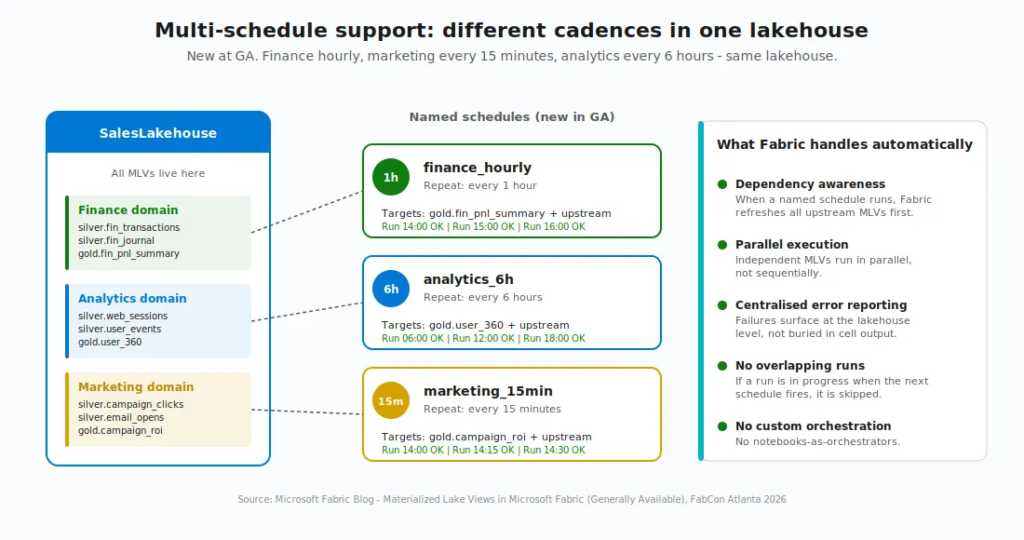
When a named schedule runs, Fabric still refreshes all upstream dependencies in the correct order, runs independent views in parallel, and surfaces errors centrally. If a run is already in progress when a schedule fires, the new run is skipped, and the next window proceeds as expected – so you don’t have to worry about overlapping runs stomping on each other.
2. Broader incremental refresh
Incremental refresh used to fall back to full quite often, because the list of “supported” SQL constructs was narrow. At GA, that list expanded significantly. MLVs now refresh incrementally when the definition includes:
- Aggregations like
COUNTandSUMwithGROUP BY - Left outer joins and left semi joins
- Common table expressions (CTEs)
That’s a meaningful change. Most real-world medallion pipelines I’ve worked on use exactly these patterns, and now they qualify for incremental processing without being rewritten. With optimal refresh, a built-in decision engine examines each refresh, evaluates the volume of changed data against the cost of a full recomputation, and automatically chooses the faster path.
I hear you, I hear you: Nikola, what happens if my query uses something the engine can’t handle incrementally? Don’t worry, it’s much easier than it sounds:) Using unsupported constructs doesn’t prevent you from creating the MLV. It only means that Fabric uses a full refresh instead of an incremental one. Optimal refresh automatically falls back to full when needed, so you don’t normally need to force it. If you do want to force one (for example, to reprocess data after a correction), there’s a one-liner for that:
REFRESH MATERIALIZED LAKE VIEW silver.cleaned_order_data FULL;
3. PySpark authoring (preview)
This one is huge! SQL is great until your transformation logic involves a custom Python library, an ML inference call, or a UDF that wraps complex business rules. Then you’d hit a wall as MLVs were SQL-only.
With PySpark authoring, you can now create, refresh, and replace MLVs from Fabric notebooks using PySpark and the familiar DataFrameWriter API. The fmlv module exposes a decorator-based pattern, documented in the official PySpark MLV reference:
import fmlv

from pyspark.sql import functions as F

@fmlv.materialized_lake_view(

name=”LH1.silver.customer_silver”,

comment=”Cleaned & enriched customer silver MLV”,

partition_cols=[”year”, “city”],

table_properties={”delta.enableChangeDataFeed”: “true”},

replace=True

)

@fmlv.check(name=”non_null_sales”, condition=”sales IS NOT NULL”, action=”DROP”)

def customer_silver():

df = spark.read.table(”bronze.customer_bronze”)

cleaned_df = df.filter(F.col(”sales”).isNotNull())

enriched_df = cleaned_df.withColumn(”sales_in_usd”, F.col(”sales”) * 1.0)

return enriched_df
A few PySpark gotchas worth knowing about:
- PySpark MLVs are still in preview at the time of writing.
- Today, PySpark-authored MLVs always perform a full refresh. Optimal refresh for PySpark is on the roadmap, but not here yet.
- The
@fmlvdecorator doesn’t support dynamic parameters or variables. All parameters must be hardcoded. - You can’t create an MLV from a PySpark temporary view (
createOrReplaceTempView) – the engine can’t see session-scoped views. Use physical Delta tables or other MLVs as sources. - Don’t delete the notebook where the MLV is defined. Scheduled refresh fails without it.
So if your transformation can be expressed cleanly in SQL, SQL is still the better choice for performance. PySpark MLVs unlock the cases where SQL alone won’t do.
4. In-place updates (Replace)
Business logic changes. A filter shifts. A join gains a column. An aggregation adds a metric. In preview, updating an MLV definition required dropping and recreating it, which lost refresh history and forced downstream consumers to reconnect.
Now, with the Replace capability, you update an MLV’s definition in place. Fabric validates the new logic, swaps it in, and preserves the view’s identity, metadata, and lineage. Downstream dependencies remain intact. Works for both SQL (CREATE OR REPLACE) and PySpark (replace=True).
This is one of those “under the radar” GA features that doesn’t get headlines but matters enormously day-to-day. If you’ve ever had to coordinate dropping and recreating a heavily consumed table while production is running, you know the pain. That goes away with this.
5. Stronger data quality
Data quality constraints are nothing new in MLVs, but at GA, they got a serious upgrade. You can now:
- Use expression-based logic that combines multiple columns
- Apply arithmetic and built-in functions inside a single rule
- Invoke session-scoped user-defined functions for validation logic that lives in Python rather than SQL
Combine that with the auto-generated data quality reports, and you get something close to a built-in data observability layer. You can quickly spot which rules fail most often, which views they affect, and how trends shift over time, without building a separate monitoring pipeline.
The lineage view – Dependencies for free
When one MLV references another (or a table), Fabric infers the relationship automatically. No manual configuration, no external orchestration tool. The dependencies are discovered from your SQL.
That dependency graph becomes a visual lineage in your lakehouse. Each node represents a transformation. Arrows show execution order. Fabric makes sure that when bronze data lands, the bronze-to-silver MLV runs first, then the silver-to-gold MLV runs against the freshly updated silver.
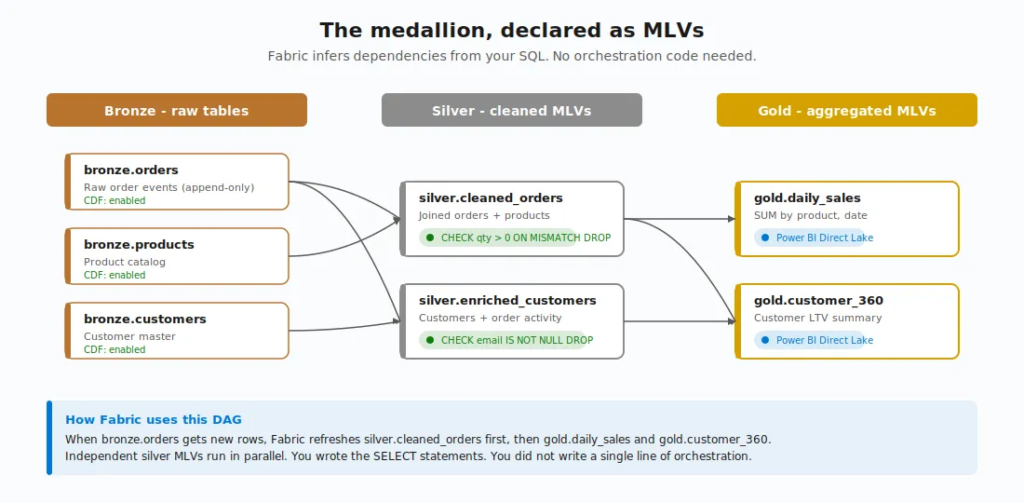
This is where the declarative approach really pays off. You’re not writing pipelines. You’re not defining orchestration. You’re writing what each layer should look like, and Fabric figures out the order. This is the beauty of a declarative approach:)
A few useful behaviors to know about:
- Independent views run in parallel
- Errors surface centrally instead of getting lost in notebook cell output
- The lineage view auto-refreshes every two minutes when a run is in progress
- All shortcuts are treated as source entities in the lineage view
- You can attach a custom Spark environment to materialized lake views lineage to optimise performance and resource usage during refresh
Data quality – Declared!
I touched on this above, but it deserves its own section because it’s one of the things that makes MLVs feel different from a hand-built pipeline.
Every MLV can have one or more data quality constraints attached:
CREATE OR REPLACE MATERIALIZED LAKE VIEW silver.valid_orders

(

CONSTRAINT positive_quantity CHECK (quantity > 0) ON MISMATCH DROP,

CONSTRAINT valid_date CHECK (orderDate >= ‘2020-01-01’) ON MISMATCH FAIL

)

AS

SELECT * FROM bronze.orders
Two action types:
- DROP – violating rows are removed, the count is logged in the lineage view, and the pipeline keeps going
- FAIL – the refresh stops at the first violation. This is also the default if you don’t specify
If multiple constraints are present and both behaviors are configured, FAIL takes precedence.
Violations surface in the lineage view and run details. Fine, but what does that actually look like in practice? Well, in the data quality report, you’ll see counts by constraint, by view, over time. So if a constraint that normally drops 0.1% of rows suddenly drops 15%, you’ll see the spike and know exactly which rule failed and which view it belongs to. That’s a quality signal you’d otherwise have to build by hand.
The Microsoft docs also note that the new expression-based constraints support built-in Spark/SQL functions like UPPER(), LOWER(), TRIM(), COALESCE(), INITCAP(), and DATE_FORMAT(), so your CHECK conditions can be richer than just simple comparisons.
When MLVs shine and when they don’t
MLVs are not a hammer for every nail. The Microsoft documentation is unusually direct about where they fit and where they don’t.
Use MLVs when you have:
- Frequently accessed aggregations (daily totals, monthly metrics) where precomputed results beat re-running expensive queries
- Complex joins across multiple large tables that need to be consistent for all consumers
- Data quality rules you want to apply uniformly, declaratively
- Reporting datasets that combine data from multiple sources and benefit from automatic refresh
- Medallion design pattern – bronze to silver to gold defined as SQL transformations
Don’t use MLVs when:
- The query runs once or rarely – precomputing won’t help
- Transformations are simple and fast already
- You need non-SQL logic like ML inference, API calls, or complex Python processing – notebooks are still better (though PySpark MLVs are starting to bridge this gap)
- You need sub-second latency for streaming – that’s Real-Time Intelligence territory
I’ll add a personal note here. I’m currently deep in a Microsoft Fabric engagement where the silver layer design choice – Warehouse vs. Lakehouse with MLVs – is actively on the table. And what I keep coming back to is this: MLVs aren’t competing with the Warehouse the way some people frame it. They’re competing with the spaghetti of notebooks-and-pipelines that you’d otherwise build inside the Lakehouse. If your team is already SQL-fluent and your transformations live naturally in SELECT statements, the case for MLVs as the silver layer in a Lakehouse-based architecture is genuinely strong.
The fine print – What to know before you jump in
I’d be doing you a disservice if I painted MLVs as a silver bullet. They have meaningful limitations, some of which will matter to your architecture:
- No cross-lakehouse lineage and execution – all sources, MLVs, and dependencies must live in the same lakehouse. If you’re using a Fabric Data Warehouse table as a source, you have to create a shortcut to it in your lakehouse first.
- No DML statements – you can’t
INSERT,UPDATE, orDELETEinto an MLV. The data is whatever the SELECT produces. - No time-travel queries in the definition –
VERSION AS OFandTIMESTAMP AS OFaren’t allowed. - No UDFs in the SQL definition – though PySpark authoring fills this gap with session-scoped UDFs.
- No temporary views as sources – the SELECT can reference physical tables and other MLVs, but not temp views. This applies to PySpark too:
createOrReplaceTempView()outputs aren’t visible to the MLV engine. - Session-level Spark properties don’t apply during scheduled refresh – set them at the lakehouse or workspace level instead.
- Schema name casing matters – all-uppercase schema names aren’t supported. Use mixed case or lowercase.
- Region availability – at the time of writing, MLVs aren’t available in the South Central US region.
None of these are showstoppers for most pipelines. But they’re worth knowing before you commit an architecture to MLVs and discover the limitation halfway through.
Wrapping up
If you’ve been building medallion design patterns in Fabric using notebooks and pipelines, MLVs are worth a serious look. They collapse five surfaces into one declarative layer. The dependency management is automatic. The data quality is built in. The lineage is visible. And as of FabCon Atlanta, they’re production-ready.
The roadmap from Microsoft is clear: optimal refresh for PySpark-authored MLVs is coming, more SQL operators will become incremental-refresh-eligible, and deeper integration with other Fabric workloads is on the way. This is a milestone, not the finish line – and I’m curious to see how MLVs evolve over the next few quarters, especially around PySpark incremental refresh and any cross-lakehouse story Microsoft might tell.
Two takeaways I’d hold onto:
- The “T” in your ELT just got a lot easier to write, schedule, and trust – if that “T” is SQL.
- MLVs don’t replace every notebook, every pipeline, or every Warehouse. But for declarative transformations that need lineage, refresh, and data quality baked in, they’re now a legitimate default in Microsoft Fabric.
Thanks for reading!
P.S. Thanks to Claude for creating these nice-looking diagrams and illustrations:)
Last Updated on April 27, 2026 by Nikola


Vivek
This is a brilliant post covering almost every angle of MLVs!
I’m strongly considering MLVs for a new medallion architecture build as well where I’m expecting to use MLV for bronze to silver and silver to gold processes.
The only line in your post that tripped me is do not use MLV if “Transformations are simple and fast already”…
What are the any cons of using MLVs for simple tables or tables with simple transformations?
Nikola
Hi Vivek,
Great question!
The short answer: there’s nothing “wrong” with using MLVs for simple transformations. They’ll work, but there are real tradeoffs you’re opting into that may not be worth it when the transformation is trivial.
Here’s what I mean:
1. Storage duplication. An MLV materializes the result as a separate Delta table in OneLake. If your transformation is SELECT * with a column rename or a simple CAST, you now have two physical copies of essentially the same data. A regular Lakehouse view (non-materialized) would give you the same result with zero additional storage.
2. Refresh overhead. Even when the optimal refresh engine detects no changes and skips, the engine still has to “check”. That’s a scheduled process that evaluates CDF, inspects source table metadata, and decides whether to act. For one simple MLV, that’s negligible. For 50 simple MLVs across multiple schedules? Those checks add up in capacity consumption.
3. Freshness delay. MLVs are schedule-based. If your source table is already clean and queryable, adding an MLV layer introduces a gap between when data lands and when the materialized copy reflects it. A regular view always returns current data and there is no refresh cycle needed.
4. Monitoring noise. Every MLV is a node in your lineage DAG. More nodes = more things surfacing in refresh history, more things to watch in the data quality reports. For complex transformations, that visibility is the whole point. For a simple pass-through? It’s noise that makes the important signals harder to spot.
So when I say “don’t use MLVs when transformations are simple and fast already”, I’m really saying: don’t create the materialization overhead (storage, refresh cycles, monitoring surface area) when the query is already cheap to run on the fly.
The way I decide: if a downstream consumer would notice a meaningful performance difference between querying the source directly vs. querying a precomputed result – materialize it. If not, a regular view is simpler, fresher, and cheaper.
Hope that helps! Thanks for the great question.
Vivek
Thanks for the detailed explanation. I’ll review these aspects closely. I just like a standard process so trying to find the perfect flow that reasonably silver all problems and MLVs are very close :).
Can you clarify this statement “No temporary views as sources – the SELECT can reference physical tables and other MLVs, but not temp views.”… Is this applicable for regular Lakehouse views as well?