Recently, I went down this rabbit hole twice within a week:)
If you’ve tried to check how much storage your Fabric warehouse tables consume, you’ve probably discovered that the usual SQL Server approaches don’t work. This post explains why, what else doesn’t work, and the one approach that does (and that I can use as a reference going forward, instead of wasting time and tokens asking LLMs).
The problem
In a traditional SQL Server or Azure SQL database, you’d run something like sp_spaceused or query sys.allocation_units to get table sizes. In Fabric Warehouse, these return zeros. The workspace item list in the portal shows dashes. The Capacity Metrics app shows workspace-level storage but not per-table breakdowns.
The reason is architectural: a Fabric Warehouse stores its data as Delta Parquet files in OneLake, not as SQL Server pages. The classic DMVs (sys.allocation_units, sys.dm_pdw_nodes_db_partition_stats) report on page-based storage that doesn’t exist here, so they return nothing useful.
What doesn’t work
I tested all of these against a production Fabric Warehouse before finding the working solution. Saving you the time:
sys.allocation_unitsjoin – returns all zeros fortotal_pages. The query runs without error, which makes it deceptive. However, you get a clean result set with every table listed at 0.000 GB.sys.dm_pdw_nodes_db_partition_stats– throws an error. This DMV exists in Synapse dedicated pools but isn’t available in Fabric Warehouse.sp_spaceused– returns zeros.DESCRIBE DETAILvia Spark – works for lakehouse tables but fails with a 400 Bad Request when pointed at a warehouse’s Delta tables through theabfss://path.notebookutils.fs.ls()at the top level – lists the table folders but thesizeproperty on each item returns 0. The metadata is there, but the sizes aren’t populated.
The “official” alternative: Azure Storage Explorer
Microsoft’s own guidance for checking OneLake storage points you to Azure Storage Explorer, a desktop application that can connect to OneLake via ADLS Gen2 and show folder sizes through right-click and “Folder Statistics.” It works, but it’s a heavy solution for a simple question.
You need to download and install a desktop application, configure an ADLS Gen2 connection with your workspace URL, authenticate through Entra, and then manually browse through the folder hierarchy to find the sizes. For a one-off check it’s fine, but for anything you want to repeat, script, or run as part of a pipeline, it’s not practical. If all you want is a quick answer to “how big are my warehouse tables,” you shouldn’t need to leave the Fabric UI or notebook.
What works
The solution is to use notebookutils.fs.ls() recursively: walk into each table’s folder, sum the actual file sizes, and skip the internal system folders that Fabric maintains alongside the table data.
Run this in a Fabric notebook (PySpark). The notebook can be attached to any lakehouse in the same workspace, it doesn’t need to be attached to the warehouse itself, because the abfss:// path addresses OneLake directly.
import notebookutils

def folder_size(path):
    total = 0
    try:
        for f in notebookutils.fs.ls(path):
            total += folder_size(f.path) if f.isDir else f.size
    except:
        pass
    return total

# Replace with your workspace GUID and warehouse item GUID
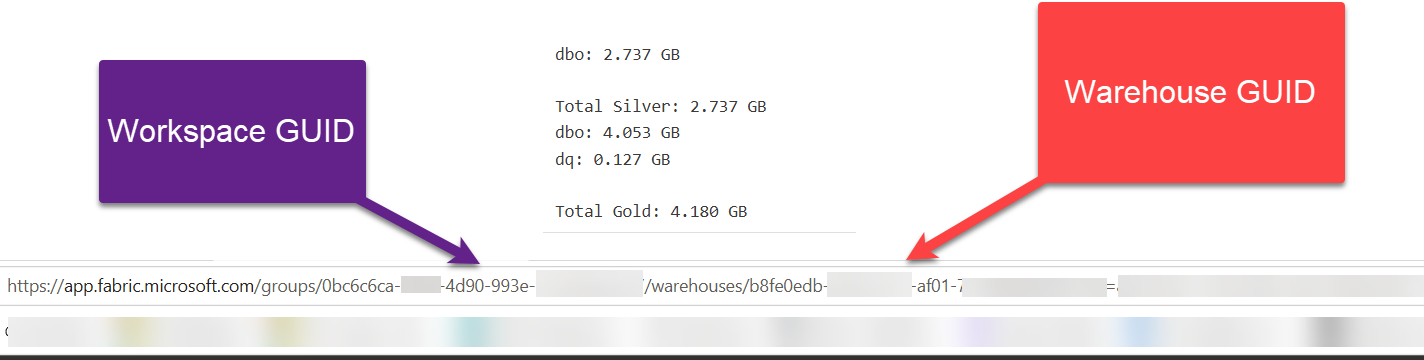
# Find both in the browser URL: app.fabric.microsoft.com/groups/<workspace-guid>/warehouses/<warehouse-guid>
ws_guid   = "xxxxxxxx-xxxx-xxxx-xxxx-xxxxxxxxxxxx"
wh_guid   = "yyyyyyyy-yyyy-yyyy-yyyy-yyyyyyyyyyyy"

base = f"abfss://{ws_guid}@onelake.dfs.fabric.microsoft.com/{wh_guid}/Tables"

total = 0
for item in notebookutils.fs.ls(base):
    if item.isDir:
        name = item.name.rstrip('/')
        size = folder_size(item.path)
        gb = size / 1024**3
        total += gb
        print(f"{name}: {gb:.3f} GB" if gb >= 0.001 else f"{name}: {size:,} bytes")

print(f"\nTotal: {total:.3f} GB")

The script explanation
Three design choices that might not be so obvious, but learned from a failure:
- Bare GUIDs, no
.Warehousesuffix. The OneLake path format for listing directory contents requires the raw item GUID, not the friendly-name format with a.Warehousesuffix. Using{wh_guid}.Warehouse/dbothrows aFriendlyNameSupportDisablederror. Using{wh_guid}/Tablesworks. The same applies to workspace names versus GUIDs – GUIDs are more reliable. - /Tables, not /dbo. OneLake organizes warehouse data under a
Tablesvirtual folder, not the SQL schema name. Requesting/dbothrows anOperationNotAllowedOnThePatherror – Fabric’s OneLake policy only permits access underTables,Files, andAuditat that level. Thedboschema appears as a subfolder underTablesif you have multiple schemas. try/exceptaround the recursivelscall. This is the critical piece. Each table folder contains not just the Parquet data files, but also internal Fabric system folders (System/metadata/virtualization/.../deletionvectors). These system paths use GUIDs and throw 400 errors when you try to list them. Without thetry/except, the recursion crashes on the first table that has deletion vectors. With it, the script skips those system paths and counts only the accessible data files. The size difference is negligible, these are small metadata files anyway, not data.
Checking multiple warehouses
To check Silver and Gold (or any other warehouse), just swap the warehouse GUID:
warehouses = {
    "Silver": "your-silver-warehouse-guid",
    "Gold":   "your-gold-warehouse-guid",
}

for name, wh_guid in warehouses.items():
    base = f"abfss://{ws_guid}@onelake.dfs.fabric.microsoft.com/{wh_guid}/Tables"
    gb = folder_size(base) / 1024**3
    print(f"{name}: {gb:.3f} GB")
Checking a lakehouse (for comparison)
Lakehouse tables are simpler – DESCRIBE DETAIL works like a charm:
tables = spark.catalog.listTables()
for t in tables:
    try:
        detail = spark.sql(f"DESCRIBE DETAIL `{t.name}`")
        row = detail.first()
        print(f"{t.name}: {row['sizeInBytes'] / (1024**3):.3f} GB")
    except Exception as e:
        print(f"{t.name}: error - {e}")
Or if you want the file-system approach (same pattern as the warehouse script, works everywhere):
import os

tables_path = "/lakehouse/default/Tables"
for t in sorted(os.listdir(tables_path)):
    size = sum(
        os.path.getsize(os.path.join(dp, f))
        for dp, dn, filenames in os.walk(os.path.join(tables_path, t))
        for f in filenames
    )
    print(f"{t}: {size / (1024**3):.3f} GB")
Summary
Getting table sizes from a Fabric Warehouse is harder than it should be, since none of the SQL-native approaches work, and the OneLake file listing has three gotchas (GUIDs not names, /Tables not /dbo, and system folders that break recursion). The recursive notebookutils.fs.ls() script with a try/except guard is the reliable solution until Microsoft surfaces storage metrics through the SQL endpoint or the portal.
Hope this helps!
Last Updated on August 3, 2026 by Nikola