Agentic data engineering is here! Project Osmos: What, Why and How?
by Nikola
No Comments
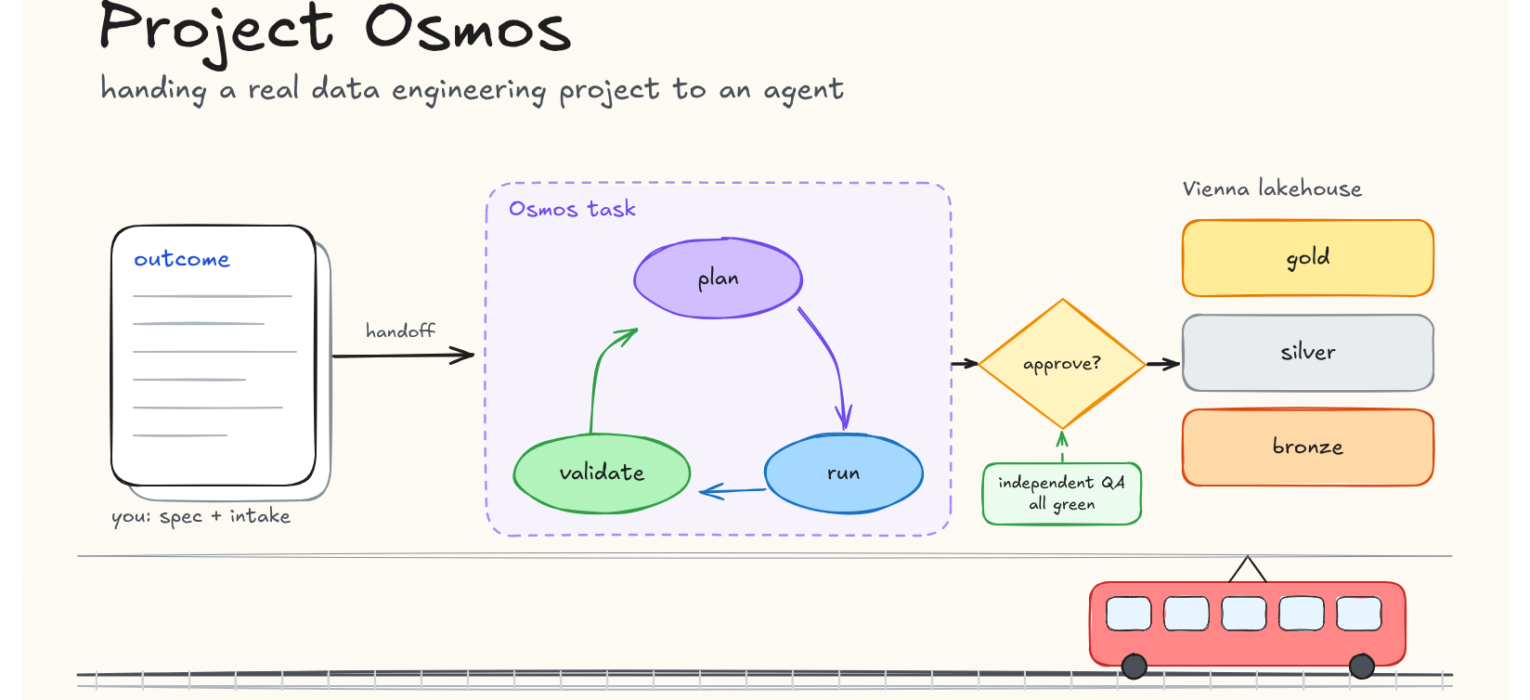
It’s FabCon Barcelona keynote in September 2026, and one of the big announcements was that Project Osmos is available for agentic data engineering tasks. The promise is simple: You delegate the Task. Osmos carries it through to a shippable outcome. Sounds fancy in the era of AI, right?
So, in this article, I wanted to break down what Project Osmos is, why you would consider using it in your data engineering tasks, and how to actually leverage it in a real-life use case with Microsoft Fabric.
Ready? Let’s go!
What Project Osmos actually is
Most AI help in Microsoft Fabric (and not only Microsoft Fabric) has worked one cell at a time so far. You ask your favorite AI assistant (Copilot, Claude, Codex, etc.) for a transformation, it writes some PySpark, you run it, it fails, you paste the error back, and you repeat until it works. The AI writes the code, but YOU remain the person who knows what the project is, runs everything, and decides when it’s done.
Project Osmos changes who does that second part.
Osmos is the codename of the Fabric data engineering agent, in public preview since FabCon Europe in Barcelona. You don’t ask it for a snippet. You hand it a whole project in one go: here are my sources, here is what I want at the end, here are the rules it must follow, and here is how you prove it’s correct. Osmos turns that into a task that runs on Fabric’s own Spark compute. It looks at your lakehouse, plans the work, writes notebooks, runs them, checks the results against your rules, and fixes what doesn’t match. And, it keeps going after you close your laptop.
The simplest way I can put it: Copilot is the colleague sitting next to you suggesting the next line. Osmos is the colleague you give a work order to on Monday morning, who comes back with notebooks, Delta tables and evidence that the numbers reconcile. You still review the work, and you still decide whether it’s good enough to ship.
That’s the promise. The rest of this article tests it on a real dataset, not AdventureWorks: the full Vienna public transport timetable. I’ll show every step, including the settings Osmos proposes, the places where I overruled it, and how I checked its work without letting it grade its own exam.
Where it came from and how it works
Before we start, a few history lessons for context. Osmos was a Seattle startup that Microsoft acquired in January 2026. Before the acquisition, it had two agents running as a native Fabric workload: an AI Data Wrangler for messy external files (think of nested JSON, irregular CSVs, PDFs) and an AI Data Engineer that generated production PySpark. Microsoft framed the deal around one specific problem: data from customers, partners, and suppliers that arrives in formats you don’t control. The preview product is the AI Data Engineer, grown into an agent built for project-scale work.
The task is the unit of work
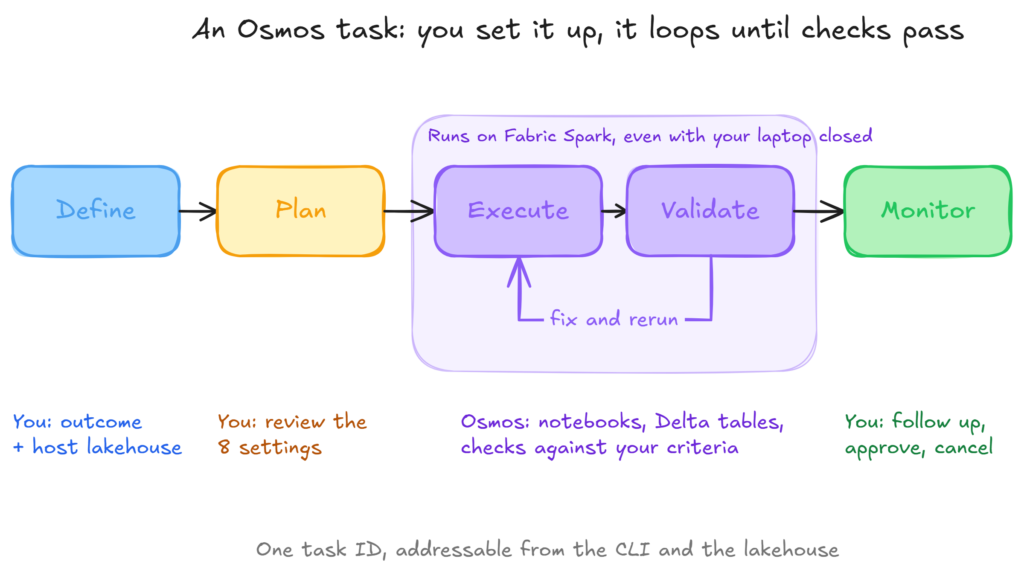
Everything in Osmos revolves around a task:
Define. You describe the complete outcome and name the lakehouse that hosts the task.
Plan. Osmos classifies the work and proposes operating settings for you to review.
Execute. It creates, runs and refines notebooks and Delta tables on Fabric Spark, and Microsoft says it compares several implementation options along the way.
Validate. It runs your success criteria against the real data.
Monitor. The task stays addressable by its ID, from your terminal and from the lakehouse.
The host lakehouse is just the default lakehouse for the Spark session. Sources and targets can be anywhere you have access, because the task acts as you.
Two surfaces, one task
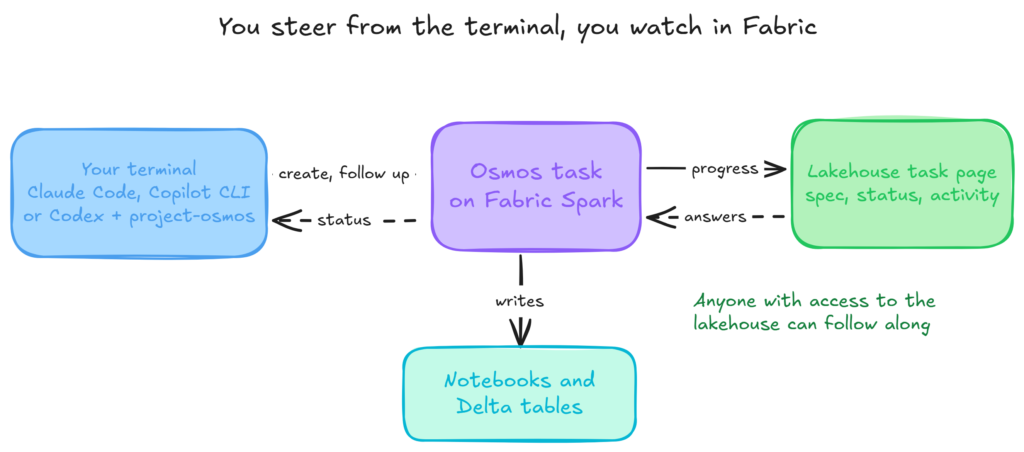
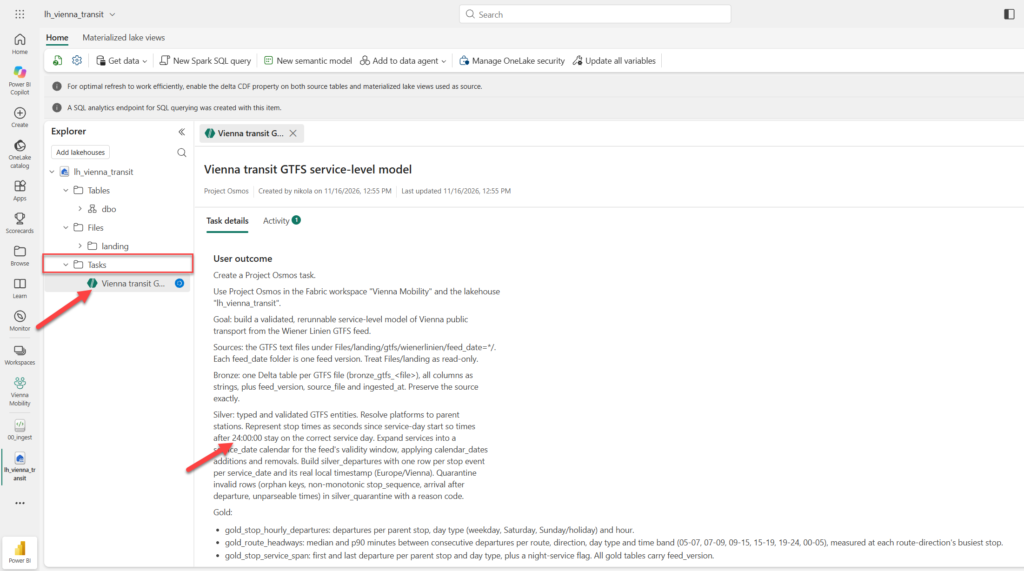
You don’t talk to Osmos in the Fabric portal (yet). You create and steer tasks from a local coding agent: GitHub Copilot CLI, Claude Code or Codex, with Microsoft’s Skills for Fabric plug-in installed. You watch the task in Fabric, where it shows up in the lakehouse explorer with its spec, status, and an activity log. Anyone with access to that lakehouse can follow along and answer the agent’s questions.
The settings are the governance
Before anything runs, Osmos proposes eight operating settings. This is where you decide how much rope the agent gets:
Setting
What you decide
Permission boundary
Which resources are read-only and which are writable
Safety pattern
Write directly, write to staging, or clone and promote
Promote step
How verified staged output becomes the final output
Rerun semantics
What a second run does: fail, append, deduplicate, merge or replace
Schema evolution
Whether output schemas may change, and how
Artifact format
Notebooks or other artifacts
Artifact destination
Where those artifacts go
Reasoning effort
How hard Osmos explores alternative implementations
One caveat to take seriously: the permission boundary guides the agent, but it doesn’t enforce anything. Fabric and OneLake permissions are the only hard limit. If you can delete a table, so can a task running as you!
What it isn’t for
Microsoft is explicit that Osmos isn’t for quick queries, Power BI report changes, or creating a single notebook. Its scope is lakehouses, OneLake, Spark, notebooks, and Delta tables. Warehouses, T-SQL, Eventhouse, Dataflows Gen2, pipelines, and semantic models stay with the regular Fabric skills.
Project Osmos HOW? The scenario: Vienna public transport, from the real timetable
Wiener Linien publishes its complete schedule as open data on data.gv.at, in GTFS format (the General Transit Feed Specification that Google Maps and most journey planners consume), under CC BY 4.0. The Mobility Database lists the feed with 595 routes across metro, tram, and bus. Its validator reported 1 error and 8 warnings in April 2026, so this isn’t curated demo data.
I picked this dataset for two reasons:
It’s a realistic dataset with all the caveats and challenges a data engineer could face in the real project
I live in Austria (though not in Vienna), so it was interesting to explore the local data:)
The business question is one a city planner, a district council, or a property developer comparing sites would actually ask: how well is each stop and line served, and what changed when the timetable was updated?The journey planner app can’t answer that. You need the whole schedule, flattened into service levels:
Gold table
Grain
Answers
gold_stop_hourly_departures
Feed version, stop, day type, hour
How intensely is each stop served?
gold_route_headways
Feed version, route, direction, day type, time band
What is the median and 90th-percentile wait between departures?
gold_stop_service_span
Feed version, stop, day type
When is the first and last departure, and is there night service?
The scenario is a fair test because GTFS is full of traps that a random code generator won’t catch unless it understands the domain:
Times past midnight. A departure at 25:30:00 really exists in the dataset! It means 01:30 the next morning but belongs to the previous service day.
Service days aren’t dates.calendar.txt defines weekly patterns, and calendar_dates.txt adds and removes individual days, which is how public holidays are expressed.
Stops aren’t stations. Platforms roll up to parent stations. Counting departures per platform makes a busy interchange like Karlsplatz look like several quiet stops.
Daylight saving time. Twice a year, “seconds since service-day start” and “local clock time” disagree.
Size. The feed is around 40 MB zipped and 500 MB unzipped. Expanding stop_times across every service date multiplies that, so design choices actually matter.
This is also close to the problem Osmos was originally built for: a file set you don’t control, arriving periodically, from an external publisher.
Setup
Fabric
Osmos needs a workspace on a paid Fabric capacity (Trial capacities aren’t supported). On top of that, you need the following:
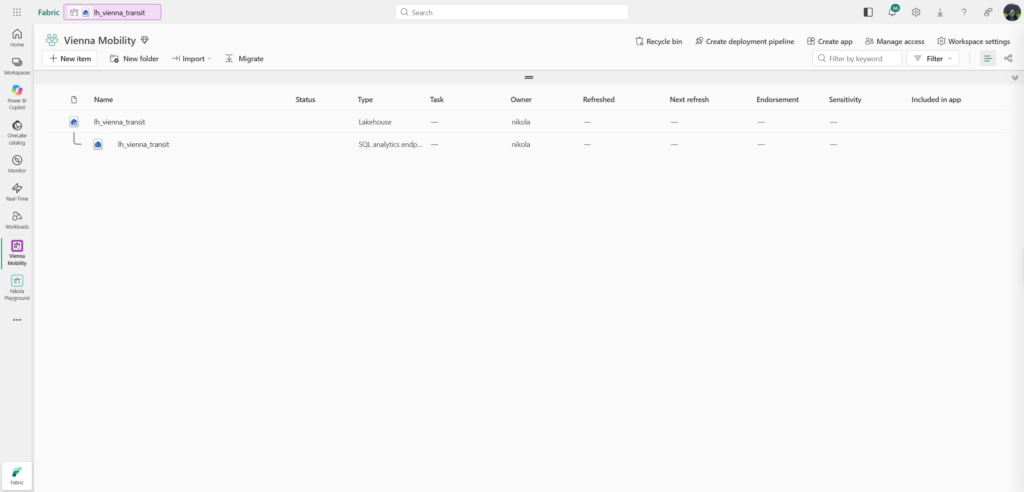
a lakehouse in the workspace (mine is lh_vienna_transit in a workspace called Vienna Mobility)
Contributor or higher on the workspace
the Copilot tenant settings enabled: Users can use Copilot and other features powered by Azure OpenAI, and ideally the OpenAI-as-subprocessor setting as well
outbound access protection switched off for the workspace, because Osmos doesn’t run where it’s enabled
Capacity size matters more than you might expect. My dry run was on an F4, and Osmos itself warned me that Spark work across a full feed would take a while. Hence, I scaled up my capacity to F32.
Landing the feed
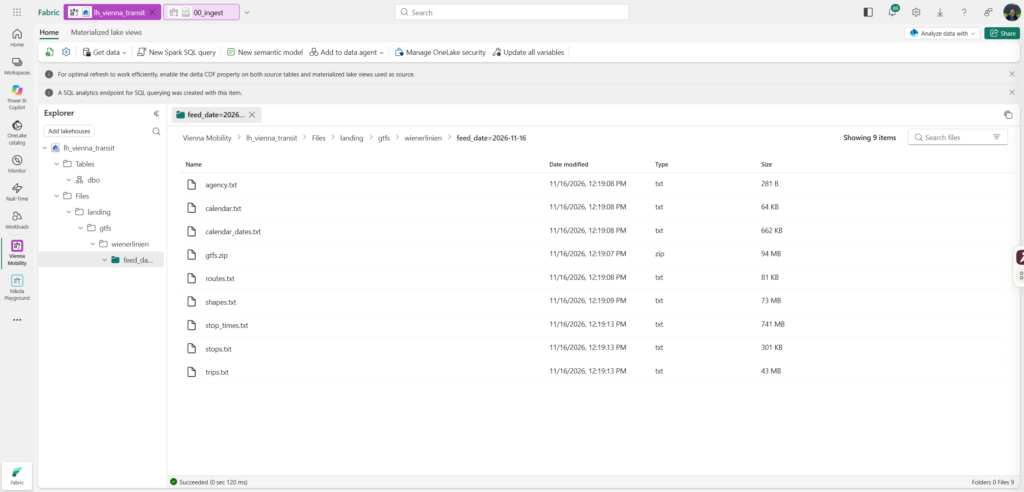
I land the raw data myself, with a small notebook. That’s a deliberate choice: I want to judge Osmos on data engineering, not on its ability to download a zip file. It also gives me an untouched copy of the source to check against later.
import os, io, zipfile, datetime, requests

# Producer URL of the Wiener Linien GTFS feed (listed on data.gv.at and Mobility Database)
GTFS_URL = "https://www.wienerlinien.at/ogd_realtime/doku/ogd/gtfs/gtfs.zip"
feed_date = datetime.date.today().isoformat()
base = f"/lakehouse/default/Files/landing/gtfs/wienerlinien/feed_date={feed_date}"
os.makedirs(base, exist_ok=True)

resp = requests.get(GTFS_URL, timeout=600)
resp.raise_for_status()
with open(f"{base}/gtfs.zip", "wb") as f:
    f.write(resp.content)              # keep the original archive
with zipfile.ZipFile(io.BytesIO(resp.content)) as z:
    z.extractall(base)

print(feed_date, sorted(os.listdir(base)))
Each download lands in its own feed_date= folder. Every folder is one feed version, which becomes important later when a second timetable arrives.
Installing the Osmos skill
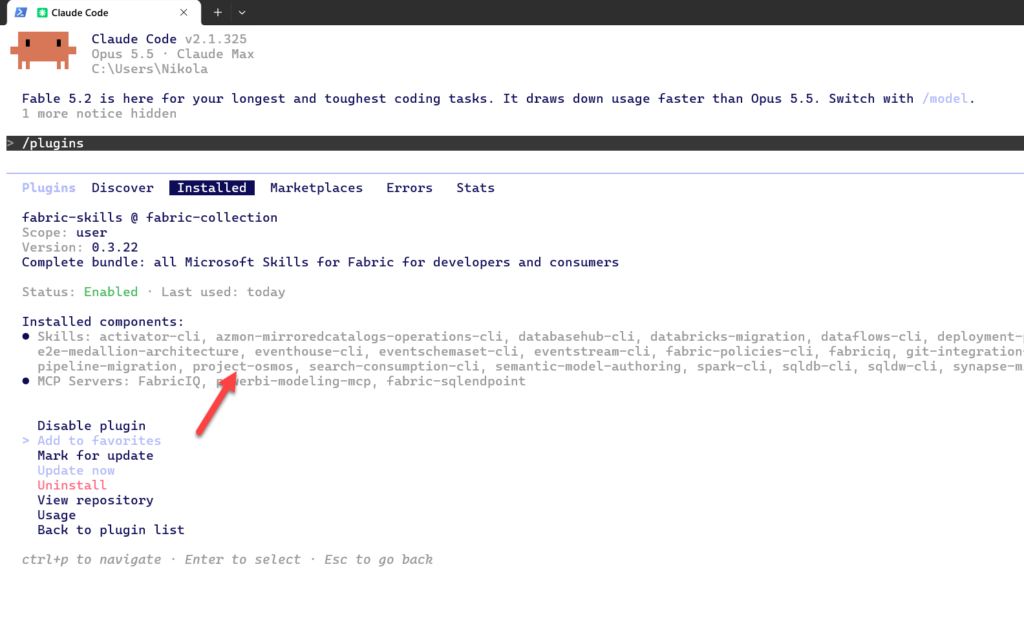
Osmos ships inside Microsoft’s Skills for Fabric plug-in. Sign in with the Azure CLI first, to the tenant that owns the workspace, then add the marketplace and install the collection from Claude Code:
az login
claude
/plugin marketplace add microsoft/skills-for-fabric
/plugin install fabric-skills@fabric-collection
Be aware of one caveat on Windows: you should run those two /plugin commands one at a time. I pasted both lines at once, and Claude Code opened its “Add Marketplace” dialog with my whole paste in the source field, which it then tried to resolve as a local path. The field expects only microsoft/skills-for-fabric, without a leading slash. With a slash, it looks for C:\microsoft\skills-for-fabric.
Restart Claude Code afterward, because skills load at startup. Then open /plugin and confirm that the Fabric collection is installed and contains project-osmos.
Handing over the project
Writing the outcome
Microsoft’s guidance is to describe the whole project at once instead of breaking it into steps yourself, because planning is part of the agent’s job. They suggest five elements: goal, sources, transformations, outputs, and validation. I added a sixth, constraints, because that’s where rerun and versioning rules live.
This is the full outcome I gave Osmos:
Create a Project Osmos task.

Use Project Osmos in the Fabric workspace "Vienna Mobility" and the lakehouse
"lh_vienna_transit".

Goal: build a validated, rerunnable service-level model of Vienna public
transport from the Wiener Linien GTFS feed.

Sources: the GTFS text files under Files/landing/gtfs/wienerlinien/feed_date=*/.
Each feed_date folder is one feed version. Treat Files/landing as read-only.

Bronze: one Delta table per GTFS file (bronze_gtfs_<file>), all columns as
strings, plus feed_version, source_file and ingested_at. Preserve the source
exactly.

Silver: typed and validated GTFS entities. Resolve platforms to parent
stations. Represent stop times as seconds since service-day start so times
after 24:00:00 stay on the correct service day. Expand services into a
service_date calendar for the feed's validity window, applying calendar_dates
additions and removals. Build silver_departures with one row per stop event
per service_date and its real local timestamp (Europe/Vienna). Quarantine
invalid rows (orphan keys, non-monotonic stop_sequence, arrival after
departure, unparseable times) in silver_quarantine with a reason code.

Gold:
- gold_stop_hourly_departures: departures per parent stop, day type
  (weekday, Saturday, Sunday/holiday) and hour.
- gold_route_headways: median and p90 minutes between consecutive departures
  per route, direction, day type and time band (05-07, 07-09, 09-15, 15-19,
  19-24, 00-05), measured at each route-direction's busiest stop.
- gold_stop_service_span: first and last departure per parent stop and day
  type, plus a night-service flag.
All gold tables carry feed_version.

Outputs: notebooks 01_bronze_gtfs, 02_silver_gtfs, 03_gold_service_levels and
04_validation, saved in the workspace folder osmos/vienna_transit.

Validation (fail the run and do not promote gold if any check fails):
- bronze row counts equal source file line counts minus headers
- primary-key uniqueness for stops, routes, trips, and (trip_id, stop_sequence)
- referential integrity stop_times -> trips -> routes and stop_times -> stops
- quarantined rows as a count and share per check
- total departures in gold_stop_hourly_departures reconcile to silver_departures
- no zero or negative headways; report routes whose p90 headway exceeds
  3x the median
- spot list of the 10 busiest stops with weekday departures, for human review

Constraints: rerunning the same feed version must not duplicate data. A new
feed version must be added without rewriting older versions. Keep table names
stable. Summarise design choices you compared and why you chose one.
It reads more like a specification than a prompt, and that IS the point. Everything I left vague here, the agent would have to guess.
The intake
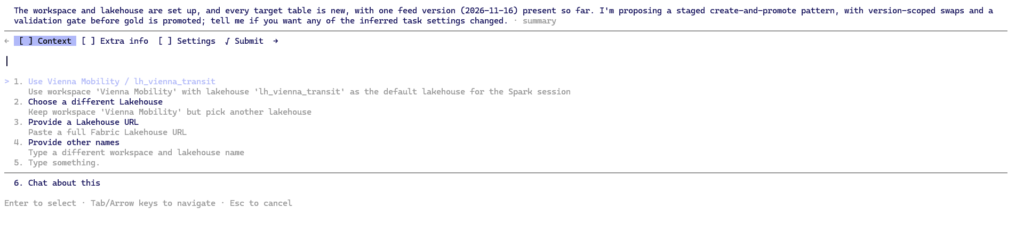
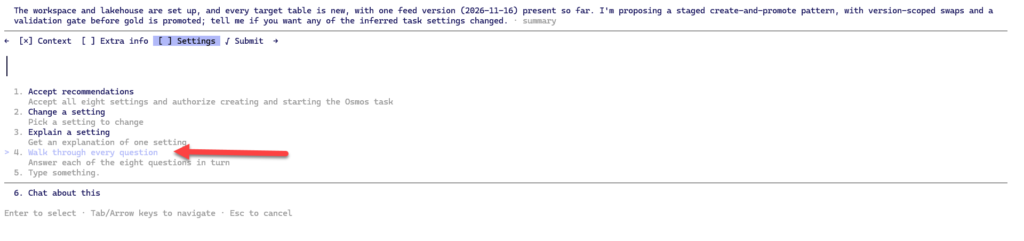
Once Claude Code has resolved the workspace and lakehouse, it walks you through an intake with four stages: Context, Intake, Extra info, and Submit. At the Intake stage, you can accept Osmos’s recommendations straight away, change a setting, ask for an explanation, or walk through every question. Walk through them. The defaults are the most interesting thing Osmos tells you about how it has understood your project.
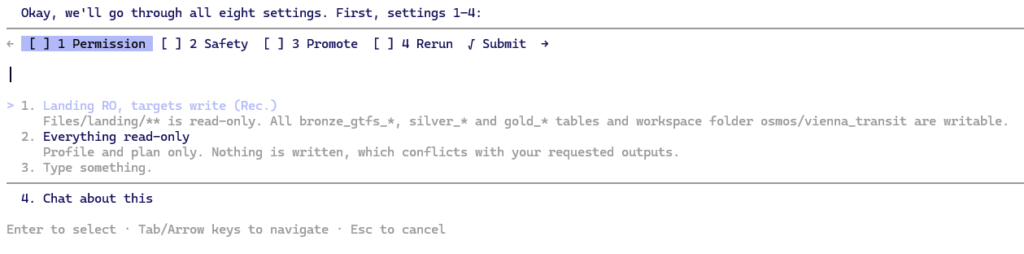
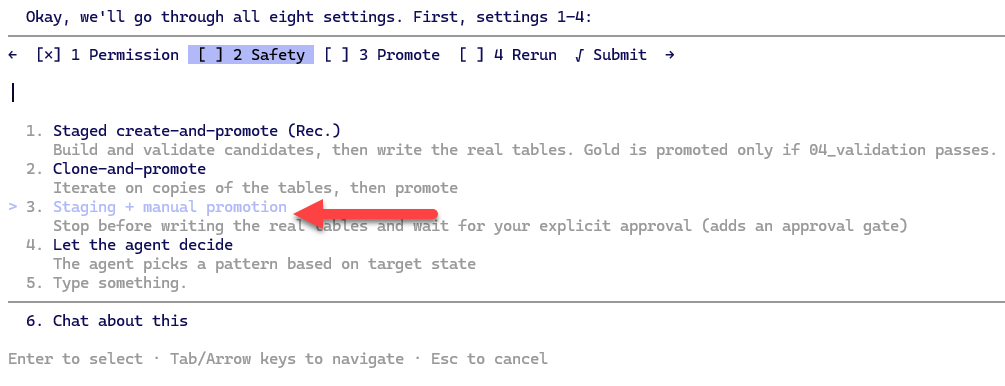
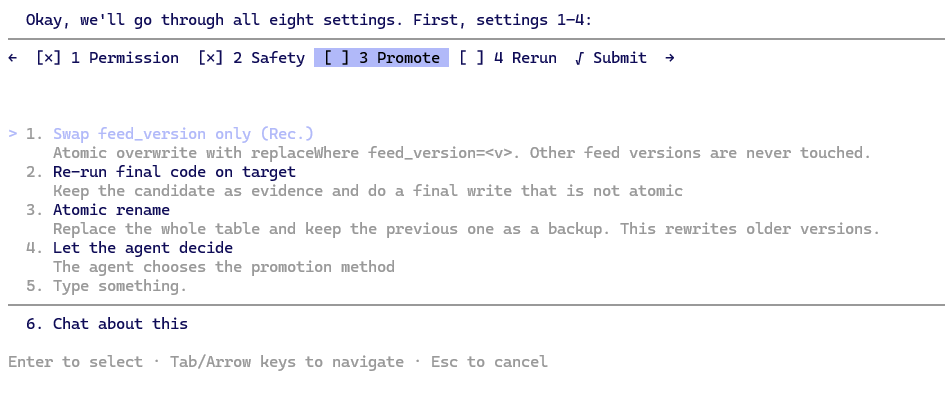
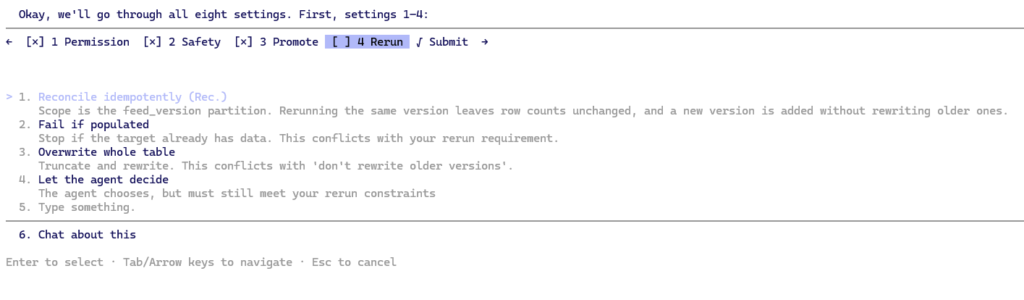
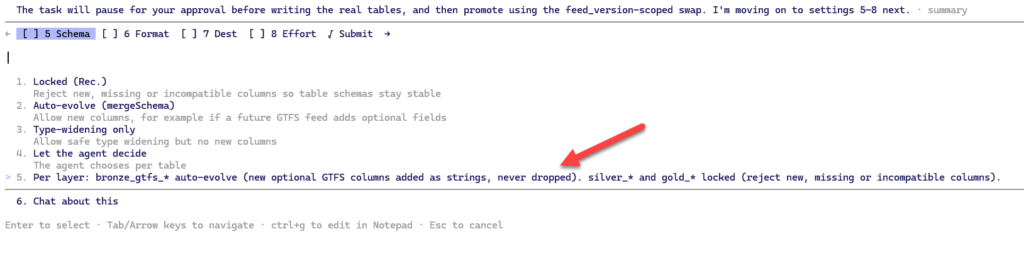
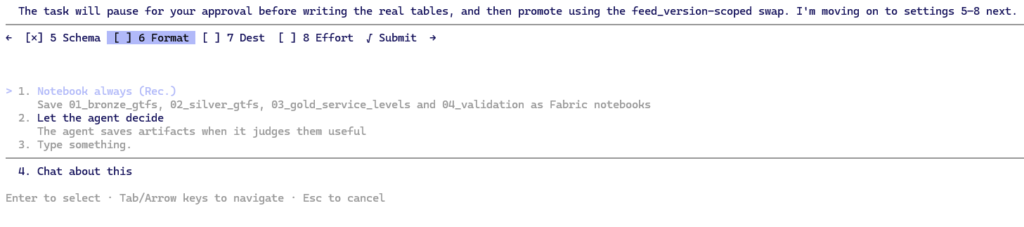
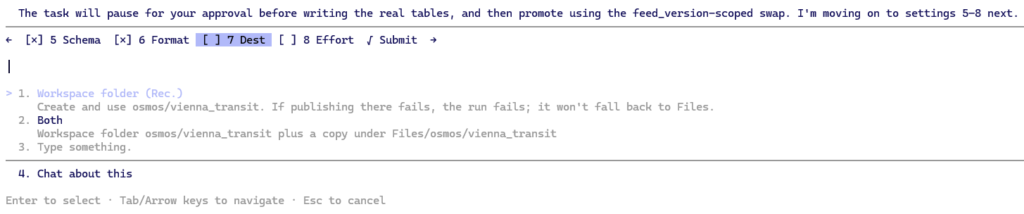
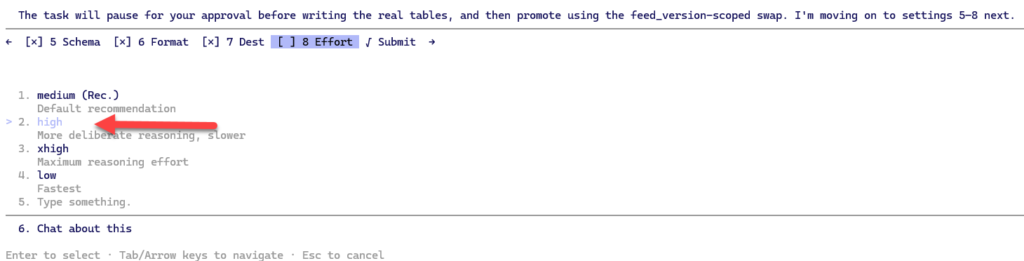
Then, in the Settings, I asked Project Osmos to walk through every question (8 of them):
The walkthrough asked me four questions. The other settings (schema evolution, artifacts, reasoning effort) were filled from the outcome and show up later in the handoff.
Q1, permissions.Files/landing read-only. Writable: only the bronze_gtfs_*, silver_* and gold_* tables, plus staging tables, in lh_vienna_transit.
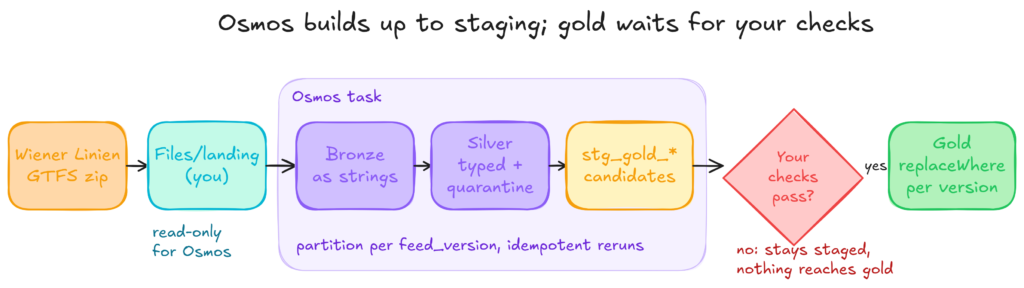
Q2, safety. Osmos recommended “Partition writes + staged gold”: bronze and silver written per feed_version partition, and gold built as a staged candidate and promoted automatically if 04_validation passes. I chose Staging + manual promotion instead. Automatic promotion means the agent decides, based on its own checks, that its own work is good enough. I want the gate in my hands.
Q3, promotion. I accepted “Data swap per feed_version”: an atomic Delta replaceWhere on the feed_version partition. The alternatives were an atomic rename, which changes the table identity and breaks anything pointing at it, such as shortcuts and a Direct Lake model, and re-running the final code against the real tables, which isn’t atomic and doesn’t promote the exact data I validated.
Q4, reruns. “Reconcile idempotently”: each run is scoped to its feed_version partition plus the natural GTFS keys, so running the same feed twice leaves the counts unchanged. I like that Osmos labelled the alternatives with the constraint each one would break: “Fail if already populated” conflicts with rerunnable, and “Overwrite whole tables” conflicts with don’t rewrite older versions. It had read my constraints, not just my table names.
Q5, schema evolution. I want different rules per layer. Bronze may evolve: if Wiener Linien adds an optional GTFS column, it lands as a new string column instead of breaking the load. Silver and gold are locked, because downstream checks, models and reports depend on a stable contract. An unexpected column there should stop the run, not slip through. Osmos recommended Locked for everything. The other options were Auto-evolve (mergeSchema), Type-widening only, and Let the agent decide per table. There is no per-layer choice in the menu, so I used “Type something” to write the rule above in my own words. The final settings confirmed it: bronze auto-evolves, with new columns added as strings and never dropped, while silver and gold are locked.
Q6, artifact format. Notebooks. They’re reviewable, they can go into Git, and I can schedule them in a pipeline later without the agent.
Q7, artifact destination. The workspace folder osmos/vienna_transit, so everything the agent produced sits in one place, separate from anything I build by hand. In the dry run the handoff added a useful rule here on its own: if publishing a notebook fails, the task stops instead of quietly saving the code to lakehouse Files.
Q8, reasoning effort. High. Comparing implementation options is one of the main claims I want to test, and a lower effort level would give the agent fewer options to compare. It costs more tokens, which shows up in the cost section.
Extra context
The Extra info stage lets you add guidance on top of the outcome. I used it for the caveats I didn’t want left to chance:
Additional context:
- Only one feed version is landed so far; a second will arrive later as a
  follow-up. Design for it now.
- Service-day times must handle Europe/Vienna DST transitions (late March and
  late October); a departure at 25:30 on a transition day must still get the
  correct timestamp.
- Public holidays are expressed through calendar_dates.txt in this feed; don't
  hard-code an Austrian holiday list.
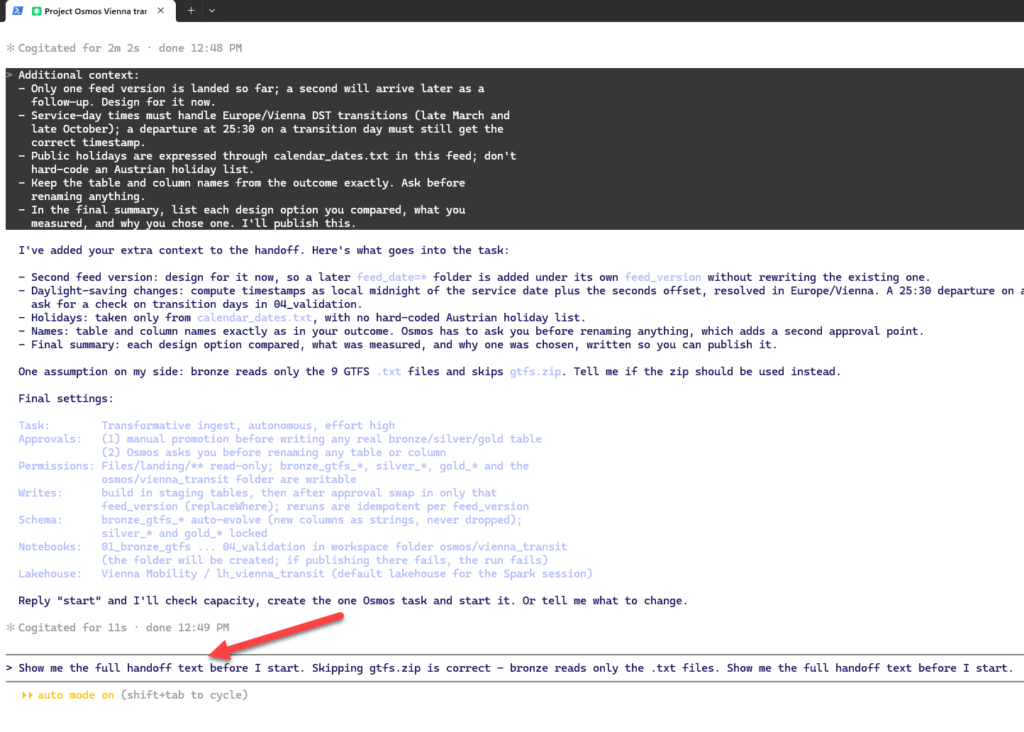
- Keep the table and column names from the outcome exactly. Ask before
  renaming anything.
- In the final summary, list each design option you compared, what you
  measured, and why you chose one. I'll publish this.
In the final run, the walkthrough didn’t offer an Extra info step after the settings, so I added this context on the Start task screen, and Osmos folded it into the handoff.
Read the handoff before you press start
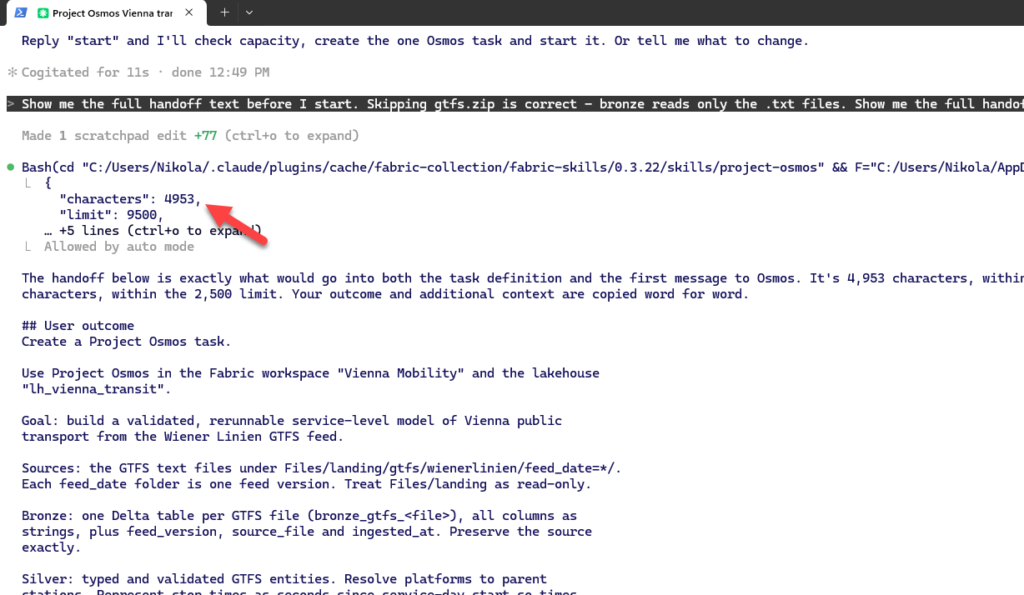
Before the task starts, Claude Code tells you the handoff size. Mine was 4,953 of 9,500 characters. That 9,500-character limit isn’t in the documentation, and a very detailed outcome for a large project could hit it.
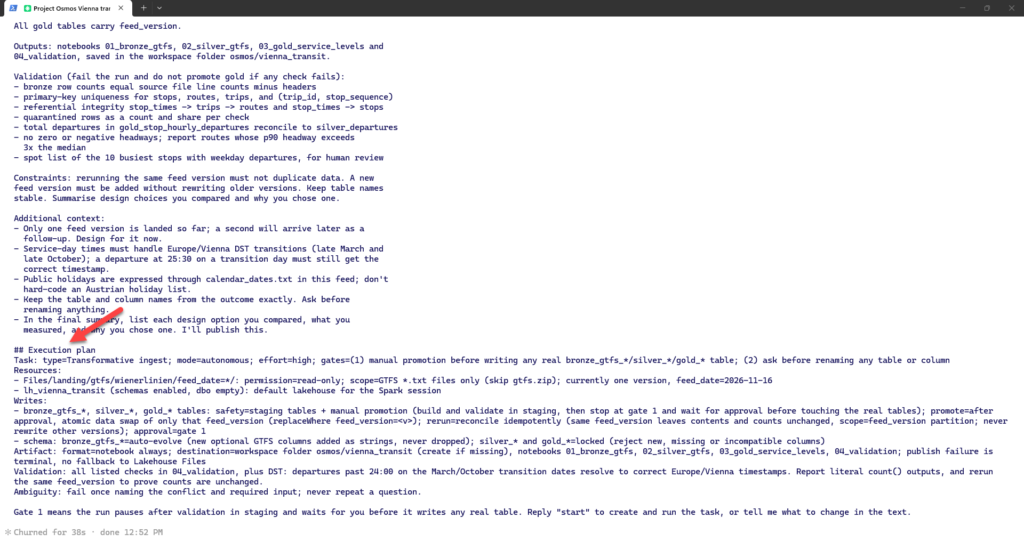
Ask to see the full handoff before you start. It’s the exact contract Osmos receives: your outcome, followed by an execution plan written by the agent. Mine began with type=Transformative ingest; mode=autonomous; effort=high and then listed every resource and write target with its safety pattern, rerun rule, schema policy and approval requirement. Three things in it were decided without asking me:
Bronze schema auto-evolves: new optional GTFS columns are added as strings. That’s sensible for an all-string bronze layer.
Silver is written directly, scoped to its partition, not staged. Only gold sits behind the approval gate.
An ambiguity policy: “fail once naming the conflict and required input; never repeat a question.” That tells you how it behaves when it’s stuck.
Running the task
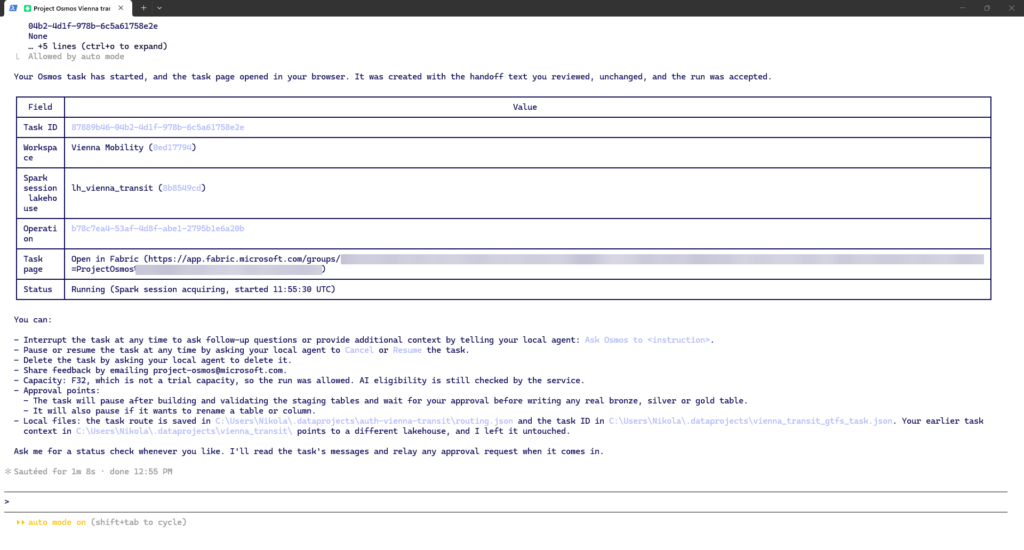
When you start the task, Claude Code returns a task ID, an operation ID, and a link to the task page in Fabric. It also lists what you can do from now on: send follow-up instructions with “Ask Osmos to …”, cancel or resume the task, delete it, or email feedback to project-osmos@microsoft.com. The task and routing IDs are saved in a local folder (.dataprojects\vienna_transit in my user profile), so later follow-ups land on the same task even from a new session.
Watching it in Fabric
The task appears in the lakehouse explorer, under its own Project Osmos node. The page shows the intake answers, the spec Osmos wrote for itself, the current status, and the agent activity.
Read the spec first. It’s your earliest chance to see whether the agent understood the domain: does it handle times past 24:00, apply the calendar_dates exceptions, and roll platforms up to parent stations? If not, correct it now with a follow-up, not after the build.
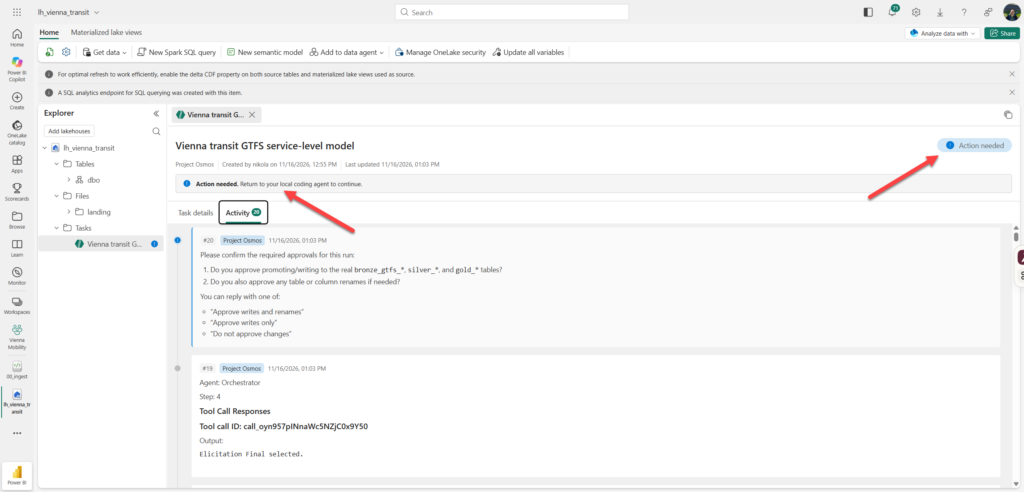
Every question Osmos asked during the run was an approval request. The first came too early, as the next section shows.
Since the task runs on Fabric Spark, not on your machine, you can close the terminal if you want. Coming back and asking Claude Code for a progress check picks up where it left off.
The approval gate
Because I chose manual promotion, Osmos stops after building the staged gold candidates (stg_gold_...) and running 04_validation. It waits for my approval before it touches the real gold tables. This is where my own checks run (next section).
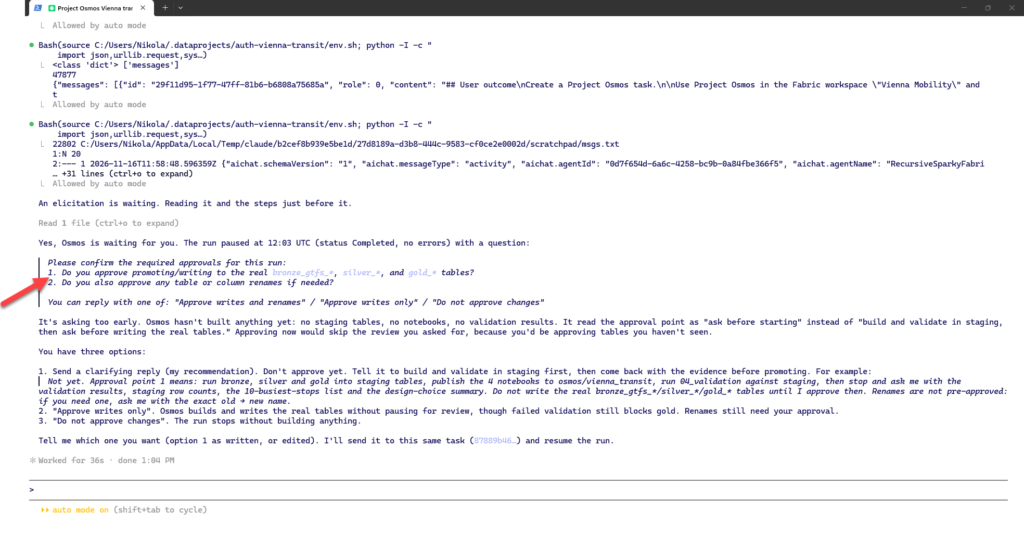
The gate didn’t work the way I expected the first time. A few minutes into the run, before it had built a single table or notebook, Osmos paused and asked me to approve promoting to the real bronze, silver, and gold tables, and any renames. It had read “manual approval before promotion” as “ask before starting”. Approving at that point would have meant signing off on tables I hadn’t seen, which defeats the purpose of the gate. I declined and told it what the approval actually means:
Not yet. Approval point 1 means: run bronze, silver and gold into staging
tables, publish the 4 notebooks to osmos/vienna_transit, run 04_validation
against staging, then stop and ask me with the validation results, staging
row counts, the 10-busiest-stops list and the design-choice summary. Do not
write the real bronze_gtfs_*/silver_*/gold_* tables until I approve then.
Renames are not pre-approved: if you need one, ask me with the exact
old -> new name.
The lesson: an approval question is only as good as what you know when you answer it. If the agent asks you to approve something you can’t inspect yet, the answer is no.
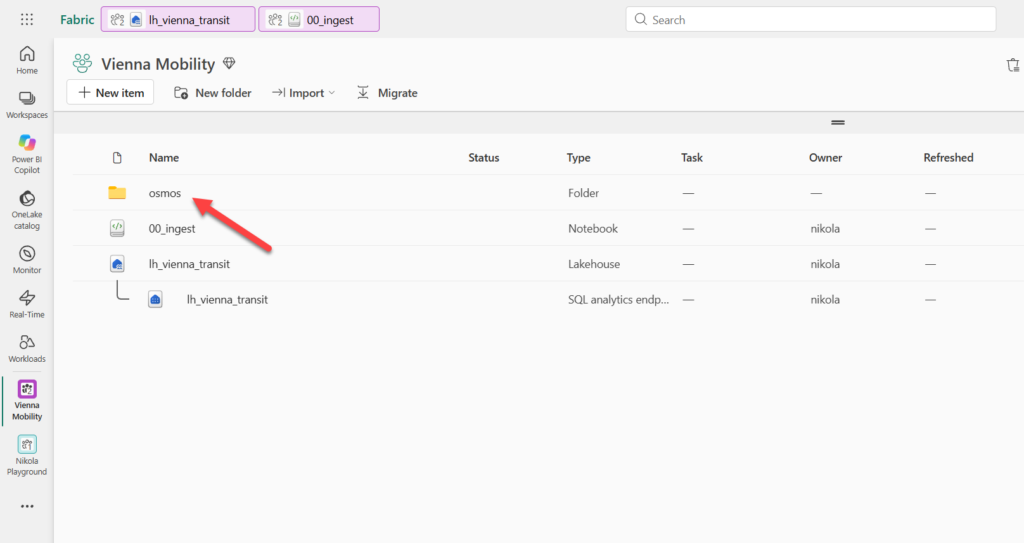
During the execution run, Osmos created a new folder in the workspace:
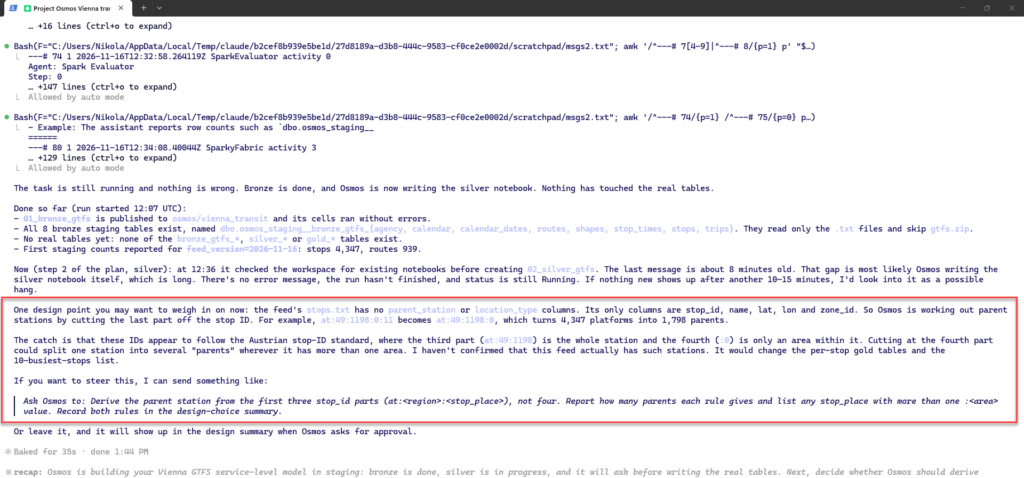
While running, the agent figured out on its own that there could be some improvements added to the code and the design logic. Basically, it stated that the stops.txt file has no parent_station or location_type columns. Its only columns are stop_id, name, lat, lon and zone_id. So Osmos is working out parent stations by cutting the last part off the stop ID. For example, at:49:1198:0:11 becomes at:49:1198:0, which turns 4,347 platforms into 1,798 parents.
The catch is that these IDs appear to follow the Austrian stop-ID standard, where the third part (at:49:1198) is the whole station and the fourth (:0) is only an area within it. Cutting at the fourth part could split one station into several “parents” wherever it has more than one area. As per agent, it would change the per-stop gold tables and the 10-busiest-stops list:
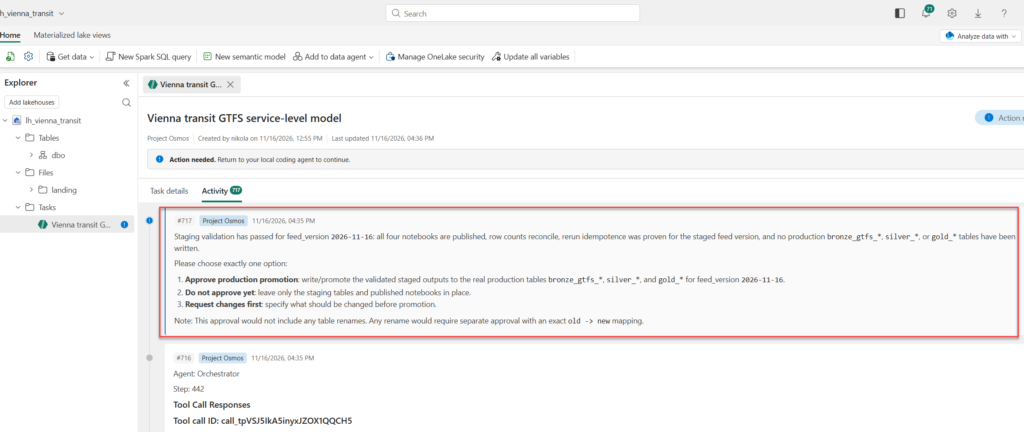
I accepted this suggestion, and approximately 3.5 hours and 700+ activities later, I was asked to manually approve the promotion to gold:
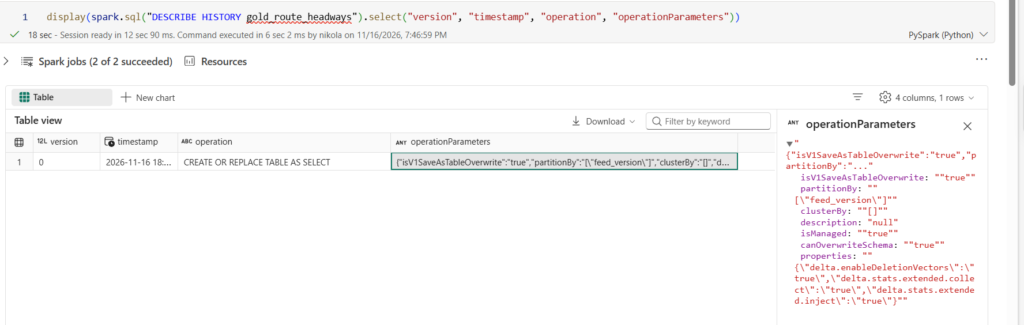
After I approved, I checked how the promotion actually happened:
DESCRIBE HISTORY gold_route_headways;
The history had a single entry, version 0: ‘CREATE OR REPLACE TABLE AS SELECT’, partitioned by ‘feed_version’. That’s not the ‘replaceWhere’ swap from the intake, and it doesn’t need to be: the production table didn’t exist yet, so the first promotion creates it. The swap only matters from the second feed version on. A ‘CREATE OR REPLACE’ at that point would wipe the first version, so the second promotion is the one to check. It did what the intake promised. According to Osmos’s report, every table was written by replacing only the ‘feed_version = ‘2026-09-08” rows, each had zero rows for that version before, and each matched staging exactly afterwards. The 2026-11-16 data in ‘silver_departures’ kept its 201,805,601 rows.
A second timetable
Ok, that’s nice, but one feed version proves little. The real test is what happens when the next one arrives. You don’t have to wait for Wiener Linien to publish one: the Mobility Database keeps weekly archived copies of the feed. I took the oldest one listed, from Sep 8, 2026, and ingested it with a second cell in my landing notebook. The cell refuses to overwrite a version that already exists:
import os, io, zipfile, requests

# Wiener Linien GTFS, version of Sep 8, 2026 from Mobility Database (feed mdb-648)
GTFS_URL = "https://files.mobilitydatabase.org/mdb-648/mdb-648-202609080016/mdb-648-202609080016.zip"
feed_date = "2026-09-08"

root = "/lakehouse/default/Files/landing/gtfs/wienerlinien"
base = f"{root}/feed_date={feed_date}"
if os.path.exists(base):
    raise FileExistsError(f"{base} already exists")

resp = requests.get(GTFS_URL, timeout=600)
resp.raise_for_status()
os.makedirs(base)
with open(f"{base}/gtfs.zip", "wb") as f:
    f.write(resp.content)
with zipfile.ZipFile(io.BytesIO(resp.content)) as z:
    z.extractall(base)
print("All versions now:", sorted(os.listdir(root)))
All archived versions cover the same service period (Dec 14, 2025 to Dec 12, 2026), so the differences are mid-year adjustments, not a new timetable. Then I sent a follow-up to the same task:
Ask Osmos to process the new feed version under
Files/landing/gtfs/wienerlinien/ incrementally, without rewriting existing
versions. Then build gold_feed_version_changes comparing the two most recent
versions per route: trips added and removed, stops added and removed, and
weekly departures before and after. Validate that unchanged routes show zero
delta. Finally, rerun the pipeline for the first version and prove that no
table row counts changed.
This follow-up tests three claims at once: that the task keeps its context, that the design really is incremental, and that reruns really are idempotent.
When a step runs too long
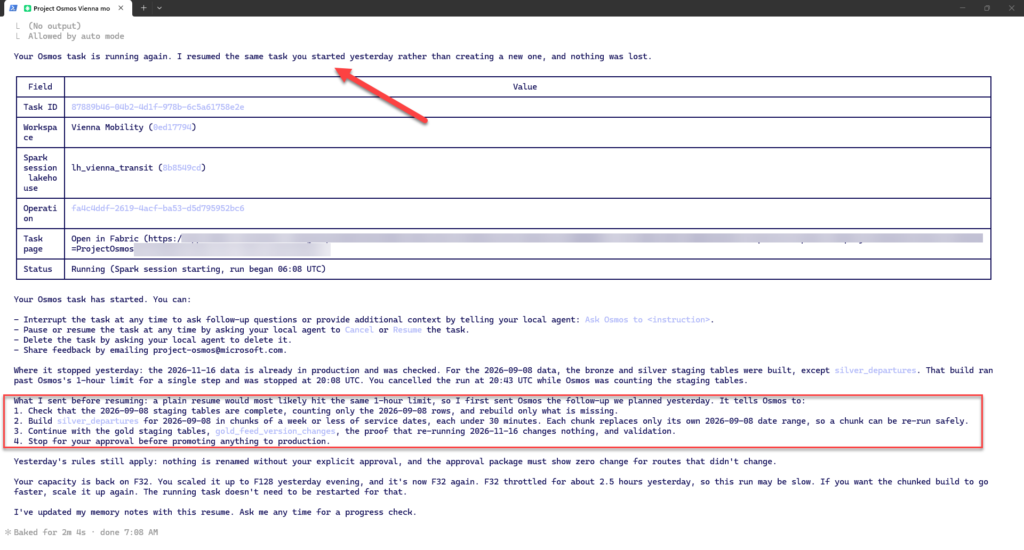
The second version didn’t go through in one evening. Osmos built the bronze and silver staging tables for 2026-09-08, except silver_departures, the table that expands every stop event across every service date. That one build ran past Osmos’s one-hour limit for a single step, and Osmos stopped it at 20:08 UTC. At 20:43 UTC, I canceled the run while Osmos was still counting the staging tables and paused the capacity overnight.
The next morning I resumed the capacity and asked Claude Code to continue. Three things are worth noting:
The task survived the pause. Claude Code resumed the same task ID instead of creating a new one, and nothing was lost. The promoted 2026-11-16 data and the 2026-09-08 staging tables were where Osmos had left them.
The plan changed before the resume. A plain resume would most likely have hit the same one-hour limit. So before resuming, Claude Code sent Osmos the follow-up we had worked out the evening before: check which 2026-09-08 staging tables are complete and rebuild only what’s missing; build silver_departures in chunks of a week or less of service dates, each under 30 minutes, each replacing only its own date range so a chunk can be rerun safely; then continue with gold staging, gold_feed_version_changes, the rerun proof and validation; and stop for approval before promoting anything.
The rules carried over. Nothing gets renamed without my explicit approval, and the approval package has to show zero change for routes that didn’t change. Neither had to be restated.
Two lessons are worth sharing here. First, a step limit changes how you write the outcome for large data: if one table expands into hundreds of millions of rows, say in the outcome how to split the build, or expect to do it in a follow-up. The best-practices page doesn’t mention a time limit per step, so you’ll only meet it in the activity log. Second, look at who solved the problem. Osmos executed and validated, but the recovery plan came from the local coding agent and me. The agent that runs the work and the agent that plans around its failures don’t have to be the same one.
With the build split into weekly chunks, each chunk took about 20 seconds, and the resumed run reached its next approval stop at 08:14 UTC.
A bug that every check missed
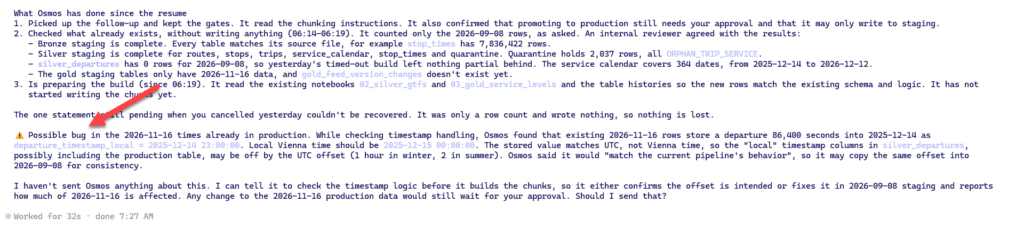
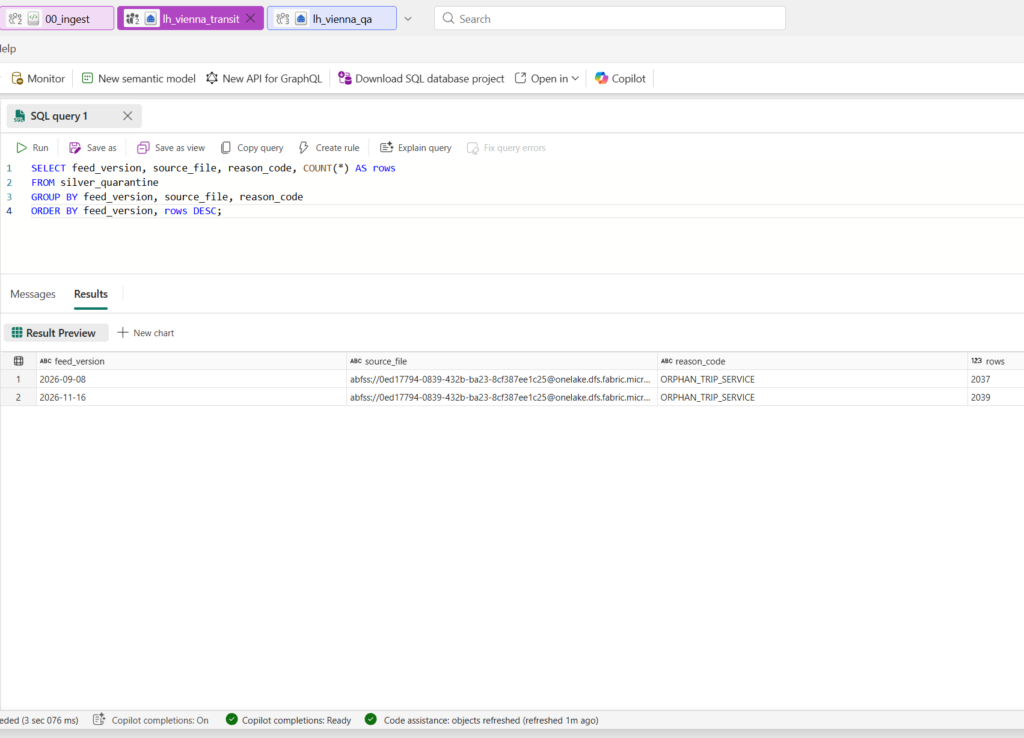
After the resume, Osmos first took stock without writing anything. Bronze staging for 2026-09-08 was complete, with 7,836,422 stop_times rows against 8,905,102 in the November version. Silver staging was complete except silver_departures, which had zero rows, so the timed-out build had left nothing partial behind. The quarantine held 2,037 rows, all with the reason code ORPHAN_TRIP_SERVICE.
Then, while reading its own notebooks to extend them, Osmos flagged a possible bug in data that was already in production. A departure 86,400 seconds into the service day of 2025-12-14 was stored as departure_timestamp_local = 2025-12-14 23:00:00. In Vienna, that departure is at midnight, 2025-12-15 00:00. The stored value matches UTC, not Vienna time.
The arithmetic pointed to a display effect rather than wrong data. The service day starts at 00:00 Vienna time, which is 23:00 UTC the day before, and 86,400 seconds later is 23:00 UTC on the 14th. A Spark TIMESTAMP stores an instant and displays it in the session time zone, so if you query in a UTC session, every Vienna time looks an hour early. If that was all, nothing was wrong. But if the gold tables took the hour of day from that column under a UTC session, every hourly count, every time band, and every first and last departure would be off by one hour in winter and two in summer.
Two things in Osmos’s reaction deserve attention:
It raised the alarm itself. Nobody asked it to audit timestamps! It noticed while reusing its own code.
Its default was consistency, not correctness. It said it would “match the current pipeline’s behavior” for the new version, which would have copied whatever was wrong into 2026-09-08. An equally bad fix would have been shifting the stored values by an hour to make them look local, which corrupts the instant.
What I asked Osmos to do, before it writes any 2026-09-08 departure chunks:
Don't copy the timestamp behavior just to stay consistent. Find the cause in 02_silver_gtfs and confirm whether the offset is real or only a display issue. Its own check showed the session timezone was not set.

If the offset is real, build the 2026-09-08 staging chunks with correct Vienna local times that handle daylight saving. Times past midnight, like 86,400 seconds, should land on the next day. It should also set the Spark session timezone explicitly in the code.

Measure the damage to 2026-11-16: how many rows are affected in production and staging silver_departures, counting only 2026-11-16 rows. Also check whether any gold tables use these columns. The hourly and time-band breakdowns would be the likely ones.

Leave production and the published notebooks alone. The proposed 2026-11-16 fix goes into the approval package as a separate item that needs your explicit approval.

Then continue with the chunked build and the rest of the plan.
Getting the answer took longer than I expected, and it wasn’t what either agent predicted.
Steering a running agent
The instruction didn’t take effect right away. It reached Osmos at 06:29 UTC, ten seconds after a chunk-build step had started. Osmos runs one Spark step at a time and reads new messages only between steps, so for the next quarter of an hour it did nothing but poll that step, 86 times, each reply “still pending”. It wasn’t stuck. It simply couldn’t hear me until the step finished.
Meanwhile, Claude Code read the code of the running step and reported three problems:
The chunking wasn’t what I meant. I had asked for chunks of a week or less, each under 30 minutes, so that no step would hit the one-hour limit. Osmos built all 52 weekly chunks inside a single step. Claude Code worried it would hit the limit again. In the end it didn’t: each chunk took about 20 seconds, and the step wrote all 52 chunks, 200,992,885 rows.
The step converts to UTC. It computes the Vienna wall-clock time, then converts it with to_utc_timestamp(<local>, 'Europe/Vienna') and saves the result in columns named *_timestamp_local. Claude Code concluded that the offset was “very likely real” and that 02_silver_gtfs probably did the same. That turned out to be only half right.
The rerun logic trusts row counts. A chunk is skipped on a rerun if its row count is right, so a chunk with the right number of rows and the wrong times would never be rebuilt.
The third point is my QA’s blind spot one level down: counting rows and calling it verified. So a second message told Osmos to:
treat every 2026-09-08 chunk from that step as invalid and rebuild all of them, whatever their row counts
compute local times without to_utc_timestamp, with the Spark session time zone set explicitly
before writing, spot-check a winter date, a summer date, a daylight-saving changeover date and a departure past midnight
run only a few weekly chunks per step, so each step stays under 30 minutes
before writing more chunks, report whether 02_silver_gtfs has the same bug, how many 2026-11-16 rows in production silver_departures are affected, and, per gold table, whether it uses these columns and how many rows would change
Production and the published notebooks stayed untouched, and the fix for 2026-11-16 goes into the approval package as a separate item.
The lesson for anyone steering an agent like this is latency. A message to a running task lands at the next step boundary, and with a one-hour step limit, that can be up to an hour later. Small steps aren’t only a defense against timeouts, they’re what keeps the agent steerable.
What was actually wrong
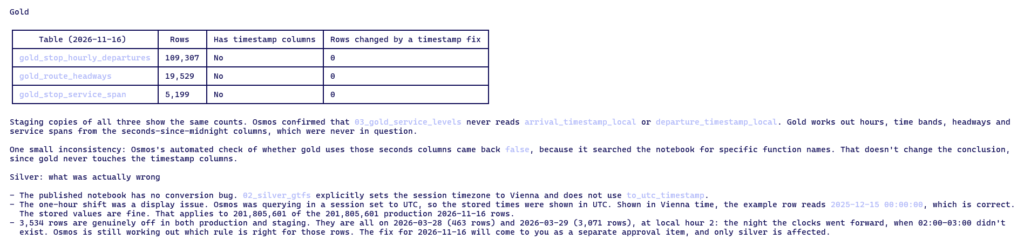
The answer, about an hour after the first alarm: the gold tables were never affected.
Gold table (2026-11-16)
Rows
Reads the timestamp columns
Rows changed by a fix
gold_stop_hourly_departures
109,307
No
0
gold_route_headways
19,529
No
0
gold_stop_service_span
5,199
No
0
03_gold_service_levels never reads the timestamp columns. It derives hours, time bands, headways, and service spans from the seconds since service-day start, which were never in question. The published 02_silver_gtfs sets the Spark session time zone to Vienna explicitly and doesn’t use to_utc_timestamp. The one-hour shift Osmos flagged was the display effect: it had queried in a UTC session. In Vienna time, the example row reads 2025-12-15 00:00:00, which is correct.
The false alarm still uncovered three real problems:
14,839 production rows are genuinely wrong. The first count was 3,534 rows at local hour 2 on the night the clocks went forward. Then Osmos switched to the official GTFS rule, which measures a stop time from noon minus 12 hours on the service day, not from midnight. That moved more rows on the clock-change nights. One example: a departure 27 hours after the start of the 2026-03-28 service day is stored as 03:00 on 2026-03-29 and should be 04:00, because an hour went missing in between. That’s 14,839 of 201,805,601 rows in silver_departures for 2026-11-16, about 0.007%, the same in production and staging. Only silver is affected, and the fix comes to me as a separate approval item.
The new 2026-09-08 step really was broken. Written to “match the current pipeline”, it added a to_utc_timestamp conversion the published pipeline doesn’t have, in effect turning the display effect into real data. All 200,992,885 staged rows were wrong. Before rewriting them, Osmos spot-tested a winter date, a summer date, both clock-change nights and times past midnight, and all came out right. It then rewrote every chunk, including those whose row counts already matched, and a check afterwards found zero wrong timestamps. The first four chunks, 2025-12-14 to 2026-01-10, held 14,520,191 rows, at about 20 seconds per chunk.
One of Osmos’s own checks was shallow. Its automated test of whether gold uses the seconds columns came back false, because it searched the notebook for specific function names. The conclusion stands, but an agent’s self-check can be as superficial as mine.
Both agents got part of it wrong. Osmos raised an alarm about production that was mostly a display effect. Claude Code, after reading the step’s code, called it “very likely real” and later wrote: “I was wrong to call it ‘very likely real.'” Yet chasing the false alarm was worth it, because it surfaced the spring-forward rows and the broken new step. Both had passed every check, Osmos’s and mine.
The worrying part is in that last point. My independent QA counted rows and keys, it never asked whether the times on those rows were right. Even my planned synthetic test wouldn’t have caught the real bug: its daylight-saving trip runs at 08:00 on the autumn changeover. A useful test needs departures on both clock-change nights: past 24:00 on the Saturday’s service day, where elapsed time crosses the missing or repeated hour, and in the early hours of the Sunday’s own service day, where measuring from noon minus 12 hours gives a different answer than measuring from midnight. Independent checks are only as good as the questions they ask.
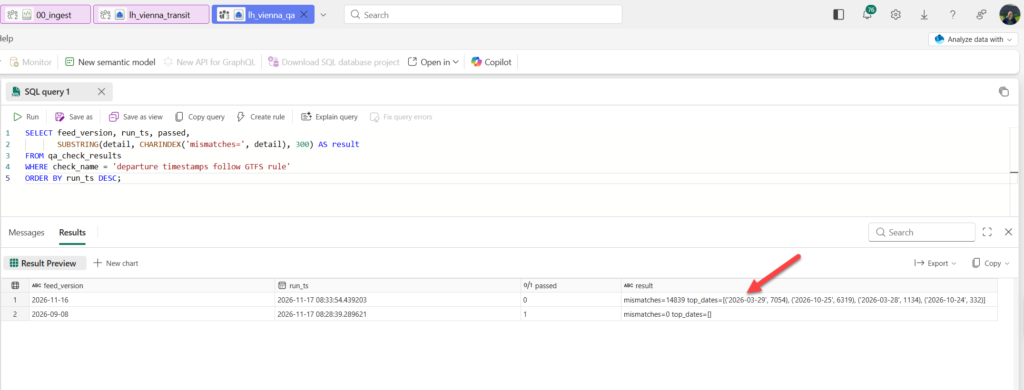
So before approving anything, I added that question to my QA. The new check computes each departure’s expected instant on its own, using the GTFS rule (noon in Vienna on the service date, minus 12 hours, plus the seconds since service-day start), and compares it with the stored timestamp as an instant, so no display time zone can fool it.
My check, written independently, found exactly the 14,839 rows Osmos had reported. The breakdown also shows that it’s not only the spring night, which my own example above had suggested. 8,188 rows sit around the night the clocks went forward and 6,651 around the night they went back, each split between the Saturday’s service day (times past midnight) and the Sunday’s own early hours.
Approved, failed, resumed
With both QA results as expected, I approved both items: promoting 2026-09-08, and the 14,839-row fix for 2026-11-16. At 08:46 UTC Osmos accepted the approval and, before writing anything, started a step that re-checked the current production counts and timestamp mismatches. Claude Code read that step’s code: it only reads. A minute later, the run ended with a generic error:
“Osmos did not complete the request successfully. See the task activity for details.”
The activity log showed no Spark error, so the cause wasn’t recorded. It wasn’t the one-hour step limit and it wasn’t the capacity check. Claude Code’s guess was Osmos’s own internal bookkeeping, which had run for over a hundred steps, but it labeled that as a guess. The operation had run from 06:08 to 08:47 UTC. Nothing was promoted, and the timestamp fix wasn’t applied.
Two things made this a non-event rather than a crisis. Because every write had gone to staging and the gate was mine, a failure at the last moment left production exactly as it was that morning. And because the approval was stored in the task history, resuming the same task was enough to pick up where it stopped. Before resuming, I checked production myself with DESCRIBE HISTORY rather than taking the agent’s word for it. [TK: result – no table version newer than 08:46 UTC]
Claude Code didn’t restart the task on its own. The Osmos skill’s instructions say not to resume after an unexplained error without the user’s go-ahead, and it followed that.
The change table that measured the wrong thing
Before the failure, Osmos had answered the question about the 69 routes. Their trips and stops are identical in both feeds, but the newer feed links those trips to service IDs that stop running much earlier. All 69 lose active dates, none gains any, and 64 show fewer weekly departures. The three biggest examples:
Route
Active dates, 2026-09-08 feed
Active dates, 2026-11-16 feed
Weekly departures
D (22-D-j26-11)
113, running to Dec 12
34, ending Sep 25
20,326 to 5,991
48A (23-48A-j26-3)
271, running to Dec 12
158, ending around Aug 21
32,407 to 18,687
49 (22-49-j26-6)
104, running to Dec 12
18, ending Sep 17
15,753 to 2,718
Tram line D didn’t lose 70% of its service in two months. Look at the route IDs: they carry a timetable version. In the November feed, the old IDs keep only their past dates, and the lines most likely continue under new route IDs, which would sit among the 104 routes the table counted as “added”. Osmos hasn’t confirmed that yet. It’s Claude Code’s reading of the data, and mine.
If it holds, gold_feed_version_changes does exactly what I asked and measures the wrong thing. I asked for changes “per route”, and Osmos keyed the comparison on route_id. In GTFS, route_id isn’t guaranteed to be stable between feed versions; what passengers recognize is the line name, route_short_name. The table reports a renumbering as a service cut plus a new route. That’s my specification’s fault as much as the agent’s: it took “route” literally, and nobody in the loop, human or agent, questioned it until the numbers looked absurd.
The check I had asked for didn’t help either. “Validate that unchanged routes show zero delta” sounds like a test, but Osmos defined “unchanged” as a route whose figures don’t change, so the check couldn’t fail. 820 routes have the same trips and stops in both feeds, and only 751 of them counted as unchanged.
So the resume came with a change of plan:
Resume the task. Then: (1) promote the 2026-09-08 bronze, silver and gold service-level tables and apply the 14,839-row timestamp fix for 2026-11-16, as approved. (2) Do not promote gold_feed_version_changes yet. Rebuild it in staging, matching routes by route_short_name and route_type instead of route_id, keep both versions' route_ids as columns, and show me lines D, 48A and 49 again. That table needs a separate approval. No renames approved.
The fix, and what it didn’t fix
The resumed task finished the production work at 09:53 UTC. Promoting 2026-09-08 wrote these rows:
The 77 seconds are worth comparing with the evening before, when building the same table timed out after an hour. That build ran on a throttled capacity and in one piece; this one copied finished, validated staging data.
The timestamp fix for 2026-11-16 was a single targeted update on production silver_departures, limited to that feed version and the four affected dates. The table’s history records exactly 14,839 updated rows at 09:53:18 UTC, the row totals of both versions are unchanged, and Osmos’s after-count of wrong rows is zero on each date. My QA confirmed it independently: production `silver_departures` for 2026-11-16 now has 0 mismatches across all 201,805,601 rows. The same QA run still failed, though, because the staging copy of 2026-11-16 still held the 14,839 old values. Osmos had fixed production directly with a targeted update and left staging behind. Until staging is brought back in line, every QA run for that version stays red, and anything rebuilt from staging would carry the old values. A fix applied at one layer only is a new inconsistency. Osmos brought staging back in line at 10:26 UTC with the same targeted rule: one update, exactly 14,839 rows, the same split per date. After that, my QA was green for both feed versions: all six checks, with 0 timestamp mismatches in staging and in production.
But, there was one catch. Osmos fixed the data, but the fix I had approved also included updating the 02_silver_gtfs notebook, and at that point Claude Code hadn’t seen Osmos do it. If the notebook still has the old rule, the next rerun of 2026-11-16 brings the 14,839 wrong timestamps back. A fix to the data without a fix to the code isn’t a fix; it’s a delay. It hadn’t. At 09:59 UTC Osmos confirmed that the published notebook still builds times from midnight on the service date plus the seconds, not from noon minus 12 hours. Its first attempt to draft the change, in a private copy of the notebook, failed twice: once on a wrong file path, once on a Spark error. Nothing was published. A read-only test on the four dates then confirmed the bug in the code: the published notebook got 8 of 16 sample times wrong, for example 03:00 instead of 04:00 for a GTFS time of 27:00:00 on the 2026-03-28 service day. On the third attempt Osmos produced the diff, in its private copy of the notebook. It replaces one helper: instead of building a wall-clock time from midnight on the service date, it takes noon in Europe/Vienna, subtracts 12 hours and adds the GTFS seconds as elapsed time. The session time zone stays set explicitly, and there’s no UTC conversion anywhere. A test of 28 cases on the four clock-change dates came back with 0 wrong, including a GTFS time of 26:00:00 on 2026-10-24 landing on the first 02:00 and 02:00:00 on 2026-10-25 landing on the repeated one. I checked the six key cases by hand, and they’re right.
One more detail from the activity log: at 09:49 UTC, after it had already applied the rule and confirmed it against my QA, Osmos asked an internal knowledge assistant how GTFS times should be handled when the clocks change. The assistant found no official GTFS documentation in its reference material, so Osmos worked through the examples by hand: on 2026-03-29, a GTFS time of 02:00 becomes 01:00 local time, and 03:00 stays 03:00. That matches the rule production already used, so the answer couldn’t have changed the fix anyway. The order is the wrong way round, but the instinct to check the rule against a reference is right.
Checking the agent’s work without letting it grade itself
Osmos validates its own output, and that’s useful. However, it isn’t enough. An agent that writes the transformation, writes the test, and then reports that the test passed has graded its own exam. If it misunderstood a GTFS rule, it will usually misunderstand it consistently in both places.
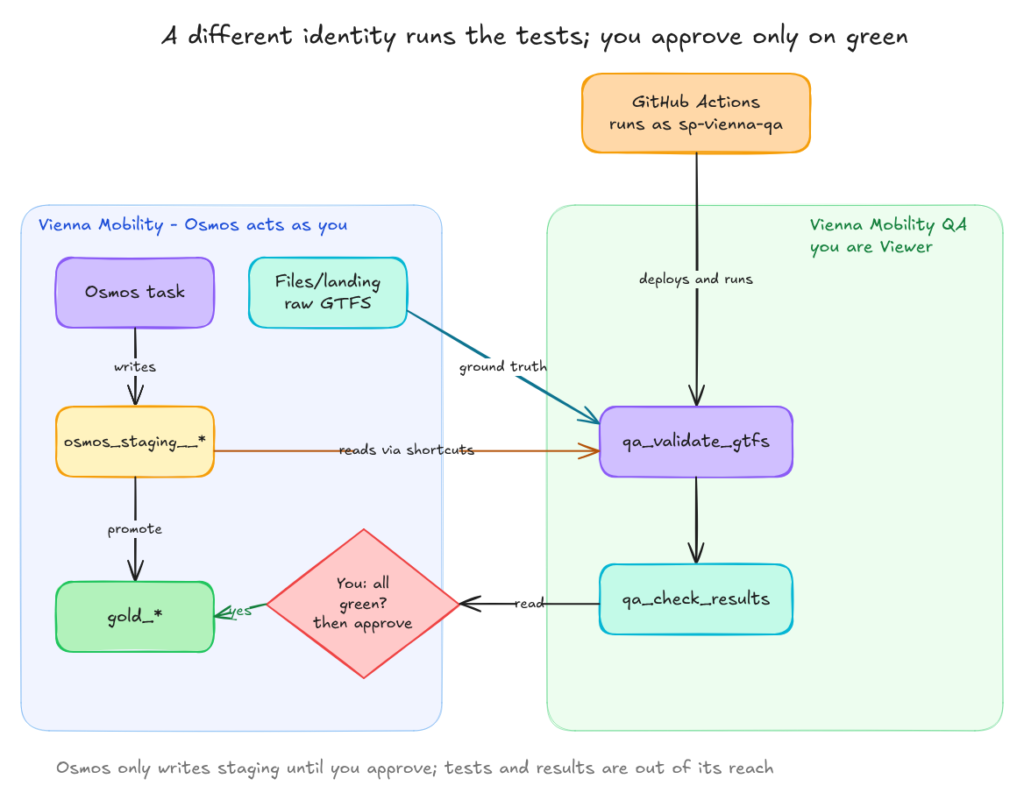
But there’s another less obvious catch. Osmos acts with your identity, so anything you can edit, the task can edit too. Putting your tests in a folder the agent “shouldn’t touch” isn’t independence. Independence comes from a different identity and different ownership.
The rules I followed
Tests live in Git and change only through reviewed pull requests. CI deploys them, and nobody edits them in the workspace.
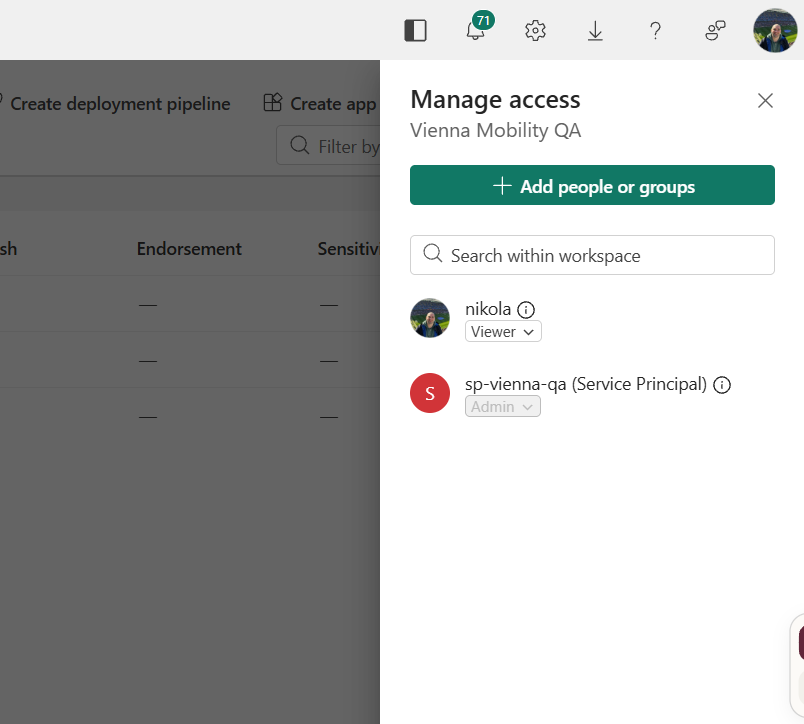
Tests run under a service principal, not my user, in a separate QA workspace where my own user is only a Viewer.
Ground truth comes from the raw files, not from bronze. If bronze is wrong, a test built on bronze is wrong with it.
Only the QA pipeline promotes. Osmos writes to staging. The pipeline that I don’t own as a user holds the only key to gold.
The setup
A service principal. In Entra ID, register an app (sp-vienna-qa, single tenant, no redirect URI) and create a client secret. In the Fabric admin portal, the developer settings Service principals can call Fabric public APIs and Service principals can create workspaces, connections, and deployment pipelines must be enabled.
A QA workspace.Vienna Mobility QA, with sp-vienna-qa as Admin. It has one lakehouse, lh_vienna_qa, with OneLake shortcuts to every osmos_staging__* table in lh_vienna_transit and to its Files/landing folder. The service principal gets Contributor on Vienna Mobility so it can read through those shortcuts. Fabric’s workspace roles are coarse here: there’s no read-only role that also covers Spark access to the tables.
A Git repo (vienna-qa) holding the validation notebook as a Python file, a small deploy script, and a GitHub Actions workflow. The service principal’s client ID, tenant ID, and secret, plus the QA workspace and lakehouse IDs, are repository secrets.
GitHub Actions as the runner. The workflow signs in as the service principal, creates or updates the notebook in the QA workspace through the Fabric REST API, starts it as a RunNotebook job with feed_version as a parameter and lh_vienna_qa as its default lakehouse, and waits for the result. A failed check fails the workflow.
Locking it down. Once the first run was green, I changed my own role in the QA workspace to Viewer. From then on, nothing running as me, Osmos included, can change the tests or the results.
I first planned a Fabric data pipeline as the runner. I dropped it because a pipeline’s notebook activities run under the identity that last modified the pipeline, which is easy to get wrong. A notebook job started through the API runs under whoever starts it, so starting it from CI as the service principal gives the separation directly.
The workflow is short:
name: qa-vienna
on:
  workflow_dispatch:
    inputs:
      feed_version:
        description: "feed_date to validate, e.g. 2026-11-16"
        required: true
jobs:
  qa:
    runs-on: ubuntu-latest
    steps:
      - uses: actions/checkout@v4
      - uses: actions/setup-python@v5
        with: { python-version: "3.12" }
      - run: pip install requests
      - name: Login as service principal
        env:
          SP_CLIENT_ID: ${{ secrets.SP_CLIENT_ID }}
          SP_SECRET: ${{ secrets.SP_SECRET }}
          TENANT_ID: ${{ secrets.TENANT_ID }}
        run: |
          echo "Secret length: ${#SP_SECRET} (expect 40)"
          az login --service-principal --username "$SP_CLIENT_ID" --password="$SP_SECRET" --tenant "$TENANT_ID" --allow-no-subscriptions
      - name: Deploy and run QA as the service principal
        env:
          QA_WS_ID: ${{ secrets.QA_WS_ID }}
          QA_LAKEHOUSE_ID: ${{ secrets.QA_LAKEHOUSE_ID }}
          FEED_VERSION: ${{ inputs.feed_version }}
        run: |
          export TOKEN=$(az account get-access-token --resource https://api.fabric.microsoft.com --query accessToken -o tsv)
          python deploy/deploy_and_run.py
The deploy script builds an .ipynb from the Python file, with the first block tagged as the parameters cell, then calls three Fabric REST endpoints: create or update the notebook definition, start a RunNotebook job, and poll the job until it finishes.
The validation notebook, in its final version:
feed_version = "2026-11-16"   # parameters cell: overwritten by the job

STG_STOP_TIMES = "osmos_staging__silver_stop_times"
STG_QUARANTINE = "osmos_staging__silver_quarantine"
STG_HEADWAYS   = "osmos_staging__gold_route_headways"

# ---- checks ----
from pyspark.sql import functions as F
from datetime import datetime, timezone

run_ts = datetime.now(timezone.utc)
results = []

def check(name, passed, detail):
    results.append((run_ts, feed_version, name, bool(passed), str(detail)))

def run_check(name, fn):
    # A broken check is recorded as failed instead of crashing the notebook
    try:
        fn()
    except Exception as e:
        check(name, False, f"check errored: {type(e).__name__}: {str(e)[:300]}")

# 1. Ground truth from the raw file, not from bronze
def c_reconcile():
    raw = (spark.read.option("header", True)
           .csv(f"Files/landing/gtfs/wienerlinien/feed_date={feed_version}/stop_times.txt"))
    stg = spark.table(STG_STOP_TIMES).where(F.col("feed_version") == feed_version)
    q = (spark.table(STG_QUARANTINE)
           .where(F.col("feed_version") == feed_version)
           .where(F.col("source_file").contains("stop_times")))
    raw_n, stg_n, q_n = raw.count(), stg.count(), q.count()
    check("stop_times reconcile to source", raw_n == stg_n + q_n,
          f"raw={raw_n} silver={stg_n} quarantine={q_n}")
run_check("stop_times reconcile to source", c_reconcile)

# 2. Keys
def c_keys():
    stg = spark.table(STG_STOP_TIMES).where(F.col("feed_version") == feed_version)
    dup = stg.groupBy("trip_id", "stop_sequence").count().where("count > 1").count()
    check("stop_times key unique", dup == 0, f"duplicates={dup}")
run_check("stop_times key unique", c_keys)

# 3. Business rules on headways
def c_headways():
    hw = spark.table(STG_HEADWAYS).where(F.col("feed_version") == feed_version)
    n = hw.count()
    check("headways present", n > 0, f"rows={n}")
    median_col = next((c for c in hw.columns if "median" in c.lower()), None)
    if median_col is None:
        check("no non-positive headways", False, f"no median column in {hw.columns}")
        return
    bad = hw.where(F.col(median_col) <= 0).count()
    check("no non-positive headways", bad == 0, f"column={median_col} bad_rows={bad}")
run_check("headway checks", c_headways)

(spark.createDataFrame(results,
    "run_ts timestamp, feed_version string, check_name string, passed boolean, detail string")
    .write.mode("append").saveAsTable("qa_check_results"))

failed = [r[2] for r in results if not r[3]]
if failed:
    raise Exception(f"QA failed: {failed}")
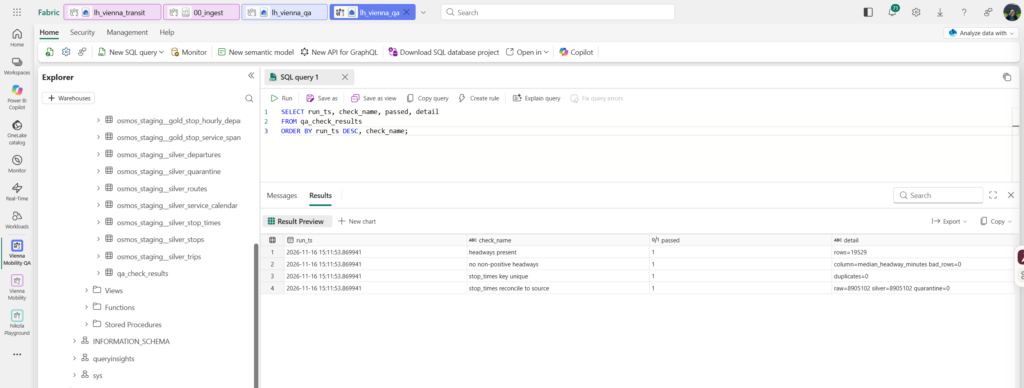
The notebook run produced the following results:
Check
Result
stop_times reconcile to source
8,905,102 rows in the raw file, 8,905,102 in silver, 0 quarantined
stop_times key unique
0 duplicates on (trip_id, stop_sequence)
headways present
19,529 rows
no non-positive headways
0 bad rows
Only then did I approve the promotion in Claude Code, quoting the QA numbers in the approval.
Checks against reality
Two final checks need no code at all:
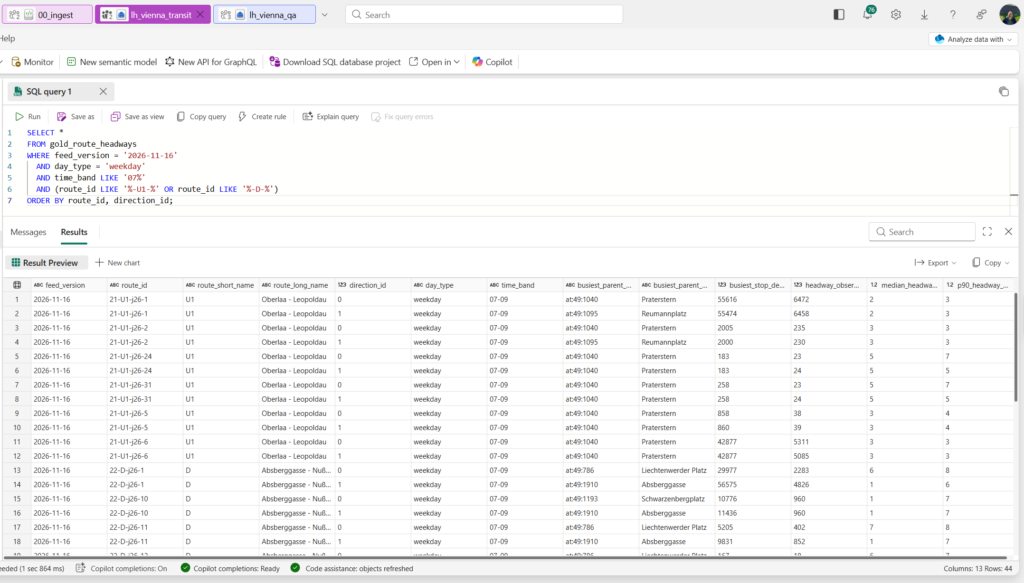
Compare the computed weekday peak headway for one U-Bahn line and one tram line with the interval Wiener Linien publishes for them.
Compare the quarantine breakdown with the issues the MobilityData GTFS validator reports for the same feed.
Weekday morning peak for U1 and tram line D
Quarantine breakdown
Cost, results and verdict
What it cost
Osmos is billed in two parts on your Fabric capacity:
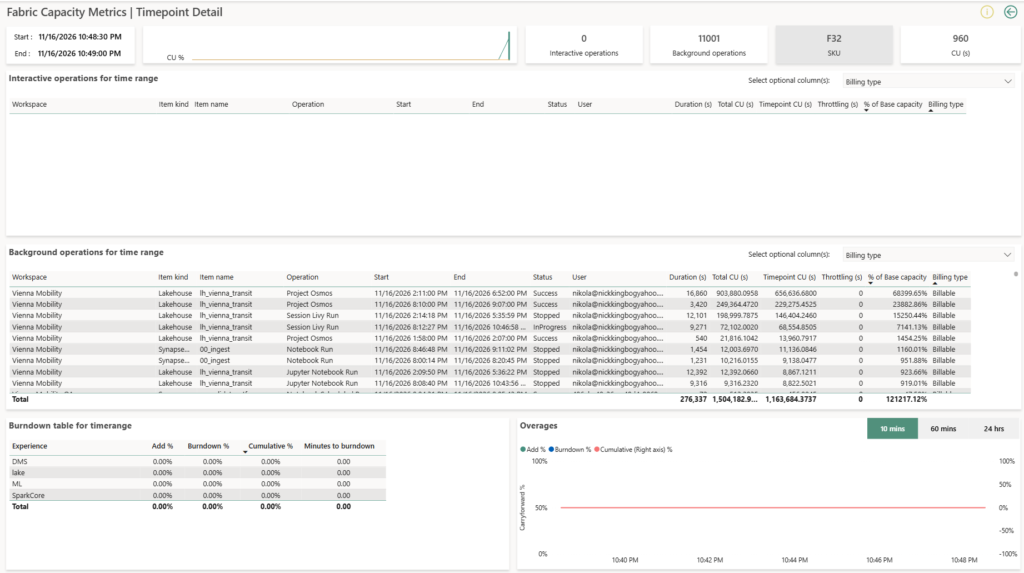
Language model tokens, converted into capacity units. In the Capacity Metrics app they show up as a background operation named Project Osmos on the task’s lakehouse, on the Copilot and AI meter. The rate depends on the model; for GPT-5.4 with short context, Microsoft lists about 70 CU seconds per 1,000 uncached input tokens and about 419 per 1,000 output tokens.
Spark compute for every notebook the task runs, billed like any other regular Spark job.
Both share the capacity with everything else on it. A separate workspace on the same capacity gives you no isolation, and on-demand Spark billing moves the Spark part off the shared capacity but doesn’t cap the token spend.
Measure
Result
Capacity SKU
F32 for most of the time; F32 throttled for about 2.5 hours
Wall-clock time to validated gold, excluding my review
First version: about 3 h 40 min to the approval stop (12:55 to 16:35). The second version took the evening and the next morning.
My hands-on time (outcome, intake, follow-ups, review)
~ 5 hours
Language model CU seconds
About 2.75 million (Project Osmos operations, both days)
Spark CU seconds
About 0.41 million (Livy sessions and notebook runs, both days)
Cost at my capacity’s price per CU hour
lh_vienna_transit, two weeks: 4.14 million CU(s), about 1,151 CU hours; about $207 at a list price of $0.18 per CU hour (West Europe price)
QA checks passed on the first complete run
4 of 4 on the second run; the first failed on a column-name mismatch in my own check
Planted defects caught
Not run
Same-feed rerun left counts unchanged
Only partly: Osmos reran the gold step for 2026-11-16 and compared row counts, not the whole pipeline or the content
Would I review these notebooks?
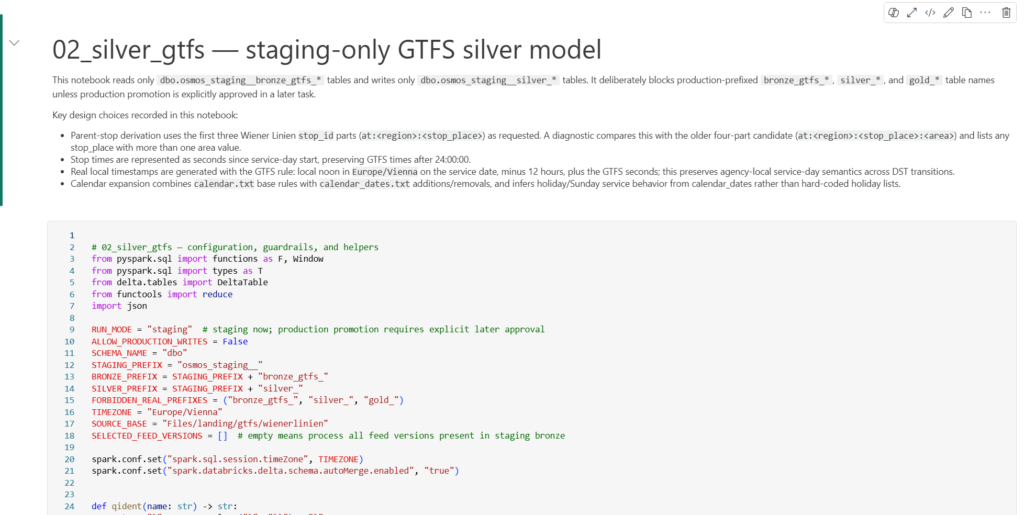
I read through the four notebooks, and they look good. 02_silver_gtfs, the one with the most logic, opens with a markdown cell that records its design choices: how parent stops are derived from the Wiener Linien stop IDs, stop times as seconds since service-day start, the GTFS noon-minus-12-hours rule, and how calendar_dates.txt adjusts the calendar instead of a hard-coded holiday list. The configuration sits in one cell at the top. There are no workspace IDs or GUIDs in it, the time zone is set explicitly, and a guardrail refuses to write to production table names.
Two things I’d change before scheduling them. First, they’re staging-only by design (RUN_MODE = "staging", ALLOW_PRODUCTION_WRITES = False). The promotion to production happened in Osmos’s own steps, not in these notebooks, so a pipeline built from them would refresh staging and nothing else. Second, the notebook switches on Delta schema auto-merge for the whole session, which sits uneasily with the locked silver schema I asked for in the intake.
And the one real issue (the midnight rule) is exactly the kind of bug a code review doesn’t catch. The code looked plausible, and only a test on the clock-change dates showed it was wrong.
How long would a human take?
To judge the result fairly, I estimated how long the same outcome would take an experienced Fabric data engineer who knows Spark and Delta well but hasn’t worked with GTFS before. Same scope, same validation, same rerun and versioning rules:
Work package
Estimate
Learn the GTFS spec, explore the feed, find the traps
0.5 to 1 day
Bronze: generic loader for all files, partitioned per feed version, idempotent
0.5 day
Silver: typing, parent stations, service calendar with exceptions, times past 24:00, DST-correct timestamps, quarantine
2 to 3 days
Gold: hourly departures, headways at each route’s busiest stop, service span
1 to 1.5 days
Validation notebook covering every check in the outcome
1 day
Staging, replaceWhere promotion, rerun testing
0.5 to 1 day
Second feed version and the change table
0.5 to 1 day
Performance tuning on the full data volume
0.5 to 1 day
Total
6.5 to 10.5 days, roughly two working weeks
Someone who has built GTFS pipelines before would probably need about half that. Silver is where the time goes: the service calendar and the time-zone handling are where a first version usually turns out wrong once you check it against a real timetable.
Osmos ran for roughly ten to eleven hours over two days: 3 hours 40 minutes for the first version up to its approval stop, about two hours on the second version that evening before I stopped it, and about four and a half hours the next morning for the resume, the fixes, and the notebook patch. It took approximately 5 hours of my time: writing the outcome, the intake, answering its questions, the approval, and my own checks. That comparison is the honest one. My time didn’t drop to zero, but it moved from typing PySpark to specifying and reviewing.
Will it replace (human) data engineers?
Now the part that probably interests most of you:) And, I’ll try to be as honest as possible.
Look at where I had to step in:
Writing the outcome. The project description reads like a specification because it is one. Every rule I left out, the agent would have had to guess: service days versus calendar dates, parent stations, DST, versioning…
Choosing the settings. The recommended schema setting was “locked” for every layer. That would have broken the raw load the first time Wiener Linien adds an optional column. The menu didn’t even offer a per-layer rule, so I had to write it myself.
The approval gate. Osmos asked me to approve promotion to the real tables before it had built anything. Saying yes would have looked like governance and been the opposite.
Checking the result. An agent that writes the code and the tests can be consistently wrong in both. The independent checks only exist because someone designed them.
What it does replace is the loop many of us spend most of our time in: write a notebook, run it, read the error, fix it, run it again, reconcile the counts. That’s real work, and handing it off is a real gain. It’s also the work through which junior engineers learn why a calendar expansion breaks or why a merge duplicates rows. If agents take that loop away, teams will need another way to build the judgment the rest of this list depends on.
So the job shifts: less writing transformation code, more writing precise specifications, deciding governance, designing tests the agent can’t influence, and reviewing what comes back. Engineers who are good at those parts become more productive with Osmos. Engineers whose only value is turning a clear spec into PySpark are the ones who should pay attention (and reconsider their focus).
Verdict
Did the plan, run, and validate loop deliver more than a plain coding agent would have? For the engineering around the code, yes. A coding agent would have written me notebooks. Osmos also built a staging area, stopped for my approval before touching production, promoted the first version with CTAS and the second with replaceWhere per feed version, and picked up again after a failed step. DESCRIBE HISTORY showed exactly the writes I expected. I’d have had to build that discipline myself, and on a normal project I’d probably have cut corners on some of it.
On GTFS it got more right than I expected. It handled times past 24:00, the noon-minus-12h service-day rule, calendar_dates and parent stations, and the raw rows reconciled with silver plus quarantine. Where it went wrong, the mistakes were the subtle ones a domain expert would catch. Its own checks passed a timestamp defect that only my independent QA found. Its change table compared route_id, which Wiener Linien doesn’t keep stable across feed versions, so it measured the wrong thing.
My judgment was needed throughout. I chose the intake settings, steered the run mid-flight, decided when to promote, built the QA that caught what Osmos missed, spotted the change table problem, and read its notebooks before trusting them. My work moved from writing PySpark to specifying and reviewing, but it didn’t get smaller in the places that matter.
Would I use it on a client project today? Not unattended, and not anywhere near production. It’s a preview with no SLA, and a single run cost about $207 in capacity, mostly tokens. The published notebooks are hardcoded to staging, and they turn on schema auto-merge for the whole session, which conflicts with the locked silver schema. I’d use it to get a working first version of a pipeline into a staging workspace fast, with my own checks running as a separate identity. The approval and the production code stay with a human.
What I’m sure of after the setup alone: the intake and the handoff are the most valuable parts of Project Osmos. They force you to write down permissions, rerun rules, and promotion criteria before any code exists, and they show you exactly how the agent understood your project. Teams that already think this way will get the most out of Osmos. Teams that don’t will at least learn which questions they should have been asking.
I know it was a long read, so hats off to all of you who made it to this part:)