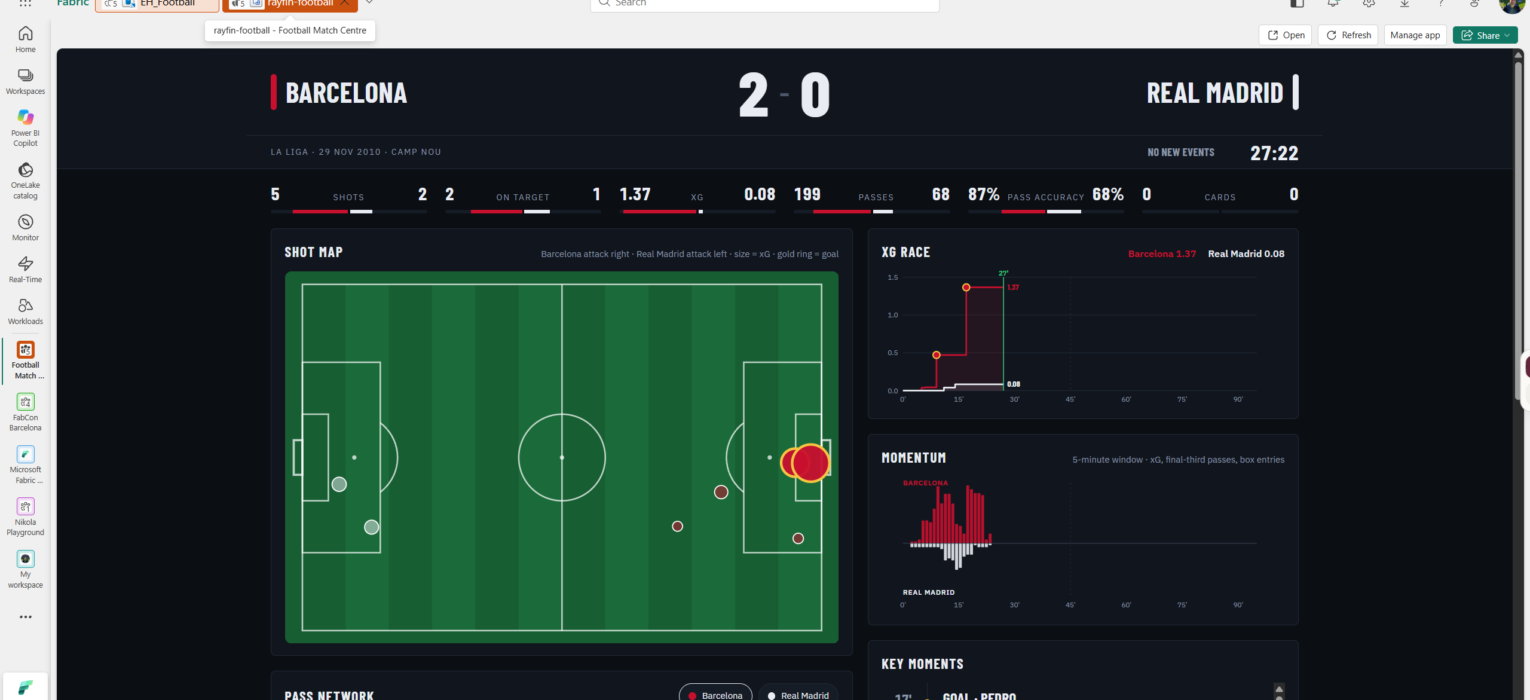
On 29 November 2010, Barcelona beat Real Madrid 5-0 at Camp Nou. This week I “watched” that match again, event by event, on a pitch inside Microsoft Fabric: Xavi at 9′, Pedro at 17′, Villa twice after the break, and Barcelona’s xG line climbing to 2.77 while Madrid’s stayed flat at 0.13.
If you know me, you know I’m a huge football and Barça fan. So when Microsoft introduced Rayfin, the open-source SDK and CLI that deploys a full application backend straight onto Fabric, I knew what my first Fabric App would be: a live match center.
This post covers what I built, the scripts that turned the whole setup into one command, and a step-by-step guide to run the same Clásico in your own workspace.
What I built
A football app has two kinds of data. Match events are read-heavy analytics: thousands of passes and shots, aggregated into xG, momentum, and pass networks. User data is the opposite: a prediction or a scouting note is a small write that has to land in a database. Fabric has always been good at the first kind. Rayfin adds the second: you define entities in TypeScript, and rayfin up provisions a Fabric SQL database, a GraphQL API, Entra sign-in and static hosting for the front end, all as one item in your workspace.
The match center uses both, in one workspace:
- Ingestion. A Python producer replays StatsBomb events into an Eventstream custom endpoint, at whatever speed you choose.
- Eventhouse. Events land as JSON in
raw_events. An update policy flattens them into a typedmatch_eventstable, and seven KQL functions do the football maths:Scoreline,XgRace,Momentum,ShotMap,PassNetwork,PlayerStatsandKeyMoments. - Semantic model. A DirectQuery model with one table per KQL function and a single
Match_Idparameter. The app sends DAX to it, so every number comes from one governed place. - Rayfin app. A React front end deployed as a Fabric App item. It reads the match through the semantic model and writes predictions to its own SQL database through the generated GraphQL API. Users sign in with their Entra account and install nothing.
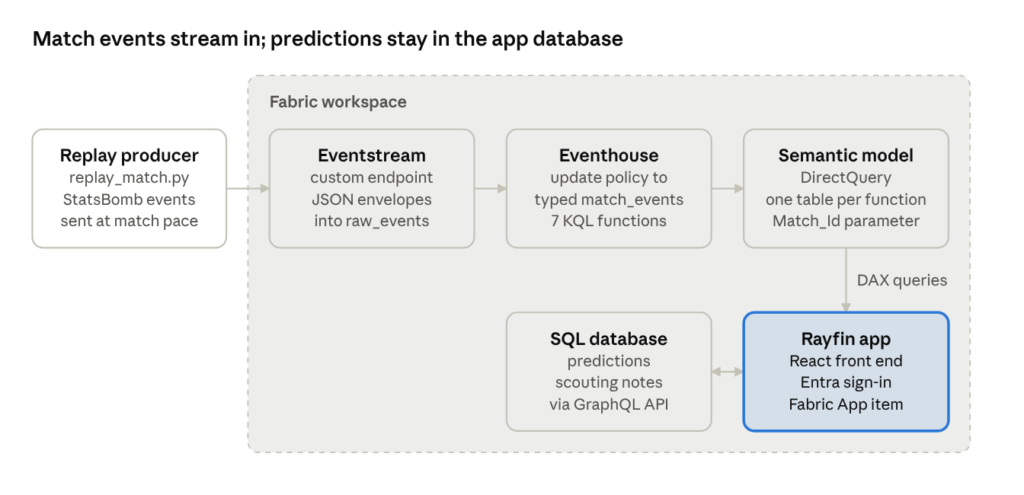
Everything except the producer lives in one workspace. The top row is the read path for match data. The app’s own SQL database, provisioned by Rayfin, stores what users write.
Making a 2010 match live
Real live feeds come with commercial contracts, which is great for real-life scenarios, but definitely the wrong place to start a demo:) StatsBomb open data is free for non-commercial use and covers La Liga seasons from the Messi era, event by event. The 5-0 Clásico is match 69299: 3,975 events, each with a timestamp, a team, a player, pitch coordinates and, for shots, StatsBomb’s xG.
The producer, ingest/replay_match.py, turns that file into a live match. It keeps the 1,565 events a match center needs (passes, shots, dribbles, duels, cards, substitutions) and drops ball receipts, carries and pressures. Then it sends each event at the moment it happened on the pitch, scaled by --speed, and skips the half-time break. At --speed 10 the whole match replays in about nine minutes.
Each message is a small envelope: match_id, emitted_at and the event itself under content.
The easy way: one command
Once Claude had written the deployment scripts, it was an easy ride. Everything in the architecture lives in the repo as code: the KQL schema as a script, the Eventstream as a JSON definition, the semantic model as TMDL, the app as TypeScript. One Python script pushes all of it to a workspace through the Fabric and Power BI REST APIs, then deploys the app with the Rayfin CLI. The only thing you do in a browser is sign in.
What you need
- A Fabric workspace on a capacity (an F2 or the trial is enough), where you are an Admin or Member
- The Fabric apps tenant setting turned on by a Fabric admin
- Python 3.10+, Node.js 20+ and the Azure CLI on your machine
- Your tenant id and workspace id. Both are in the browser address bar when the workspace is open:
app.fabric.microsoft.com/groups/<workspace-id>/...?ctid=<tenant-id>.
In the commands below, replace each placeholder, including its angle brackets.
Step by step
- Get the repo and open a PowerShell terminal in its folder
- Sign in to Azure and install the producer’s one dependency:
az login --tenant <tenant-id>
python -m pip install -r ingest\requirements.txt
3. Preview the plan. Nothing changes:
python fabric\deploy\deploy.py --tenant-id <tenant-id> --workspace-id <workspace-id> --dry-run
4. Deploy. The first run takes about 15 minutes, most of it is Fabric provisioning items:
python fabric\deploy\deploy.py --tenant-id <tenant-id> --workspace-id <workspace-id>
5. Replay the match. The producer reads the Eventstream connection string from the Fabric API with your az login token, so there’s nothing to copy:
python ingest\replay_match.py --events ingest\data\events_69299.json --speed 10
6. Check the whole chain:
python fabric\deploy\08_verify.py
7. Open the Fabric App item rayfin-football in the workspace.
What the deploy does
| Step | What happens |
|---|---|
| 1. Eventhouse | Creates EH_Football and its KQL database, or reuses them |
| 2. KQL schema | Runs the schema script: tables, mapping, update policy, 10-second batching, the seven functions |
| 3. Eventstream | Creates ES_MatchEvents from its definition: custom endpoint into raw_events |
| 4. Semantic model | Uploads Football_Model from TMDL, pointed at your Eventhouse |
| 5. Credentials | Sets the model’s data source to end-user sign-in, so every user queries the Eventhouse as themselves |
| 6. App config | Writes the model id into the app’s environment files and rayfin.yml |
| 7. App deploy | Runs rayfin up: the Fabric App item, its SQL database with the Prediction, ScoutingNote and WatchedMatch tables, the GraphQL API and the built front end |
Every step is safe to re-run, and items that already exist under the default names are reused. After a full replay, the verify script should report Barcelona 5 goals from 14 shots, xG 2.77 and 723 passes at 88.1%, against Real Madrid’s 0 goals from 5 shots and xG 0.13.
To run the match again, clear the tables in a KQL queryset with .clear table raw_events data and .clear table match_events data. After changing one part, re-run only its step, for example, deploy.py --only 2 after editing the KQL.
The app
The moment I cherished this exercise most was the Clásico replaying on a pitch. My first version looked like a plain dashboard, so the second one borrows from TV broadcast graphics: a dark ground, the two team colors as the only real colors, condensed type for every number, and the score as the biggest thing on the page.
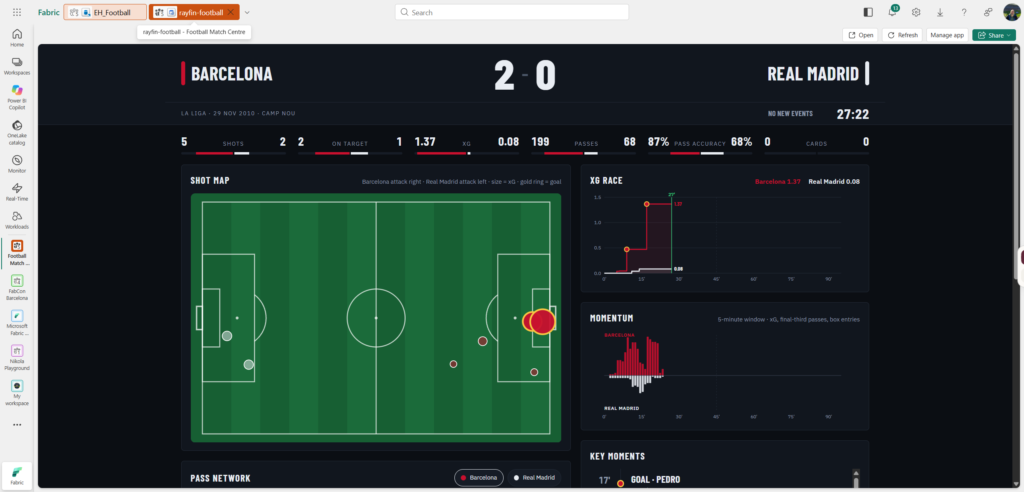
What’s on screen:
- Scoreboard. Score, a pulsing LIVE marker and a match clock that ticks every second. When a goal is scored, the scoring team’s color sweeps across the strip with the scorer’s name.
- Stat bars. Shots, shots on target, xG, passes, pass accuracy and cards, each bar filling toward its team’s side.
- Shot map. Both teams on one full pitch: Barcelona attack the right goal, Madrid the left. StatsBomb records every team as attacking left to right, so the away team’s coordinates are mirrored. Marker size follows xG, and goals get a gold ring.
- Pass network. Average positions and the passing links between players, with a Barcelona / Real Madrid toggle. In this match, it shows exactly what you’d expect: Xavi in the middle of everything.
- xG race and momentum. Cumulative xG per team, and a mirrored momentum chart built from shots, final-third passes, and box entries over a 5-minute window.
- Key moments. A timeline of goals, shots, cards, and substitutions, using players’ common names (Xavi, not Xavier Hernández Creus).
- Predictions. Before kickoff, every signed-in user can predict the score and the first scorer. The form locks when the match goes live, and a prediction that’s still possible turns green. This is the part that runs on Rayfin’s own SQL database.
Predictions: the part that writes
Predictions are what make this an app rather than a report. Before kickoff, each signed-in user submits a score and, optionally, a first goalscorer. That’s a write: a row in the app’s own SQL database, one per user per match, which its owner can change until the match goes live.
In Rayfin, the whole backend for that is one TypeScript class:
@entity()
@role('authenticated', ['read'])
@role('authenticated', ['create', 'update', 'delete'], {
  policy: (claims, item) => claims.sub.eq(item.user_id),
})
export class Prediction {
  @uuid() id!: string;
  @int() match_id!: number;
  @int() home_goals!: number;
  @int() away_goals!: number;
  @text({ optional: true }) first_scorer?: string;
  @int({ optional: true }) points?: number;
  @boolean() locked!: boolean;
  @text() author!: string;
  @date() createdAt!: Date;
  @text() user_id!: string;
}
rayfin up turns that into a table, a GraphQL API and a permission rule. Everyone signed in can read every prediction, because a leaderboard with hidden rows is pointless. Only the owner can create, change or delete one: the server checks the sub claim in the user’s Entra token against user_id, so editing someone else’s prediction fails even if a user tampers with the request. The front end calls client.data.Prediction.create(...) and update(...), typed against the same class, so a wrong field name fails at compile time.
During the match, the app compares every prediction with the live score and marks the ones still possible in green. The points column is there for settling the game at full time; that part isn’t built yet.
Power BI can write back too these days. Translytical task flows let a button in a report call a Fabric User Data Function that inserts, updates or deletes rows. That’s the right tool for an action inside a report: approve an order, fix a record. The difference here is where the write lives. In a report, it’s an action added to a visual. In a Rayfin app, it’s the data model itself, with its permissions declared next to it and a UI built around it.
How Claude fit in
Claude built most of this. It wrote the replay producer, the KQL schema and functions, the Rayfin entities, the semantic model as TMDL, the React app, both designs, and the deployment scripts. My part was the brief, the decisions, the iteration process, and running every piece against my own tenant.
That last part is important. Claude can’t see my Fabric tenant, so it never knew whether its code worked until I ran it and sent back the error. A few of the walls I hit were its own guesses: a rayfin config command that doesn’t exist, and KQL variables named after reserved words. Each fix took one round trip: I pasted the error, it found the cause, I re-ran.
It also caught problems before they reached me. Claude tested the deploy scripts against a mocked Fabric API, and that run found three bugs I never saw: the KQL script being split into 16 broken fragments, the model id written to a file the app never reads, and a pass network query that needed one call per team.
Why this beats a “classic” Power BI report
What impresses me most is how far past a traditional BI tool this goes. The possibilities feel limitless. Here’s where the match center goes beyond a “classic” Power BI report:
- It writes. Predictions are the app’s own data model, not an action added to a report. Each one lands in a SQL table, and only its owner can change it, enforced on the server by one decorator on the entity,
claims.sub.eq(item.user_id). - It moves. The clock ticks every second, the score flips, and a goal sweeps the team color across the screen. A report refreshes, whereas an app can behave.
- It looks like the subject. A full pitch with both goals, mirrored coordinates, and a broadcast scoreboard took no custom visual SDK. It’s an SVG in a React component.
- It stays in Fabric. The numbers still come from one semantic model, users sign in with Entra, and everything sits in the workspace next to the data, under the same governance.
To be fair, it isn’t free of trade-offs:
- Rayfin is in preview. During this build, the service started requiring a newer CLI than my project pinned, and the upgrade to 1.36 changed the client API in two places.
- It’s code. Someone has to write and maintain a React app. A report author with no developer around is still better off in Power BI.
- The Eventhouse costs capacity. An always-on Eventhouse is the biggest consumer in this setup, so size the capacity for it.
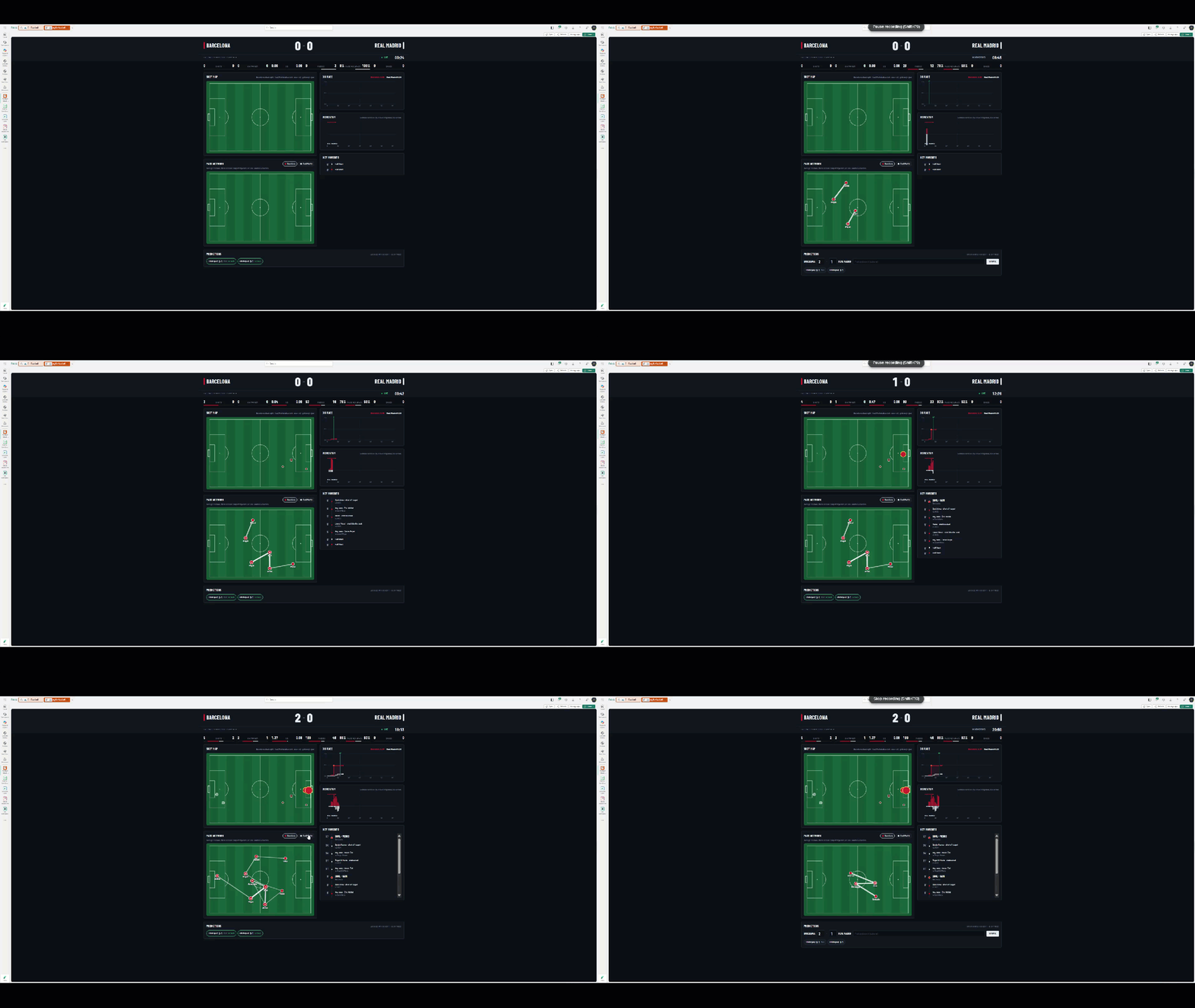
Try Rayfin
If you work with Fabric, try Rayfin. Start small: npm create @microsoft/rayfin@latest scaffolds a working app with sign-in and a data model, and npx rayfin up puts it in your workspace. The awesome-rayfin gallery has templates to learn from; the Helsinki Public Transport template is the closest to this project, and my deploy scripts started from its own.
To run the match centre itself, clone the repo and follow the steps above.
Two licensing notes. StatsBomb open data is for non-commercial use with attribution, so it suits demos and talks, not a paid product. The deploy scripts and the query transport code are adapted from the MIT-licensed Helsinki template.
Sources
- Fabric Apps explained – Tabular Editor blog
- Rayfin on GitHub
- awesome-rayfin template gallery
- Fabric Apps programming model, Microsoft Learn
- Microsoft Build 2026: building agentic apps with Microsoft Fabric and Microsoft Databases
- StatsBomb open data
Thanks for reading!
Last Updated on October 28, 2026 by Nikola