Barcelona is done. Nearly 5,000 people, 130+ sessions, and a very long list of announcements. This is my cut of the ones that matter, why they matter, and what you should do about them.
TL;DR Everything you build in Fabric now reaches Microsoft Copilot and agents directly. Fabric IQ in Copilot is generally available, apps in Power BI are coming to Pro and PPU, and the new F0 SKU with on-demand billing removes the capacity decision from the start of every project. Two things to be careful about: no pricing for F0 yet, and AI access to your semantic models is switched on by default.
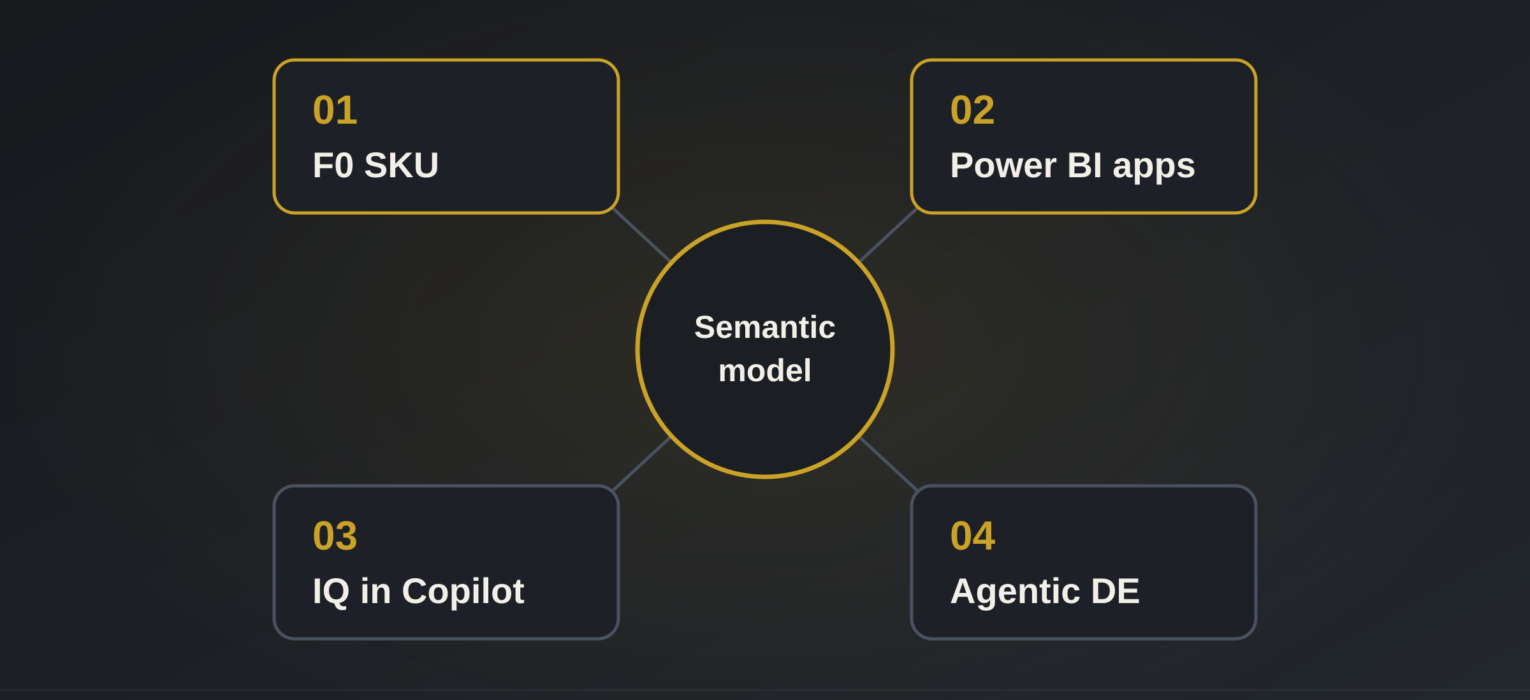
I’ve attended enough Fabric conferences to know that the announcement list is long and most of it is incremental. This one was different. Not because of any single feature, but because four of them, taken together, change where Fabric starts (F0), where it ends (apps and Copilot), and who gets to use it (Pro users). Let me go through them in the order you or your customers will feel them.
#1: F0 and on-demand billing: the capacity decision moves to the end
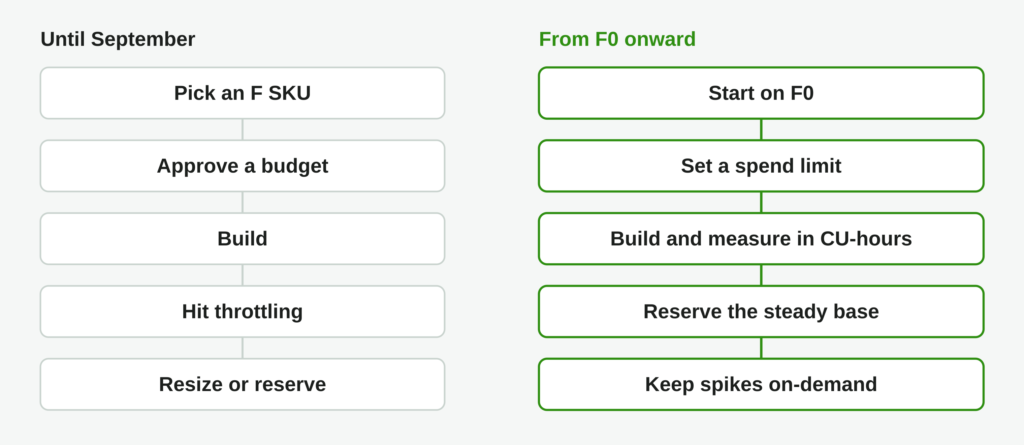
If you’ve ever sold, scoped, or just started a Fabric project, you probably know the first conversation (or at least, a variation of it). Which F SKU? Who approves the budget? What happens when the trial capacity expires? That conversation happened before anyone had written a single line of code, and it ruined more pilots than any technical limitation.
Microsoft announced two things that change this. F0 is a zero-provisioned capacity: you get access to Fabric and OneLake with no compute reserved up front, and on-demand billing switched on by default. On-demand billing itself is being extended from Spark (the existing Autoscale Billing for Spark) to every Fabric workload. On an F2 or higher, you can move individual billing categories to on-demand while keeping the rest provisioned.
The fine print here probably matters more than the headline. Usage is measured in CU-hours without smoothing, and you set spend limits over a rolling 24-hour window. For the sake of clarity: on a provisioned capacity, a background job is smoothed over 24 hours, so a bad notebook shows up as a throttling curve days later. On on-demand, the same notebook shows up on today’s bill. And here, it is a feature, not a bug:)
Real-life example
Imagine Meridian Bikes, a mid-size retailer with a Power BI estate and a Synapse warehouse they want to move. Today, a Fabric pilot/PoC/PoV means a funded F64 trial for 60 days, a go/no-go meeting at day 55, and a big question mark when the trial ends. With F0, the pilot runs on Meridian’s own tenant, with a spend limit of, say, 50 CU-hours per day. At the end of the pilot there is no cliff: the capacity metrics app shows which workloads were steady (reserve those) and which were spiky (leave those on-demand). The sizing conversation happens once, at the end, with evidence.
Reservations don’t go away. They rather get a clearer job. Here is how I now think about a capacity estate:
- Reserved F SKU for proven, steady load. Still ~40% cheaper than pay-as-you-go.
- Pay-as-you-go F SKU for known but variable load, with pause and resume.
- Capacity overage (now GA) for short peaks above the provisioned capacity. Billed on a separate meter at 3x the pay-as-you-go rate, no reservation discount.
- On-demand for anything spiky, experimental or not yet sized. F0 is this layer with nothing underneath it.
Warning #1. Pricing is not yet published. The on-demand multiplier and F0 costs were not shared in Barcelona. The only data point we have is overage at 3x PAYG with no reservation discount, which tells you where Microsoft prices elasticity. Hence, please don’t cancel a reservation on the strength of an announcement. But, gather your capacity metrics now, so you can compare in an hour instead of a quarter when the numbers become available.
#2: Apps in Power BI: Pro and PPU users get Fabric
This is the one I’d probably pick if I could only talk about a single announcement. Microsoft is bringing a new app-building experience to Power BI Desktop, powered by Fabric Apps. If you are not sure what Fabric Apps are, I suggest you start by reading this fantastic article from Kurt Buhler at Tabular Editor.
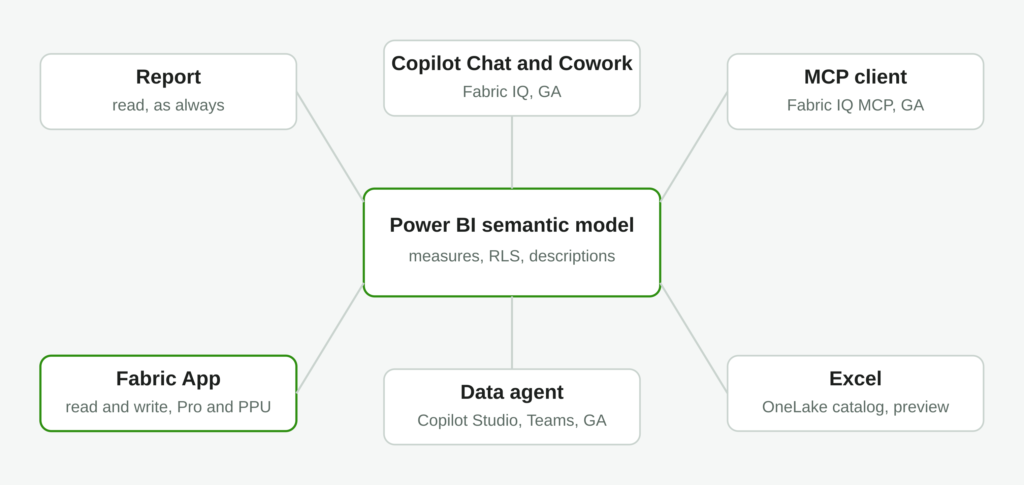
You start from a trusted semantic model, describe the app in natural language, preview it, edit it, and publish it to Fabric. These apps accept inputs, write data back, keep shared state and support operational workflows. Each app gets its own SQL database, authentication, and security from Fabric Apps.
But the biggest deal is the licensing part: apps in Power BI will be available in preview to Power BI Pro and Premium Per User customers, not only to Fabric capacity customers. Pro and PPU users also get Fabric Database capabilities, up to 1 GB per app, at no additional cost.
Let me say this plainly. For 10+ years, the semantic model was the end of the pipeline. You built it, you put a report on top, and the user read it. Now the model becomes the backbone of an operational app, and the people who can build that app are the 22 million-semantic-model installed base, on the license they already have.
Real-life example
Back to Meridian Bikes. Their dealer managers look at a sales report every Monday, spot a dealer with a falling return rate, and then open an email to ask the regional lead for a stock adjustment. Three tools with two days of lag. With apps in Power BI, the analyst who owns the sales model describes an app in one sentence: “a dealer review screen with return rate by model, a comment field, and an approve stock adjustment button.” The app writes the comment and the decision into its own Fabric database. No capacity purchase, no React developer, no Power Apps licence. The analyst stays in Power BI Desktop.
Two more things from the same announcement that are worth mentioning. Microsoft showed an early look at semantic views: governed business metrics defined where the data lives in OneLake, reusable across and beyond Fabric. And they committed to Apache Ossie, a vendor-neutral standard for exchanging semantic metadata, in collaboration with Snowflake, with the stated goal of getting DAX recognized as an Ossie query language. If you ever wondered whether Microsoft sees the semantic layer as the strategic asset, this is the answer.
What is still missing, and worth knowing before you promise anything to a customer: service-principal, app-owns-data embedding for Fabric Apps is not there yet. Internal apps are ready. ISV-style external embedding is not.
#3: Fabric IQ in Copilot: your model is now an AI surface
Fabric IQ in Microsoft Copilot Chat and Cowork is generally available. A business user asks a question in Copilot, Copilot infers which report or semantic model fits, and answers grounded in that governed model, without additional AI token costs. In Cowork, Power BI content participates in long-running, asynchronous tasks. The Fabric IQ MCP server is GA as well, so the same governed answer is available to any MCP client: Claude Code, VS Code, Codex, GitHub Copilot, or an agent you build yourself.
Alongside it, Fabric data agents in Copilot Studio are GA, which gives you the generally available route into Teams and Microsoft 365 Copilot. Ontologies get an agentic creation experience from semantic models, OneLake data and documents, and you can bring DAX measures into an ontology. Microsoft 365 Copilot inside Power BI is in preview, off by default, and needs an M365 Copilot licence.
Why this is a bigger deal than it sounds: the quality of every answer on every one of those surfaces is decided by the quality of the semantic model. Clear names, descriptions, certified measures, sensible security. If your model has a column called Amt_Net_2 and no description, Copilot will confidently answer the wrong question. I spend a full day on exactly this in my workshops, and after Barcelona, it is no longer a nice-to-have.
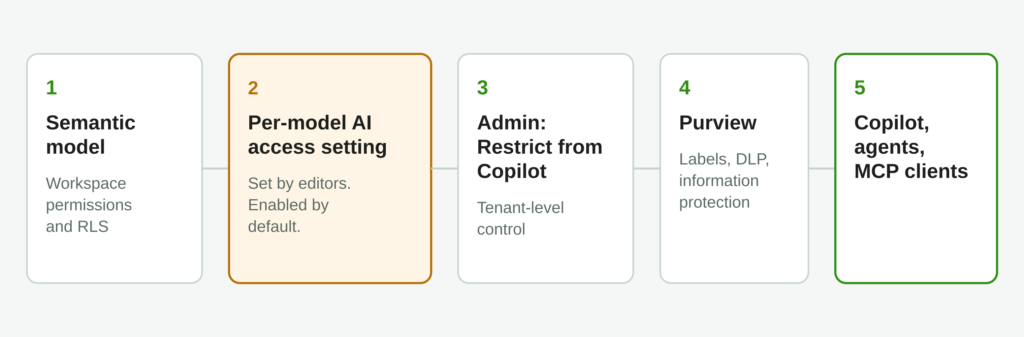
Warning #2. There is a per-semantic-model setting, managed by anyone with write permission, that decides whether read-only users can reach the model through Copilot, Cowork, data agents and the MCP servers. It is enabled by default. On top of it sits the admin-level “Restrict from Copilot” control.
Translation: every model a Microsoft 365 user can read is an AI surface today, unless someone turned it off. Most tenants will find this out the hard way. Decide this week which models you want to hold back.
#4: The engineering side: a data engineering agent and a real ADF path
Two announcements for the people who build pipelines rather than models.
The data engineering agent (preview) is built on the Osmos acquisition from January. It takes on long-running work: migrations, schema harmonization, ETL. You set the outcome and the guardrails – it plans, executes, and validates on Fabric Spark. You can steer it from GitHub Copilot, VS Code, Codex or Claude Code. If you’ve read my articles on agentic data engineering, this is the first Microsoft-native agent that does work instead of answering questions.
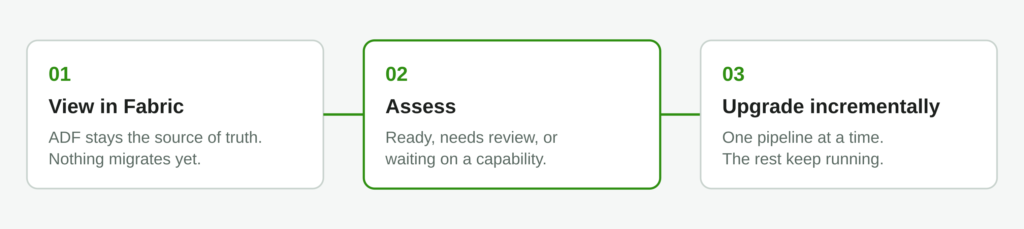
The ADF and Synapse upgrade path is now three steps. First, “View in Fabric” brings your existing Data Factory into a Fabric workspace while ADF stays the source of truth. Nothing migrates. Second, a built-in assessment marks each pipeline as ready, needs review, or depends on a planned capability, with a downloadable report and API support for large estates. Third, you upgrade supported pipelines one at a time while the rest keep running. SSIS packages can run inside Fabric pipelines too:)
Real-life example
Meridian has 140 ADF pipelines, half of them built by a contractor who left in 2022. Nobody wants to touch them. With the new path, the data lead connects the factory to a Fabric workspace, runs the assessment, and gets a report: 90 pipelines ready, 35 need review (mostly custom activities), 15 depend on a capability on the roadmap. That report is the migration plan. The data engineering agent then takes the 90 ready ones, under guardrails, while the humans look at the 35.
Everything else, in one paragraph
- Observability in Fabric (preview) with unified workspace monitoring into a shared Eventhouse and an operations agent that investigates pipeline failures
- Deployment plans (preview) as first-class workspace items with YAML as the source of truth, plus bulk item definition APIs GA
- Policies in Fabric (preview) for attribute-based governance
- Copy job with CDC, SCD Type 2 and audit columns GA
- GPU-accelerated warehouse queries in preview
- Database Hub in public preview across Azure SQL, PostgreSQL, Cosmos DB and SQL database in Fabric
- F4096 and F8192 SKUs GA
What to do this week
- Prepare your semantic models for Copilot. Names, descriptions, certified measures, RLS. Then decide which models to hold back, through the admin control and per model.
- Gather capacity metrics now. CU consumption by workload, today. When F0 and on-demand pricing arrive, you want the comparison to take an hour. Keep your reservations.
- Run the ADF and Synapse assessment. It touches nothing in production, and the output is a migration plan.
Thanks for reading!
Thanks to Claude for generating these nice-looking illustrations.
Last Updated on October 5, 2026 by Nikola