You spin up your first Eventhouse, ingest some IoT data, fire up a KQL query, and it runs fast. When I say fast, I mean embarrassingly fast. A few weeks later, you query data from a couple of months ago, and… it’s still fast, but maybe a tiny bit slower. A year later, the same query starts to feel sluggish. Two years later, you can’t find some of the data at all.
Welcome to the world of tiered storage in Real-Time Intelligence!
Most newcomers to Eventhouse know they’re using “a fast time-series database” and leave it at that. But underneath that simplicity, there are two different policies doing two completely different jobs. Unless you understand both, you’ll either be paying for storage you don’t need or losing data you wanted to keep.
Let’s break these two down.
The two-tier reality
There is one important thing probably nobody told you when you created your first KQL database: your data isn’t living in one place. It’s living in two.
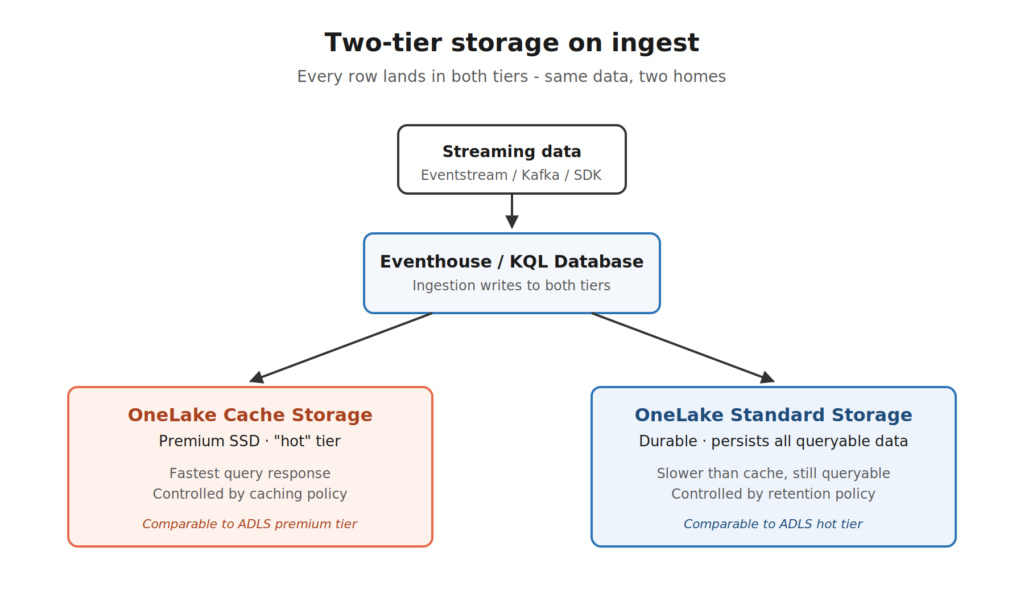
When you ingest a row into Eventhouse, that row gets written into two storage tiers behind the scenes:
- OneLake Cache Storage – premium SSD storage. This is where queries fly. Think of it as the data sitting on the desk, ready to grab.
- OneLake Standard Storage – durable storage that persists every queryable row. Think of it as the data filed away in the cabinet. It’s still accessible, just not as fast.
By default, when data lands in your KQL database, it’s treated as “hot” and lives on both tiers. So, basically, the same data in two homes. The hot copy makes your queries fast, whereas the standard copy makes sure nothing is ever lost.
Now, let’s bring up the question that newcomers don’t think to ask: if I never touch any settings, how long does data stay in either tier?
The default retention policy is 3.650 days (ten years). The default caching policy is also 3.650 days.
So out of the box, every row you ingest is sitting on a premium SSD for the next decade. And that’s where the money problem starts.
Policy #1: The caching policy – “how fast?”
The caching policy answers a single question: how long should data stay in the hot SSD cache?
That’s it. That’s the whole job.
If you set the caching policy to 30 days, that means rows from the last 30 days live on the premium SSD tier (alongside the standard copy), and rows older than 30 days only live in standard storage. Queries on the recent data stay blazing fast. Queries on older data still work, they just have to fetch from the slower tier.
The KQL syntax looks like this:
.alter table SensorReadings policy caching hot = 30d
Done! Anything older than 30 days drops off the hot cache.
Now, an important detail: the older data isn’t gone. It’s just not on the SSD anymore. The query engine can still pull it up, it just costs you a little extra read time and a “cache miss” against your Fabric capacity. Whenever a query has to reach into cold data, it triggers what Microsoft calls a read transaction, and that uses more compute than a hot query.
So far, so good. Caching policy = SSD residency = query speed.
But, wait a minute… If older data still lives in standard storage forever, what about that cost? You’re not paying for premium SSD anymore, but you’re still paying to store ten years of telemetry by default. And that brings us to the second policy.
Policy #2: The retention policy – “how long?”
The retention policy answers a different question: how long should data exist at all?
When the retention period expires, the row doesn’t just leave the cache, but it leaves the building completely. Soft-deleted, gone, no more queries against it. Done.
The KQL syntax:
.alter-merge table SensorReadings policy retention softdelete = 365d
Now your sensor readings are kept for one year, and that’s it. After 365 days, they’re soft-deleted, and (after the recoverability window, if any), the data is truly gone.
So, to put it in plain English:
- Caching policy controls which data is fast.
- Retention policy controls which data exists.
These two policies do completely different jobs and that’s where most of the confusion comes from. People configure one and assume the other follows. It doesn’t. You can have data with a 30-day caching policy and a 10-year retention policy, meaning queries on the recent month are lightning fast, but you can still query data from nine years ago (slower, from standard storage).
There’s exactly one rule connecting the two: the caching period must be less than or equal to the retention period. Which makes sense if you think about it for two seconds:) You can’t cache data that’s already been deleted. Beyond that constraint, the two policies don’t talk to each other.
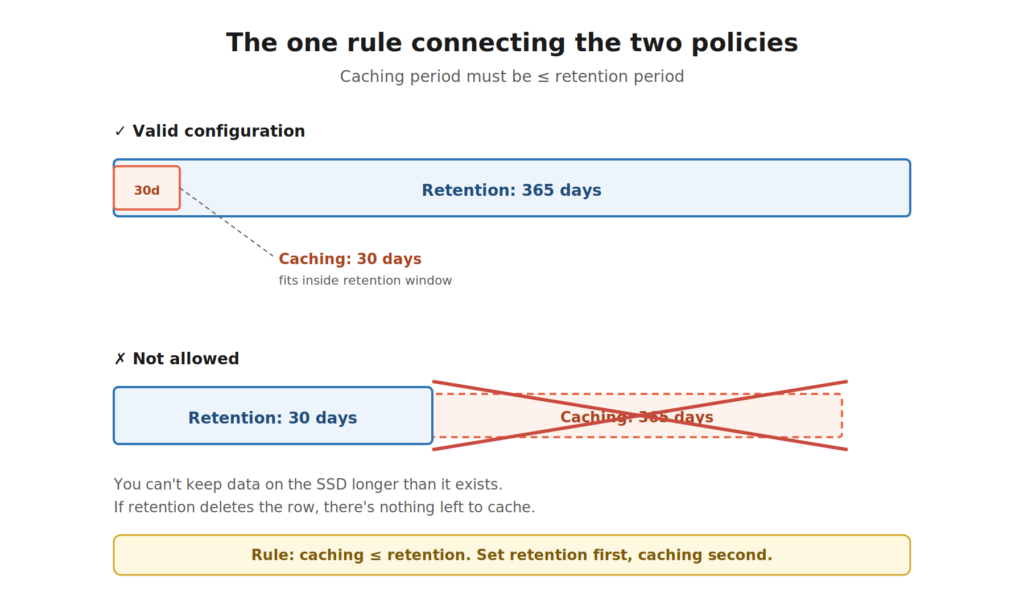
Can it be better than this? Let’s run a scenario.
Say you’re collecting telemetry from a fleet of delivery vehicles. Every truck pings GPS, speed, and engine status every 10 seconds. Tens of millions of rows per day.
You set:
- Caching policy: 7 days
- Retention policy: 365 days
Let’s see what happens to a single row of telemetry as time passes:
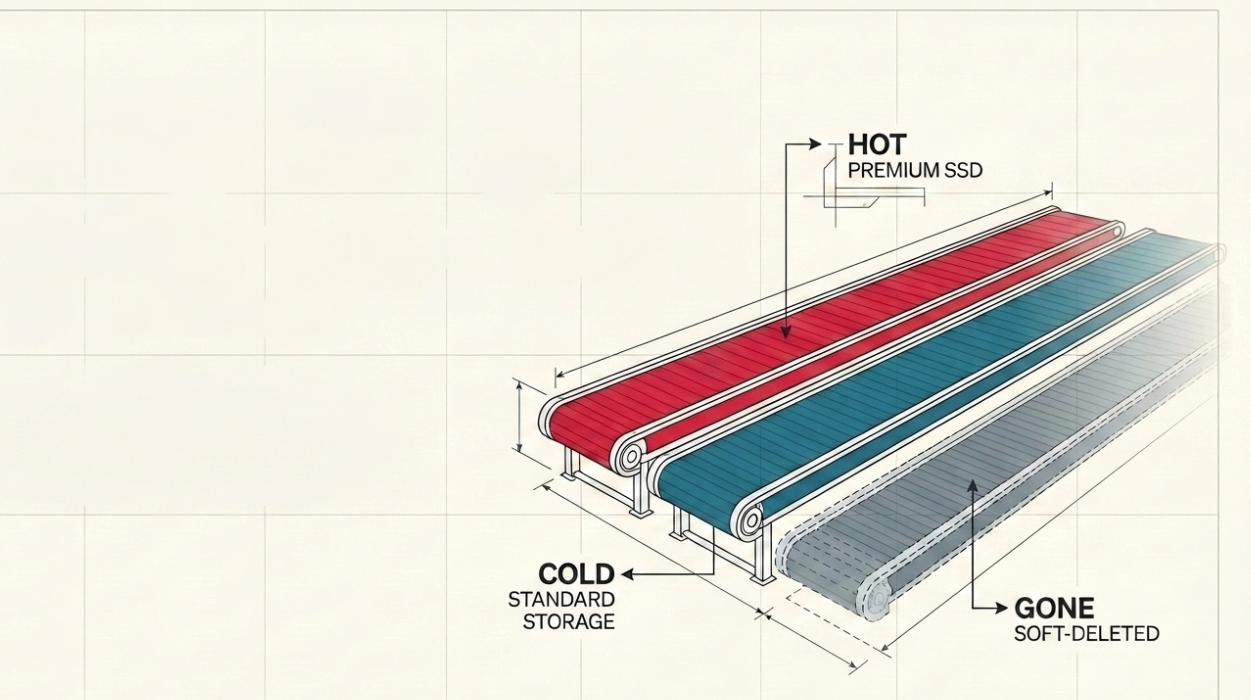
- Day 1 – Day 7: The row lives on premium SSD and in standard storage. Queries are instant. Real-time dashboards refresh in milliseconds.
- Day 8 – Day 365: The row drops off the SSD cache. It’s still in standard storage. You can query it – just a bit slower, and each query against this older data nibbles a little more compute from your capacity.
- Day 366 onward: The row is soft-deleted. Gone from cache, gone from standard storage, gone from queries.
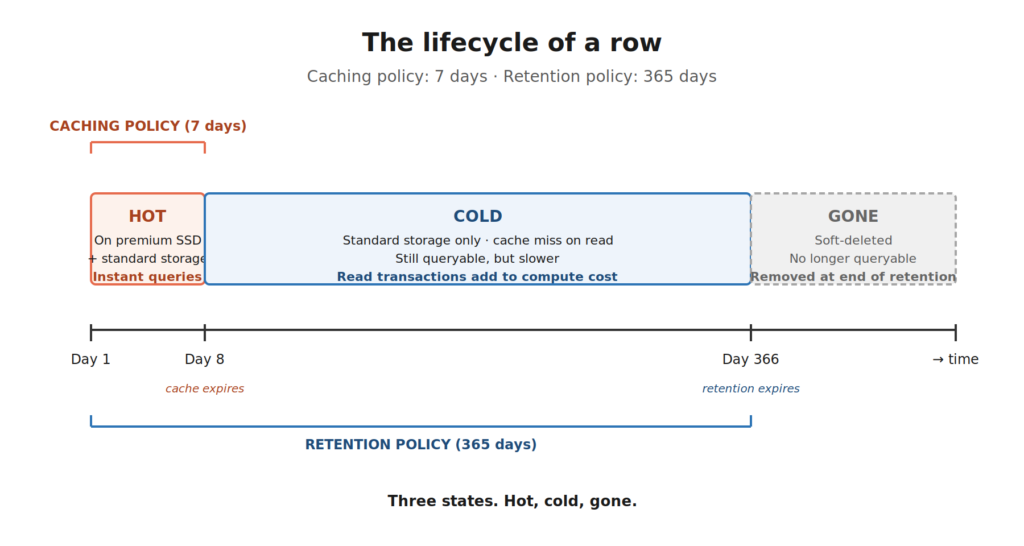
These are our three states from the title: Hot, cold, and gone…
This distinction matters for your bill. Storage in Eventhouse is billed separately from your Fabric capacity units, and both tiers show up against your OneLake Storage meters: cache storage as the premium tier, standard storage as the hot tier. The longer your caching window, the more premium storage you consume. The longer your retention window, the more standard storage you consume. Different lever, different meter, but both cost you.
There’s one important escape hatch, though. If you turn on the Capacity Planner (sometimes called Always-On) for your Eventhouse, the cache storage cost gets folded into your capacity charges instead of being billed separately. The trade-off is that your Eventhouse stays active 100% of the time, so you’re paying for compute uptime even when nothing is running. For workloads with steady, predictable querying, it’s often a win. For workloads that go quiet for hours, it isn’t.
So, caching policy affects either your capacity (with Always-On) or your cache storage bill (without it). Retention policy always affects your standard storage bill. Two policies, three places they show up on your invoice.
Can it get even better than THIS?! OneLake availability.
Now we are moving to a territory where it gets really interesting for newcomers, because this is the part that ties Eventhouse into the broader Fabric story.
Your KQL database is, by design, an engine optimized for blazing-fast time-series queries. But what if you want to query that same data from a Lakehouse notebook? Or from Power BI in Direct Lake mode? Or from the Warehouse?
That’s what OneLake availability does.
When you turn OneLake availability on for a table, Eventhouse maintains a Delta Parquet copy of the data in OneLake – the same format every other Fabric engine speaks natively. Now your real-time data is queryable from Spark, Power BI, T-SQL, and KQL, all from the same source of truth.
And, watch out for this elegant bit: the retention policy applies to the OneLake mirror too. When data is removed from your KQL database at the end of the retention period, it’s also removed from the OneLake mirror. One policy, one source of truth, automatically synchronized.
The caching policy, on the other hand, has nothing to do with OneLake availability. The Delta Parquet files in OneLake aren’t part of your hot cache. They’re a separate, format-shifted copy meant for cross-engine querying. Hot cache is for KQL queries against the SSD-resident, optimized format. OneLake availability is for everyone else.
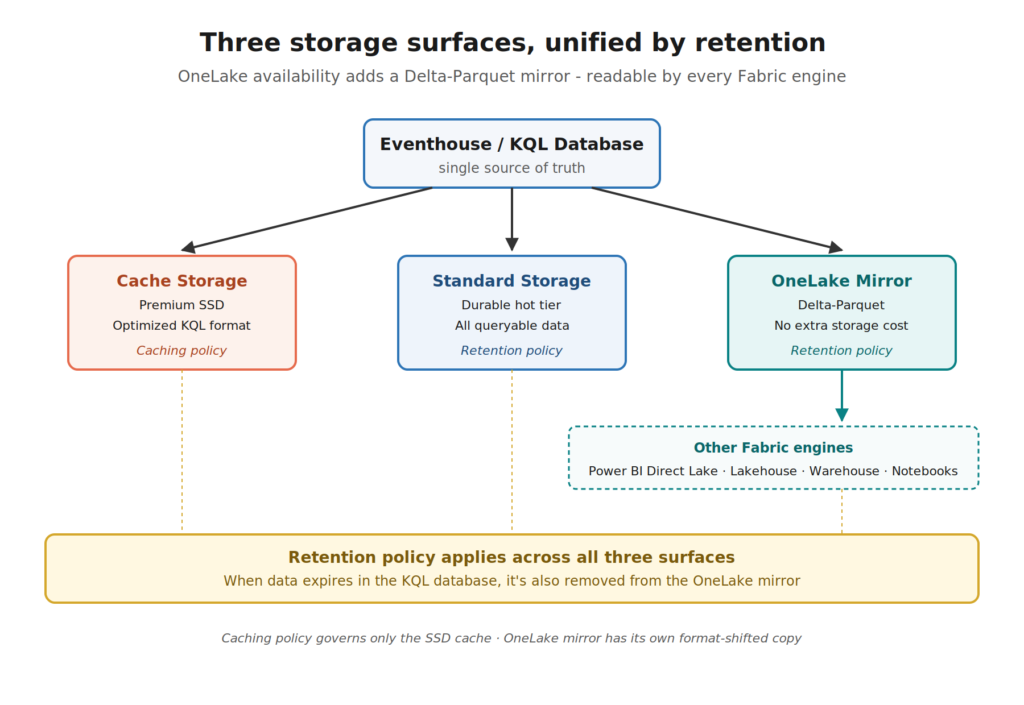
Two policies, three storage surfaces, all kept in sync.
So what should a newcomer actually do?
I hear you, I hear you: Nikola, this is a lot. What do I actually do on day one?
Here’s a starting point for a typical real-time analytics workload:
Set your caching policy based on your “active query window.” Look at your dashboards. Look at your alerts. What’s the typical time range your business actually queries? If 95% of your dashboards filter to the last 30 days, your caching policy should be 30 days. Anything longer is paying for premium storage you don’t actually use. (Remember the rule: the caching period can’t exceed your retention period. So, set retention first, caching second.)
Set your retention policy based on your business requirement. This is rarely a technical decision, but more a compliance, regulatory, or business-history decision. How long does the business need this data to be queryable at all? Set retention to that number, not “as long as possible.”
Don’t just leave the defaults. The 3.650-day default for both policies is generous and safe, but it’s also a way to quietly burn capacity and storage you don’t need. Once you’ve identified your real query window and your real retention requirement, dial both policies down accordingly. Your bill (and your capacity admin) will thank you.
Decide whether Always-On makes sense. If your queries are steady and predictable, the Capacity Planner / Always-On mode rolls cache storage into capacity charges and gives you 100% Eventhouse uptime. If your workload is bursty and goes quiet for long stretches, the default suspend-when-idle behavior is usually cheaper. Don’t flip this on by default and always measure first.
If you need cross-engine access, turn on OneLake availability. It maintains a Delta Parquet copy of your data in OneLake at no extra storage cost, retention is unified with the KQL database, and it opens up the rest of the Fabric ecosystem to your real-time data.
Wrapping up
Caching and retention sound similar. They both involve “keeping data around”, but they’re answering completely different questions, and they live on completely different storage tiers. One controls speed (and capacity pressure), whereas the other controls existence (and storage cost). Get them confused, and you’ll either overpay or lose data you actually needed.
The good news? Once the two-tier picture clicks, the rest of Eventhouse storage stops feeling like a black box. You start seeing your data move through three predictable states – hot, cold, and eventually gone – and you tune the policies to match the shape of how your business actually uses the data.
I’m curious to see where Microsoft takes the tiered storage model next. The fact that retention is already unified across the KQL database and the OneLake mirror is a strong signal that the boundaries between “real-time data” and “everything else in Fabric” will keep getting thinner. And that’s a good thing for everyone building on top.
Thanks for reading!
Thanks to Claude for creating these nice-looking illustrations in the article.
Last Updated on May 9, 2026 by Nikola