It’s the end of the year, and you can find all kinds of retrospectives everywhere. So, I thought: why not throw another one:)?
Microsoft Fabric just turned two a couple of weeks ago (at Ignite in November, to be more precise). As the product is still very much a “work in progress”, we have overseen literally hundreds of new features in the last 365 days. Obviously, not all of them are equally important – some were simply trying to fix the obvious issues in the existing workloads, or trying to catch up either with competitors or with some functionalities we had in the older Microsoft data platform solutions, whereas the others were targeting super niche use cases.
Therefore, in this article, I’ll try to distill what I consider the biggest announcements around Microsoft Fabric in 2025.
Before we jump into the Top 5, a few important disclaimers:
Disclaimer #1: The list is based on my personal opinion. Which means that the list may be strongly biased:)
Disclaimer #2: There are no Power BI features in the list. This is done intentionally. Although Power BI officially belongs to the Microsoft Fabric family, it’s a way more mature product that evolves at a whole different pace compared to the rest of the Fabric platform. I plan to publish my Power BI list as a separate one
Disclaimer #3: When picking my top 5, I was trying to evaluate not just the immediate impact and/or value that particular feature brings to Fabric workloads, but also to think about its potential impact in the future
With all that being said, here is the list. The top 5 are not sorted in any particular order of their importance. It’s simply “best from the rest” and I rate them equally within the list.
#1 OneLake Security
Since Fabric was announced as an “end-to-end analytics platform”, its security model was…Let’s say, cumbersome. From a security standpoint, Fabric looked like a “Frankenstein,” with each part of the platform having its own security model. That was certainly beating “the unification mantra” that Fabric was proclaiming since day one – because, how can we talk about unification if the security model is not unified?
We were crying for a proper security model and it was finally announced in 2025. Although still in public preview and with many limitations still in place, OneLake Security aims to overcome this fragmented security approach and, instead of pushing security rules to individual engines (Spark vs. SQL vs. KQL vs. Power BI), enforce them directly on the tables stored in OneLake.
The idea behind OneLake Security is fairly simple: security “lives” with the data, and no matter which Fabric engine is later used to process the data, security rules will be enforced for any downstream workload.
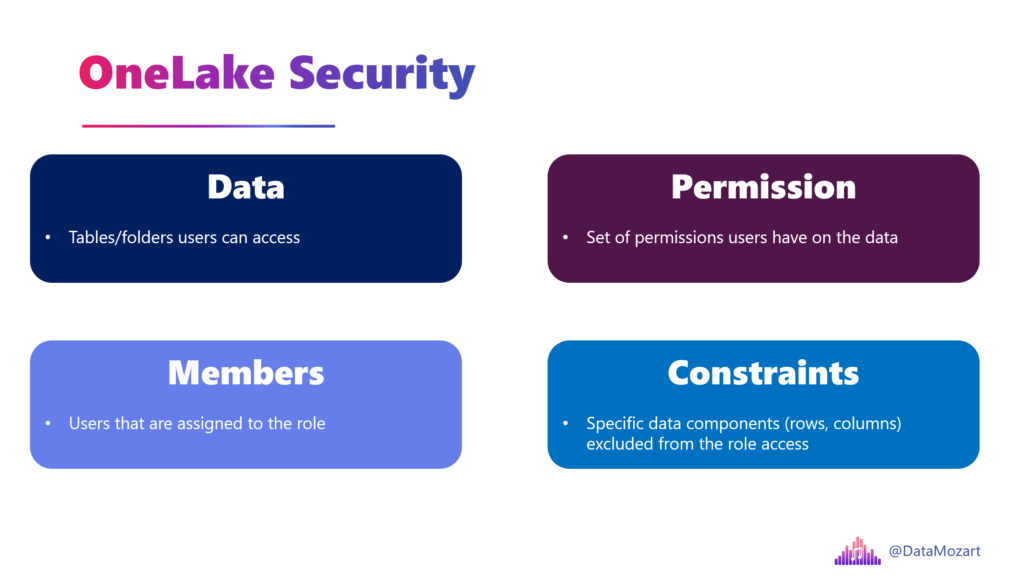
The year 2026 should be a real breakthrough for OneLake Security – it will probably go to GA, and we all sincerely hope that we will finally get a robust and unified security model across the entire Fabric platform.
You can find more details about the OneLake security access control model here.
#2 Fabric IQ
Out of nowhere, at Microsoft Ignite, we got another workload in Fabric! Fabric IQ was introduced as Microsoft’s attempt to enter the new semantic data layer arena, where traditional semantic layers are enhanced to support numerous AI workloads and machine reasoning over data stored across the organization. There are four items in the IQ workload:
- Ontology
- Graph
- Data agent
- Operations agent
- Power BI semantic model
The key component of Fabric IQ is called Ontology. This is not a new term – it has existed for centuries in philosophy. But, let’s not talk about philosophy – this is a technical blog, right:)?
Palantir, a company that is considered a pioneer in this area, defines an ontology like this: “An ontology refers to the systematic mapping of data to meaningful semantic concepts.”
I like to think about Ontology as a conceptual model for the data. I already wrote about the conceptual model and what it represents.
Onotologies and IQ definitely deserve a separate article, so I won’t go into details here. Here is just a simple illustration of why ontology is important, especially for AI agents’ rapidly growing involvement:
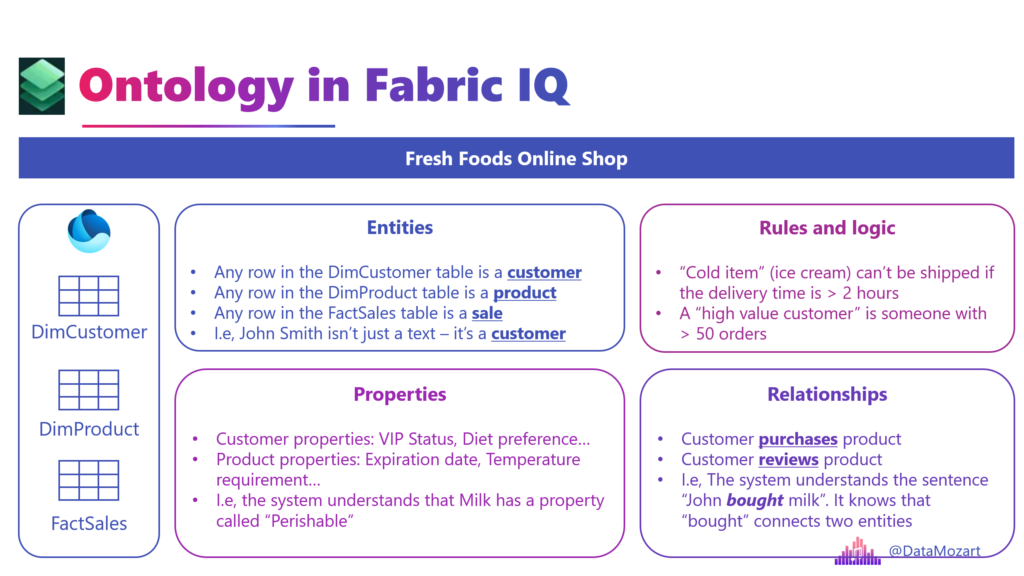
In the simplest words: The Ontology turns “Column A equals value X” into “The Customer bought an expired Product”.
I’m quite confident that IQ will become the “1st class” Fabric citizen in 2026, so we should all look closely at the development of this new workload.
Learn more about Fabric IQ here.
#3 Spark Autoscale Billing
I hate this name! If there were a prize for the most misleading feature name in Fabric, Spark Autoscale Billing would be on the podium for sure. But, name aside, I really like this feature.
In a nutshell, Spark Autoscale Billing enables a pay-as-you-go model for Spark workloads in Fabric. Yes, I know, it doesn’t sound exciting, but let me explain why this feature found its place in my top 5 list…First, let’s quickly illustrate how Spark Autoscale Billing (I hate this name, have I already told you that?!) works.
Imagine you have a couple of Spark jobs that are “killing” your Fabric capacity. They consume a lot of resources, so other operations might be jeopardized. Turn on Autoscale Billing, and these Spark jobs will be executed using serverless compute resources that are provisioned outside of your “regular” capacity, and you will pay the bill for these compute resources separately. So, your Fabric capacity resources are not consumed by these jobs, but you’ll be charged extra for this additional compute.
Now, you are probably wondering: ok, this is nice, but why is this such a big deal? Well, today it’s Spark jobs only, but who knows if in the future we will get a possibility to run other Fabric workloads using a classic serverless, pay-as-you-go model. Wouldn’t it be great if we were capable of setting any workload that consumes a lot of CUs to run in a serverless mode? When this feature was announced at FabCon in Las Vegas, I shared my thoughts that it might be a first step in “outsourcing” heavy workloads from Fabric capacity, in order to protect regular capacity workloads.
More information about Autoscale Billing for Spark can be found here.
#4 Data Agents
Copilot is cool, but the (AI) party is somewhere else:) Yes, looking at demos, Copilot might seem like your perfect AI companion to assist you in developing various solutions in Microsoft Fabric. And, don’t get me wrong, it’s ok-ish for basic tasks, but it struggles as soon as you stretch it over the predefined limits.
And, that’s where the Data agent comes into play. With the Data agent, you are in charge, and you can build your own conversational Q&A systems. While Copilot relies on its self-generated context, Data agents can be configured by providing additional, personalized context. This is done by providing both instructions to agents, as well as example queries to empower the Data agent to respond in a more deterministic way to common user queries.
Last but not least, unlike Fabric copilots, whose scope is limited to Fabric, data agents are standalone items, which can be integrated with external systems like Copilot Studio, AI Foundry, IQ, Teams, and many more.
Learn more about Data agents here.
#5 Workspace Identity
One of the coolest new bits in Microsoft Fabric is Workspace Identity – basically a managed identity that’s automatically created and tied to a Fabric workspace. Think of it as a friendly service principal that Fabric manages for you so you don’t have to mess with credentials, secret keys, or certificates. Once you enable it in your workspace settings, this identity can authenticate against resources that support Microsoft Entra (Azure AD) without you writing a single password into your pipelines or configs. It’s a huge win for security and reduces operational headaches, especially when you’re working with firewall-restricted storage like Azure Data Lake Gen2 through trusted workspace access.
Behind the scenes, Fabric creates a matching app registration and service principal in Microsoft Entra ID for each workspace identity, and it automatically handles credential rotation and lifecycle management. Since it’s managed by Fabric, you don’t have to babysit secrets or worry about leaks, although you do still need to assign the right permissions to the identity for the resources you want to access. Only workspace admins can create and configure these identities, and if you delete the workspace or the identity itself, anything depending on it will break and can’t be restored – so handle it carefully!
Workspace Identity also plays nicely with trusted workspace access: services like OneLake shortcuts, pipelines, semantic models, and Dataflows Gen2 can use it to “talk” to secured data sources without storing credentials. That makes building secure, credential-free data pipelines much easier and keeps your environment tighter and less error-prone.
You can read more about Workspace identity here.
More cool features that didn’t make it into Top 5, but are still too good not to be mentioned…
As I mentioned, there were many other fantastic features added or improved, such as:
- Identity columns for Warehouse
- Clustering for Warehouse
- Shortcuts to OneDrive/SharePoint
- Shortcuts with transformations
- Materialized Lake Views (another one with the misleading name!)
- Adaptive target file size in Spark
- Optimized compaction for Spark workloads
- Workspace-level private links
- Mirroring for SQL Server
- Fabric CLI
But they didn’t make it in my top 5 list, even though I might end up using some of them more frequently than the top 5 features. Again, for the top 5, I also considered the number of use cases and their potential impact on the future Fabric workloads and the general platform direction.
So, my dear Fabricators, that was all for this year…I’m super excited to follow how Fabric will develop in 2026 and see which features will make it to the top 5 next year.
Thanks for reading!
What were your top 5 Fabric features in 2025? Let me know in the comments.
Last Updated on December 24, 2025 by Nikola