
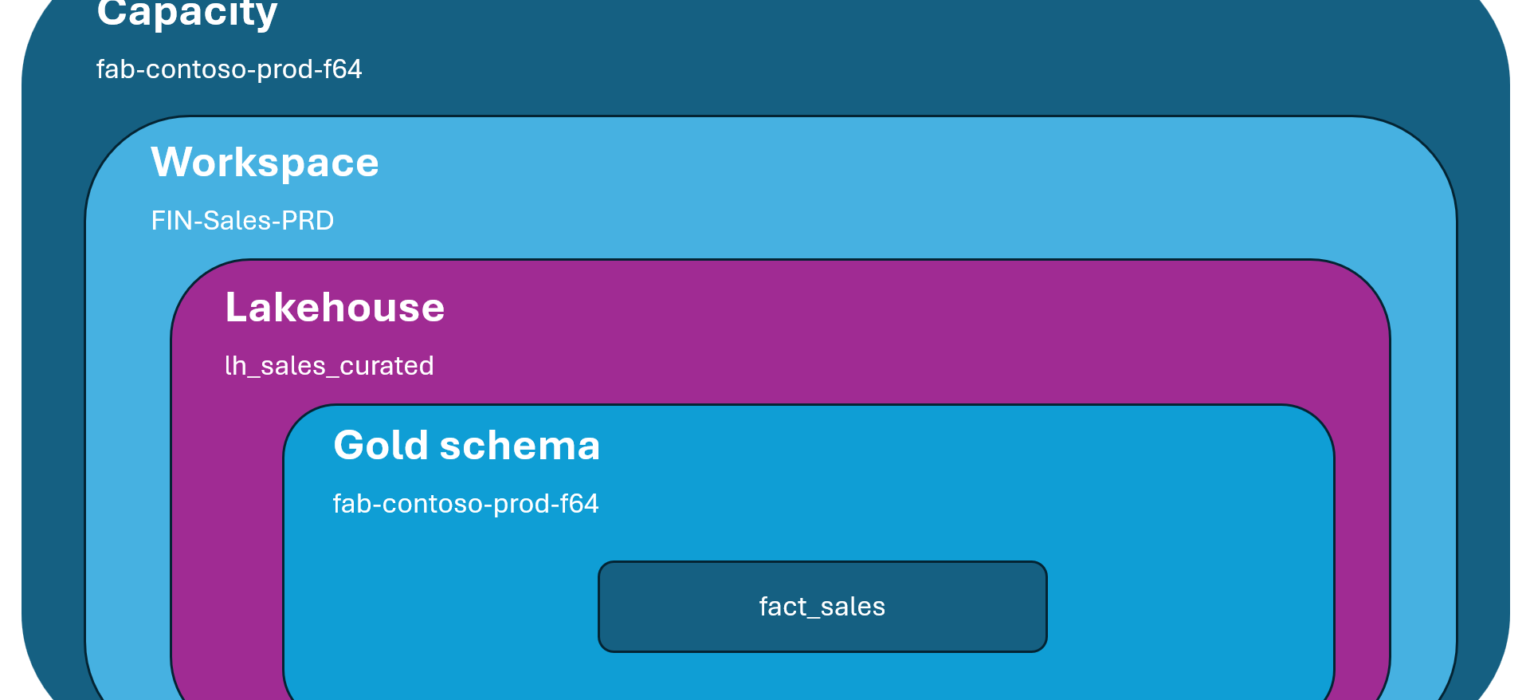
My dear Microsoft Fabric friends – if you’ve ever opened a workspace and seen “Lakehouse”, “Lakehouse 1”, “lh_test_v2”, and “NewLakehouse_DELETE_ME” all sitting next to each other, this post is for you 😀
Three weeks into a fresh Fabric tenant, things look great. Twelve weeks in, you’re staring at 47 workspaces, three of them called something like “Test – DO NOT USE”, and nobody on the team can remember which Lakehouse holds the actual production sales data.
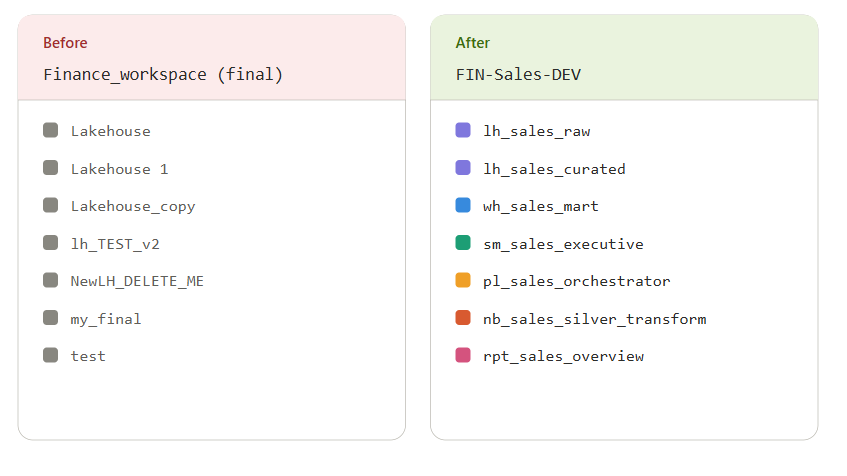
There’s a famous quote from Phil Karlton: “There are only two hard things in computer science: cache invalidation and naming things.” In Microsoft Fabric, naming things isn’t just hard – it’s one of those tasks that can easily make your life much harder. A bad name doesn’t sit quietly in one place. It shows up in the workspace browser, the OneLake catalog, the Git repository, the deployment pipeline, the capacity metrics app, the lineage view, and inside every single SQL query that touches that item.
Rename it later? Sure, but you’d better be ready to update the references.
So, let’s talk about a naming framework that survives more than a quarter.
Why does naming matter so much MORE in Fabric?
Naming conventions aren’t a new conversation in the data world. We’ve been having it for years across data warehouses, ETL tools, and BI platforms. So what’s different about Microsoft Fabric?
A few things, actually.
First, Fabric is a unified platform. The same item can be referenced from a notebook, from a SQL endpoint, from a semantic model, from a pipeline, from a Power BI report, and from your Git repository. One name, ten consumers. If the name is “Lakehouse_test”, every one of those consumers inherits the confusion.
Second, while workspace folders are a nice addition (more on those in a minute), they’re organizational only, because they don’t carry permissions, and Git integration still has gaps around them. You can use folders to tame the visual chaos in a workspace, but you can’t lean on them to encode meaning the way you would on a file system. The names of the items inside still have to do that work.
Third, Fabric items have dependencies that aren’t always visible until you break them. Rename a Lakehouse, and the notebook that mounted it via the workspace artifact path may break. Rename a semantic model, and your deployment pipeline rules might suddenly point at nothing.
So good names aren’t a nice-to-have. They’re probably the cheapest insurance policy you’ll ever buy.
Four principles before any patterns
Before we get into the actual patterns for capacities, workspaces, and items, let’s lock in the four principles that the rest of the framework hangs on. These are opinions, but they’re opinions formed by watching different teams struggling with the naming standards.
Principle 1: Pattern beats personal taste. A team where everyone follows a slightly suboptimal naming convention will outperform a team where everyone follows their own perfect one. Pick the pattern, document it, enforce it. The exact characters matter less than the consistency.
Principle 2: Read left to right, most general to most specific. A name like FIN-Sales-Bronze-Orders tells you the domain (Finance), the project (Sales), the layer (Bronze), and the entity (Orders), in decreasing order of how broadly each part applies. The opposite (Orders-Bronze-Sales-FIN) holds the same information, but it sorts terribly and reads weird.
Principle 3: Optimize for sorting, not for English. You will spend more time scanning alphabetical lists in the workspace browser than you will reading names out loud. That means prefixes carry weight. lh_Sales and lh_customers will cluster together, whereas Sales_lh and Customers_lh will scatter across the alphabet.
Principle 4: Names should describe purpose, not implementation. A pipeline called pl_LoadOrdersFromADLS_v2 ages badly the moment you stop loading from ADLS. A pipeline called pl_sales_bronze_orders_ingest describes what it does and survives any change in the source system.
Got those four? Good. Now we can build.
Tenant-level: capacities and domains
Let’s start at the top. Tenant-level naming is the easiest part to get right, because there are usually only a handful of these objects. It’s also the easiest part to get wrong forever, because nobody wants to migrate a capacity once it’s live.
Capacities
A Fabric capacity is a billing and compute boundary. The name should answer three questions at a glance:
- Who owns it? (Organization, business unit, or shared platform team)
- What’s it for? (Production workloads, development sandbox, specific project)
- (Optionally) What size? (F-SKU – though you can read this elsewhere, having it in the name helps with cost reviews)
A pattern that works well:
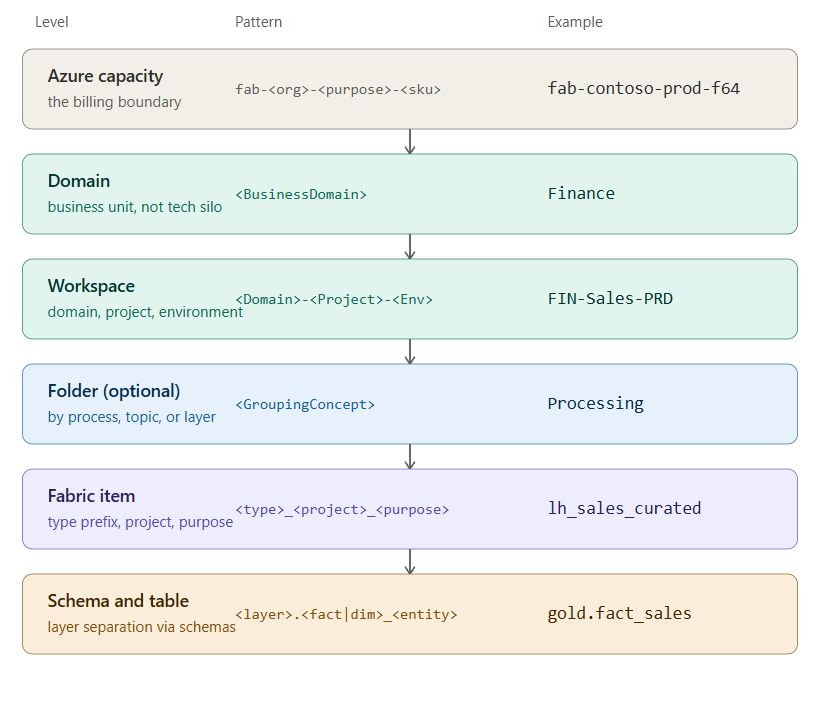
fab-<org>-<purpose>-<sku>
Here are a few examples:
- fab-contoso-prod-f64 – main production capacity
- fab-contoso-dev-f8 – shared development capacity
- fab-contoso-finance-f32 – dedicated capacity for the Finance domain
Why fab- and not cap-? Because a Fabric capacity isn’t really a Fabric thing. It’s an Azure resource that happens to power Fabric. It shows up in your Azure subscription alongside virtual machines, storage accounts, Key Vaults, and everything else your cloud team manages. When they scan a resource group, you want them to instantly know “that’s a Fabric capacity” without having to click in. The fab- prefix does that job. It’s consistent with Microsoft’s own Azure resource abbreviation conventions, and it keeps your Fabric footprint visible across the whole subscription.
Word of warning: Be very mindful when picking the name of the Fabric capacity. Once it’s set, you can’t change it in the Fabric Admin portal, as documented here!
Domains
Domains are Fabric’s mechanism for organizing workspaces by business meaning rather than technical structure. They map (ideally) to your data mesh subjects, or your major business units, or whatever organizational structure makes sense for distributing governance.
The single most important thing about domain naming is this: business-aligned, not technology-aligned.
Wrong: Lakehouses, PowerBI, Pipelines. These are technology silos. They tell you nothing about what’s inside. Right: Finance, Marketing, Supply Chain. These are business domains. Anyone in the company knows what they mean.
Microsoft has solid guidance on domain design in the official Fabric docs, and it’s worth reading before you create your first one. The short version: think about how your organization is shaped (functional, divisional, geographic, customer-segmented) and let that shape the domain hierarchy.
A naming pattern that works:
<BusinessDomain>
<BusinessDomain> – <Subdomain>
Here are a few examples:
- Finance
- Finance – Treasury
- Marketing – Campaigns
Keep names readable. Domains show up in big text in the OneLake catalog. They are not the place to use abbreviations.
Workspaces – Where governance actually lives
Capacities and domains are the scaffolding. Workspaces are the floors, and almost everything you do day-to-day happens inside one. So this is the layer where naming pays off the most, and where teams argue the most.
A workspace in Fabric is simultaneously:
- A unit of access control
- A unit of deployment (via deployment pipelines or Fabric CLI)
- A unit of Git integration (one workspace, one branch)
- A container for items
That’s a lot of jobs for one boundary, and your naming convention needs to acknowledge all of them.
Here are the patterns I keep coming back to (depending on the specific project requirements):
<Domain>-<Project>-<Environment>
<Domain>-<Environment>-<Type>
And, as usual, a couple of examples:
- FIN-Sales-DEV
- FIN-Sales-TST
- FIN-Sales-PRD
- MKT-CampaignAnalytics-DEV
- FIN-DEV-Engineering
- MKT-PRD-Analytics
Three quick notes on this pattern.
Why three letters for the environment? Because DEV, TST, PRD (or UAT, STG, etc.) sort consistently and read at a glance. Development works too, but it eats characters and your workspace switcher gets crowded.
Why prefix the domain? Because alphabetical sorting will cluster everything in the same domain together when you open the workspace switcher. You’ll thank yourself later.
What about feature workspaces? When developers branch off to work on a feature in isolation, you need a fourth element. I use:
<Domain>-<Project>-FT-<initials or ticket>
Like FIN-Sales-FT-ni-1234. The FT (feature) makes it instantly clear this is a short-lived branch workspace, not part of the main promotion path.
A note on Git branches
Workspaces and Git branches are basically married in Fabric. So your branch naming should mirror your workspace naming. My fellow MVP, Kevin Chant, has a great post on naming conventions for Microsoft Fabric Git integration that aligns nicely with the GitHub flow strategy. I’d recommend reading it alongside this one if you’re setting up CI/CD from scratch.
The short version: keep main mapped to your DEV workspace, and let deployment pipelines (or fabric-cicd) handle promotion from there.
Folders inside workspaces – Organize, but don’t lean too hard
Now, before we drop into individual items, let’s deal with the layer that sits between them and the workspace – folders. Folders inside a workspace went generally available back in December 2024, and they changed the conversation a lot. You now get up to ten levels of nesting and a real way to group things visually inside a busy workspace.
So, problem solved? Well, not quite:)
Folders in Fabric are organizational only. They are not a permission boundary. If you have access to a workspace, you have the same access to every folder inside it. There’s no way to share Folder A with one team and hide Folder B from them. Workspaces are still the only permission boundary you have.
There’s also a CI/CD catch worth knowing about: Git integration doesn’t fully respect folder structure yet. If you’re committing items to source control through Fabric Git, the folder hierarchy you carefully built in the workspace UI may not survive the round trip cleanly. Worth checking the current state of support before you commit to a folder-heavy organization scheme.
So, how should you actually use folders? There are a few pieces I’d recommend reading alongside this one. My fellow MVPs, Jon Vöge wrote a really thoughtful piece on workspace folder strategies, as well as Marc Lelijveld in his naming conventions, and Johnny Winter published a follow-up naming piece that specifically tackles how folders (plus coloured icons and task flows) interact with a naming convention. Between them, you get most of the current thinking on this.
My take, for what it’s worth:
- By item type (
Lakehouses,Notebooks,Pipelines,Reports) – works in smaller workspaces, gets noisy in large ones, and effectively duplicates information that yourlh_,nb_,pl_prefixes already encode. - By medallion layer (
Bronze,Silver,Gold) – clean if your workspace is dedicated to one project and your code items naturally split along layer lines. Less useful if you have multiple projects sharing the workspace. - By topic or solution (
Sales,Inventory,Customer360) – my favorite for larger, source-aligned workspaces. The folder name carries the business context, and the items inside can stay focused on their purpose. - By process (
Ingestion,Processing,Presentation) – Johnny Winter’s preferred pattern, and a good one for smaller, single-project workspaces. It lines up nicely with how you’d read the solution top-to-bottom: raw data lands in one folder, gets transformed in the next, gets served out of the third. - By environment (
DEV,TST,PRD) – I’d avoid this. Mixing environments inside one workspace breaks the deployment pipeline model and conflates artifacts that should never live together.
Naming-wise, folders should follow the same conventions as everything else: business-meaningful, readable, no spaces if you can avoid them. PascalCase or hyphenated lowercase both work fine. Don’t put a fld_ prefix on them, because the UI already tells you they’re folders:)
And one more piece of advice from Johnny that I’ll second: don’t go more than one or two levels deep. Yes, the platform technically lets you nest ten levels. No, you should not. Folder sprawl is a real thing, and your navigation experience degrades fast.
One last thing: folders don’t replace good item names. They reduce the visual noise, but the moment somebody opens an item in Power BI Desktop, in a notebook reference, or in a SQL query, the folder is gone and only the item name remains. So treat folders as the cherry on top, not the cake.
Data items: where the running example begins
Ok, now we drop one level deeper. Let’s pretend you and I are setting up a new Fabric environment for Contoso Retail, a fictional company that needs to analyze sales across stores. From here on, that’s our running example.
Inside the workspace RTL-Sales-DEV, what items do we need? Probably a Lakehouse for raw and cleaned data, possibly a Warehouse for curated business marts, and a semantic model on top.
A pattern for data items:
<itemtype>_<project>_<purpose>
For the Contoso Retail Sales project:
lh_sales_raw– Lakehouse for raw, source-aligned datalh_sales_curated– Lakehouse for cleaned, conformed datawh_sales_mart– Warehouse for business-facing martssm_sales_executive– semantic model for executive dashboardssm_sales_operational– semantic model for operational reports
A few things going on here. The lowercase prefix (lh_, wh_, sm_) makes the item type sortable and instantly recognizable. The middle segment locks the item to the project, which matters when you have shared workspaces (less common, but it happens). And the suffix describes the purpose without committing to implementation details.
What about reports? I keep reports in their own naming bucket, separate from semantic models, because the relationship between reports and models is many-to-one and I want that distinction visible:
rpt_sales_executive_overviewrpt_sales_store_performance
A small but important rule: never use the same name for a Lakehouse and the semantic model that sits on top of it. Fabric will technically allow it, and you will technically regret it the first time you debug a Power BI refresh issue.
Lakehouse internals: the layer that pays for itself
Here’s where the naming framework actually starts saving you time on a daily basis. Once you open a Lakehouse, you’re looking at schemas and tables. And SQL queries. And notebook references. And Direct Lake semantic models reading from those tables.
Every single one of those consumers inherits whatever naming choices you made.
So, what’s the strategy here?
Use schemas to separate medallion layers. Schemas in Lakehouses give you a clean way to express the bronze/silver/gold separation without polluting every table name with a layer prefix. Inside lh_sales_raw and lh_sales_curated, you organize like this:
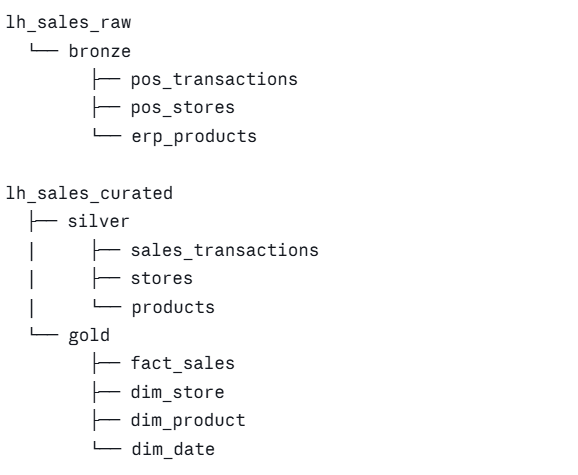
Let’s break down what’s happening here?
In bronze, tables are named after their source system and the entity as it exists in that source. pos_transactions immediately tells me this came from the point-of-sale system. No transformations, no business renaming. If the source system calls a column ORDR_DT_KEY, that’s what bronze gets. Bronze is a faithful mirror.
In silver, tables are conformed and cleaned. Source system prefixes drop away, because we’ve now harmonized across sources. sales_transactions is the canonical sales transaction, regardless of which system contributed to it.
In gold, tables follow dimensional modeling conventions: fact_ for facts, dim_ for dimensions. This is what semantic models read from. This is what business users will (indirectly) see in their reports.
If your Lakehouse doesn’t have schemas yet, or if you have to support older items that don’t, you can fall back to layer prefixes inside the table name itself: bronze_pos_transactions, silver_sales_transactions, gold_fact_sales. It’s not as clean, but it works.
Why does this matter so much? Because every SQL query you write will look like this:
SELECT * FROM lh_sales_curated.gold.fact_sales
Read that out loud. “From the curated sales Lakehouse, in the gold layer, give me the sales fact table.” That sentence is your data model. The naming convention earned its keep before you wrote a single transformation.
Code items – Notebooks, pipelines, dataflows, and environments
We’re not done yet. The data items are the destinations. The code items are how the data actually gets there, and they multiply faster than anything else in your workspace.
A pattern that mirrors the data items:
<itemtype>_<project>_<layer>_<purpose>
For the Contoso Retail Sales project:
pl_sales_orchestrator– master pipeline that orchestrates the daily runpl_sales_bronze_pos_ingest– ingests POS data into bronzepl_sales_bronze_erp_ingest– ingests ERP data into bronzenb_sales_silver_transform– notebook that handles bronze-to-silver transformationnb_sales_gold_build– notebook that builds gold layer dimensional tablesdf_sales_silver_customer_enrich– Dataflow Gen2 that enriches customer dataenv_sales_pyspark– the Spark environment used by the sales notebooks
Notice that the layer (bronze, silver, gold) appears in code items too. That’s intentional. When you’re scanning a workspace with 30 items, the layer tag tells you instantly where in the pipeline the item lives.
Spark environments deserve a quick word. Don’t share environments across unrelated projects. The whole point of a Spark environment is to pin libraries and runtime versions for a specific workload. A name like env_sales_pyspark scopes it correctly. A name like env_default is asking for trouble the first time someone in the Marketing project upgrades a library.
A few non-negotiables
Some rules don’t need a long argument. Just follow them.
- No spaces in names. Spaces become
%20in URLs, get ugly in Git, and make your shell commands miserable. Use hyphens or underscores, pick one of those and commit. - Lowercase or PascalCase, pick one. Both work.
lh_sales_rawandLhSalesRaware both readable.LH_Sales_raw_v2is not. - No version suffixes. No
v2, nofinal, noFINAL_REAL. That’s what Git is for. - No personal names in shared items. “nikola_test_lakehouse” is fine for five minutes. After that, somebody else needs to find it, and your name tells them nothing about the contents.
- Avoid abbreviations that aren’t already standard in your org.
FINfor Finance is fine.LHfor Lakehouse is fine.ABCDEfor “Annual Budget Compilation Data Engine” is not fine.
And one more, which doesn’t quite fit in a bullet: document the convention somewhere your team will actually read it. A naming framework that lives only in your head is a framework that will quietly fork into ten variants the first time you take a vacation.
Wrap-up
A reasonable question at this point: with coloured item icons, workspace folders, and task flows all helping us organize things visually, do we even need a naming convention anymore? Johnny Winter asked himself the same thing and came to the same answer I do – yes, we still do. Visual organization helps you find things inside one workspace on one screen. A naming convention helps you find things across workspaces, across tools, across queries, and across people who weren’t in the room when the item was created. Those are different problems, and the second one is bigger.
A naming framework is the cheapest piece of architecture you’ll ever set up, and the most expensive one to retrofit. Get it in place before your tenant fills up, get the team to agree on it, and then trust the convention to do its work.
Two things to remember:
- Pattern beats taste. Even a slightly imperfect convention, consistently applied, is worth more than a perfect convention that nobody follows.
- Apply this pragmatically, not dogmatically – that’s Johnny’s phrasing, and it’s the right phrasing. Everything in this post is a starting point for a conversation with your team, not a commandment.
I’m curious to see whether Microsoft eventually ships configurable naming templates at the workspace or capacity level. There’s a community idea for exactly that, and it would close one of the last gaps in Fabric governance. Until then, the framework is on us.
Thanks for reading!
Last Updated on April 20, 2026 by Nikola



Tomek
Thank you so much for this wonderful summary of such extremely important aspects of Fabric development. However, there’s one question I still can’t quite answer: if I have multiple projects (for Finance, Sales, Marketing, etc.) that require data from the same ERP and CRM systems, I’d like to avoid having to import this data from scratch in all these workspaces every time or having to juggle shortcuts (Finance might need additional data beyond what’s already been imported from the ERP). Wouldn’t it be better to create separate workspaces for the systems needed by almost everyone, or even—for smaller organizations—to create a shared “core data” workspace and then make the gold layer available to the others? One potential argument against this is that there might not be a clear owner for such a workspace, but perhaps I’m overlooking something or simply overcomplicating things.