You’ve probably spent the last year hearing about Lakehouses and Warehouses until your ears are ringing. But today, we’re talking about another house in Microsoft Fabric – the Eventhouse.
I’ve recently had a chance to work with a large client on the Real-Time Intelligence project implementation, and was amazed by the power of Eventhouse!
If a Lakehouse is a massive library and a Warehouse is a high-end bank vault, the Eventhouse is a 24-hour Air Traffic Control Tower. In technical terms, an Eventhouse is a logical container tailored for streaming data. It’s built on the Kusto (KQL) engine. While the rest of Fabric is busy thinking about ‘data at rest’ (data that’s sitting in a file waiting to be read), the Eventhouse is obsessed with ‘data in motion’. It’s where your logs, your IoT sensor data, and your real-time clicks live. It doesn’t just store data – it catches it mid-air.
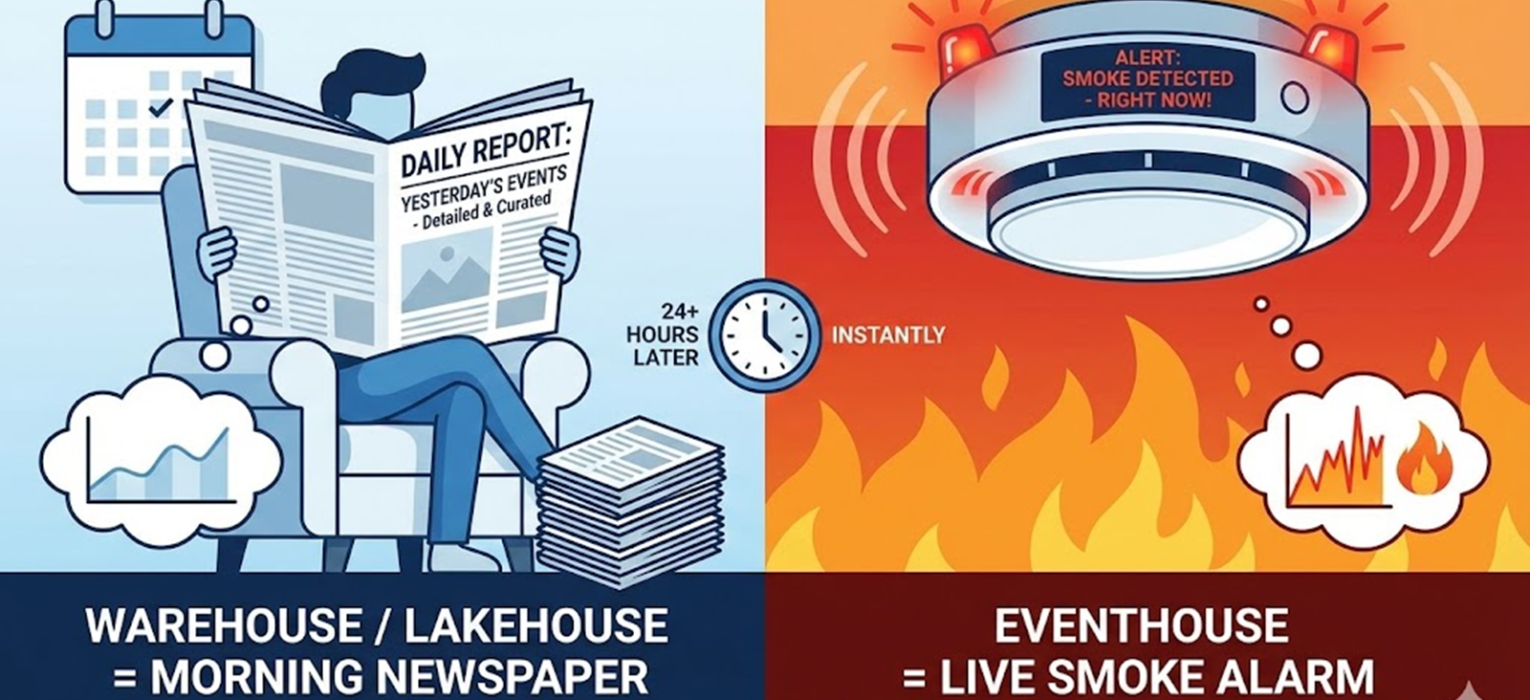
“The newspaper” analogy
You might be thinking, ‘Can’t I just put my sensor data in a Lakehouse?’ Well, sure you can. But there’s a massive catch: latency.
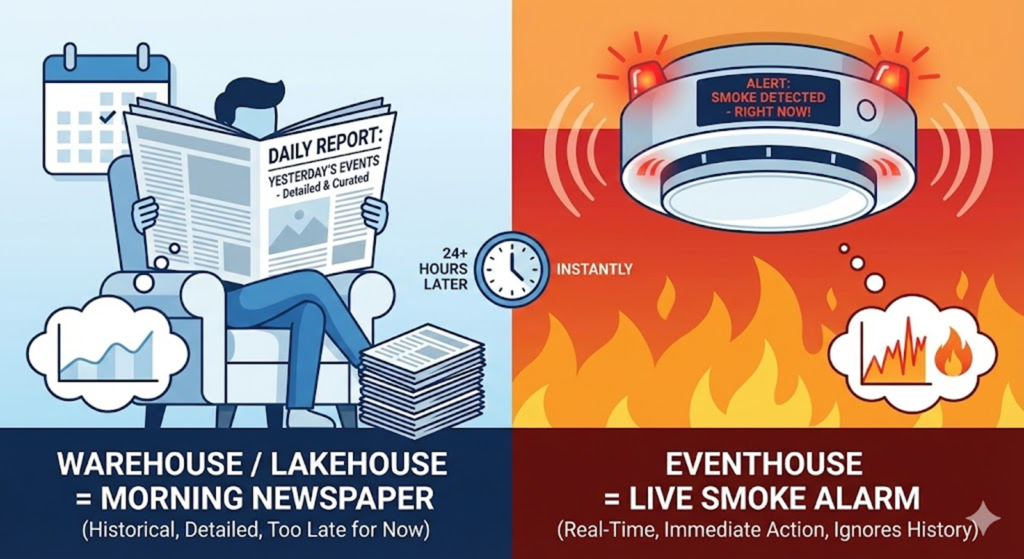
Think about it like this:
- The Warehouse/Lakehouse approach is like reading the morning newspaper. It’s great! It’s detailed, it’s curated, and it tells you exactly what happened yesterday. But if your house is currently on fire, a newspaper delivered tomorrow morning isn’t going to help you much.
- The Eventhouse approach is the live smoke alarm. It’s scanning the air every second. It doesn’t care about the history; it cares about what is happening right now.
If you have a million rows of data coming in every minute from a factory floor, you don’t want to wait for a Spark job to spin up, ‘shuffle’ the data, and write a Delta table. You want to query it the millisecond it hits the wire. That is why we need an Eventhouse.
The difference in architecture
Warehouses and Lakehouses are built for throughput (moving big chunks of data at once). The Eventhouse is built for concurrency and low latency (handling thousands of tiny ‘events’ coming in at the same time and letting you query them instantly).
The reason Eventhouse is so fast is the engine: KQL (Kusto Query Language). If SQL is a precise surgical scalpel, then KQL is a high-powered leaf blower. It is designed specifically to scan through billions of rows of text and logs in seconds.
In an Eventhouse, you aren’t worried about complex joins between 50 tables. You’re doing ‘Search’ and ‘Filter’ across massive streams. It’s built to index everything by default, so when you hit ‘Run,’ the answer is there before you’ve finished clicking the mouse.
So, the rule of thumb for your next project:
- If your data is coming in batches and you want to do standard reporting, go Warehouse.
- If you have massive raw unstructured data, such as PDFs, images, video, or audio files, and you want maximum flexibility, go Lakehouse.
- If your data is streaming, comes in high volumes, and you need to react in seconds, go Eventhouse.
Additionally, the big differentiator between the Lakehouse/Warehouse vs. Eventstream approach could be: use Lakehouse/Warehouse for analytical workloads, and use the Eventhouse for operational workloads.
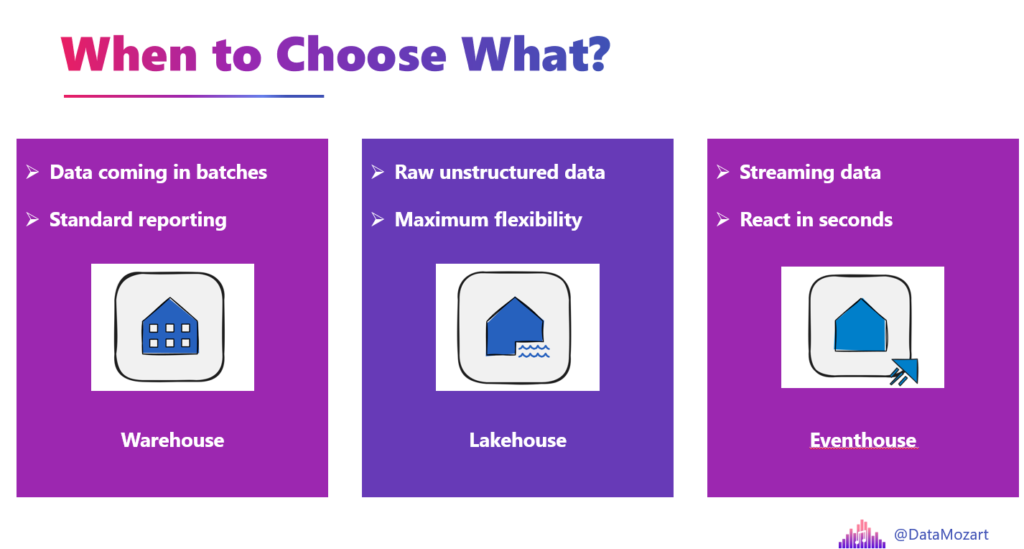
It’s not about which one is ‘better’ – it’s about choosing the right tool for the speed of your business.
Eventhouse vs. KQL Database
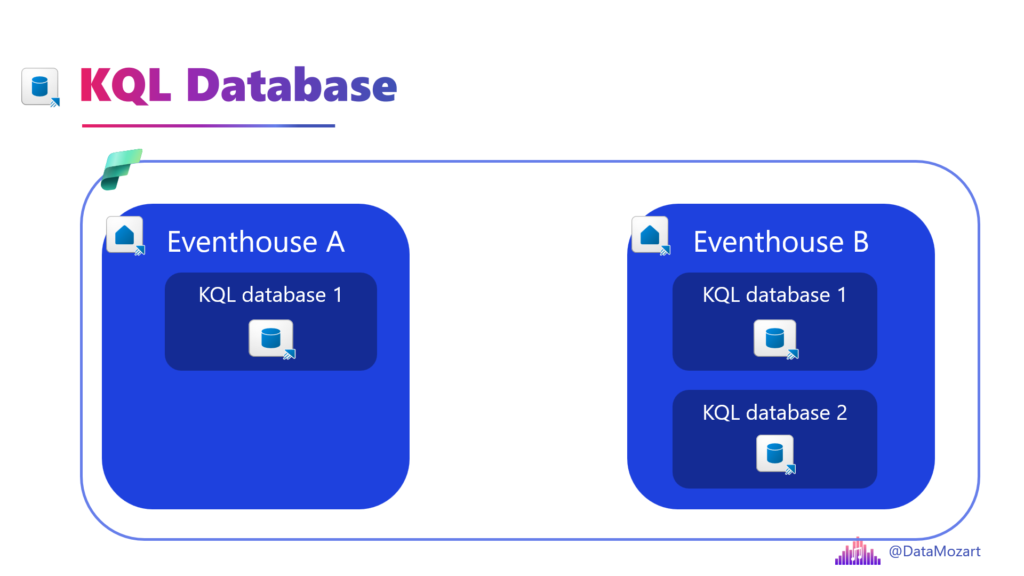
This is a point of confusion for a lot of people because, when you look at the workspace, they look very similar. But there is a clear parent-child relationship here.
Think of it like this: The Eventhouse is the apartment building, and the KQL Database is the apartment.
The Eventhouse is the high-level container. It’s the architectural “host.” When you create an Eventhouse, you aren’t just creating a place to put data, you are also setting up the compute and management layer.
- Shared resources: The Eventhouse manages the “capacity” (resources) for everything inside it.
- Centralized management: You use the Eventhouse to manage things like data ingestion, networking, and security at scale across multiple KQL databases.
- Think of it: The building provides the electricity, the water, the security guard at the front desk, and the overall structure. Without the building, the individual apartments have nowhere to exist.
The KQL Database is where the actual work happens. This is where your data is stored and where your queries run.
- Storage and tables: This is where you create your tables, your functions, and your materialized views.
- Data isolation: You might have one KQL Database for “Production Logs” and another for “Test Logs” inside the same Eventhouse.
- Think of it: This is your actual living space. It has your furniture (tables) and your rules (functions). You can have many apartments in one building, but they all share the building’s foundation.
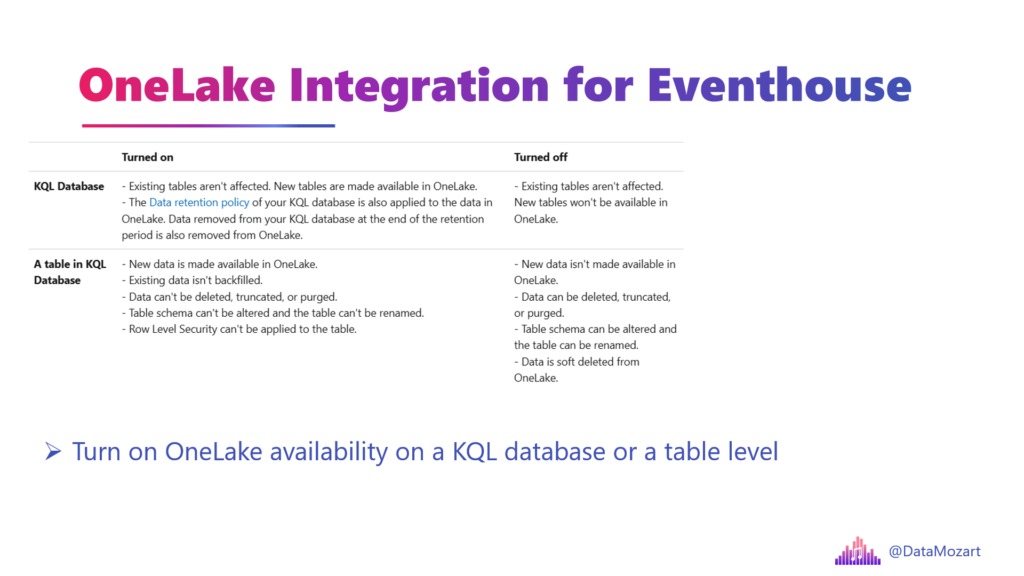
Eventhouse OneLake availability
You’ve probably heard about the OneCopy principle in Fabric, right? This means, we create a single copy of the data in OneLake, and all the Fabric engines can read the same copy of the data. This principle is based on the unified, open table format, called Delta Parquet. However, when you store the data in Eventhouse, it’s not stored in Delta Parquet format. Which defeats the purpose of the OneCopy principle, right?
Well, not really. There is a special feature, called Eventhouse OneLake availability, that allows you to automatically create a logical copy of the Eventhouse data in Delta Parquet format, and then query this data using any other Fabric workload, including Direct Lake storage mode for Power BI semantic models. This feature can be enabled on both the entire KQL database level and on the individual table level.
Key strengths
Let me now quickly introduce some of the key strengths of the Eventhouse in Microsoft Fabric. In this article, I’ll just briefly introduce them, and then I plan to cover them in more detail in the future.
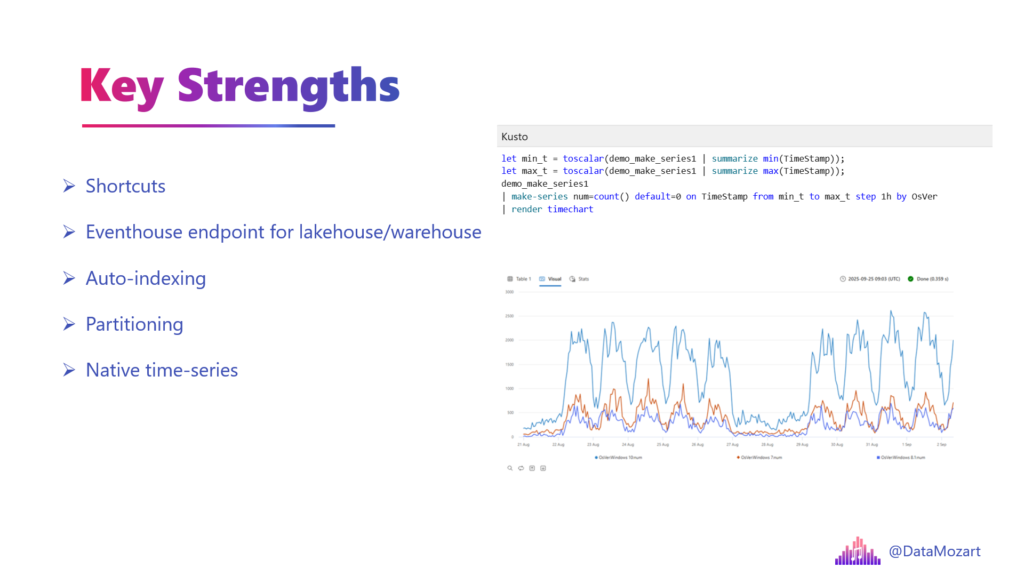
Shortcuts
I’ve already written about shortcuts in Microsoft Fabric. As a reminder, a shortcut is a OneLake object that points to another storage location. Essentially, it allows you to create a virtual copy of the data without physically moving it from its original location.
Shortcuts in a KQL database conceptually work the same as in the Lakehouse, but there are also some specifics when it comes to their physical implementation. As already mentioned, I’ll cover KQL database shortcuts in detail in one of the next articles.
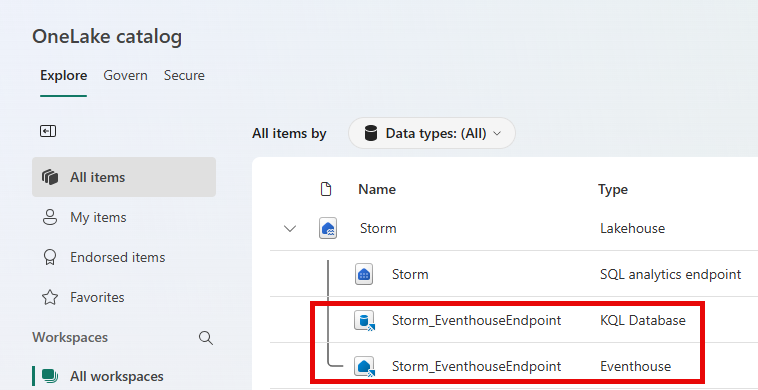
Eventhouse endpoint for Lakehouse/Warehouse
The Eventhouse endpoint is a capability in Microsoft Fabric that lets users query lakehouse or warehouse data in a high-performing and real-time querying way, using both KQL and SQL.
Auto-indexing
One of the biggest headaches in database history is indexing. In the old days, you had to guess which columns people would query and build indexes manually. If you missed one, your query would crawl.
In an Eventhouse, everything is indexed by default. Because it’s built on the Kusto engine, it indexes data as it arrives. You don’t ‘tune’ an Eventhouse, you just feed it.
Partitioning
Then there’s partitioning. Usually, you have to decide: “Do I partition by year? By month? By department?” If you get it wrong, moving data is a nightmare.
The Eventhouse handles partitioning based on ingestion time automatically. It’s like having a closet that reorganizes itself every night so the clothes you wear most often are right in front.
And the compression? It’s amazing. Eventhouse automatically squishes data down.
Native time-series
Now, let’s talk about time series. Most databases treat time like just another number. But the Eventhouse understands time.
If you want to see a trend, find an anomaly, or predict where a sensor reading is going, you usually need a math degree and 200 lines of Python. In Eventhouse, we use KQL, which has “Time Series” baked into its DNA.
Standard SQL is like looking at a series of polaroid photos. You have to flip through them one by one to see what changed. Eventhouse is like having a video editing suite. You can use one command like make-series to fill in missing data points, or series_decompose to strip away the “noise” and see the actual trend. It’s built to answer “What’s normal?” and “When did it stop being normal?” in milliseconds.
Complex JSON and XML parsing
Let’s wrap it up by talking about the messy stuff: nested JSON and XML. We’ve all seen those JSON files that look like a giant tangled ball of Christmas lights – arrays inside objects inside other arrays.
In a traditional warehouse, you’d spend three days writing a flattening script. The Eventhouse has a feature called Dynamic Columns. You just dump the JSON in. You don’t even have to define the schema first! It’s like a high-end wood chipper. You throw in a whole tree (a complex, nested JSON object), and the Eventhouse shreds it into perfectly organized wood chips (columns) that you can query immediately. You want to reach deep into a nested array? You just use a simple dot notation (like Log.Details.Sensor.Value). It’s that easy.
Stay tuned for more about Eventhouse and Real-Time Intelligence workloads in Microsoft Fabric!
Thanks for reading!
P.S. Special thanks to Minni Walia from Microsoft for providing valuable feedback for this post
Last Updated on February 17, 2026 by Nikola