“The best feature you’ve never heard of”!
That’s how Christopher Schmidt from Microsoft’s RTI (Real-Time Intelligence) product team described the update policies feature during his recent session at FabCon Atlanta. And, that reminded me that this exact same feature helped me save my client an enormous amount of resources a couple of weeks ago. Hence, in this article, I’ll try to explain what update policies in Microsoft Fabric RTI are, and why you should start using them on a regular basis in your RTI workloads.
If you’ve ever worked with real-time data, you know the drill: data lands in your table in some raw, messy format, and before anyone can make sense of it, somebody (or something) needs to clean it up, reshape it, and move it to the right place. The usual approach? Build a separate pipeline, schedule it, monitor it…
Wouldn’t it be great if there were a way to automatically transform the data the very moment it lands in the table? No pipelines, no scheduling, no monitoring?
What on earth is an update policy?
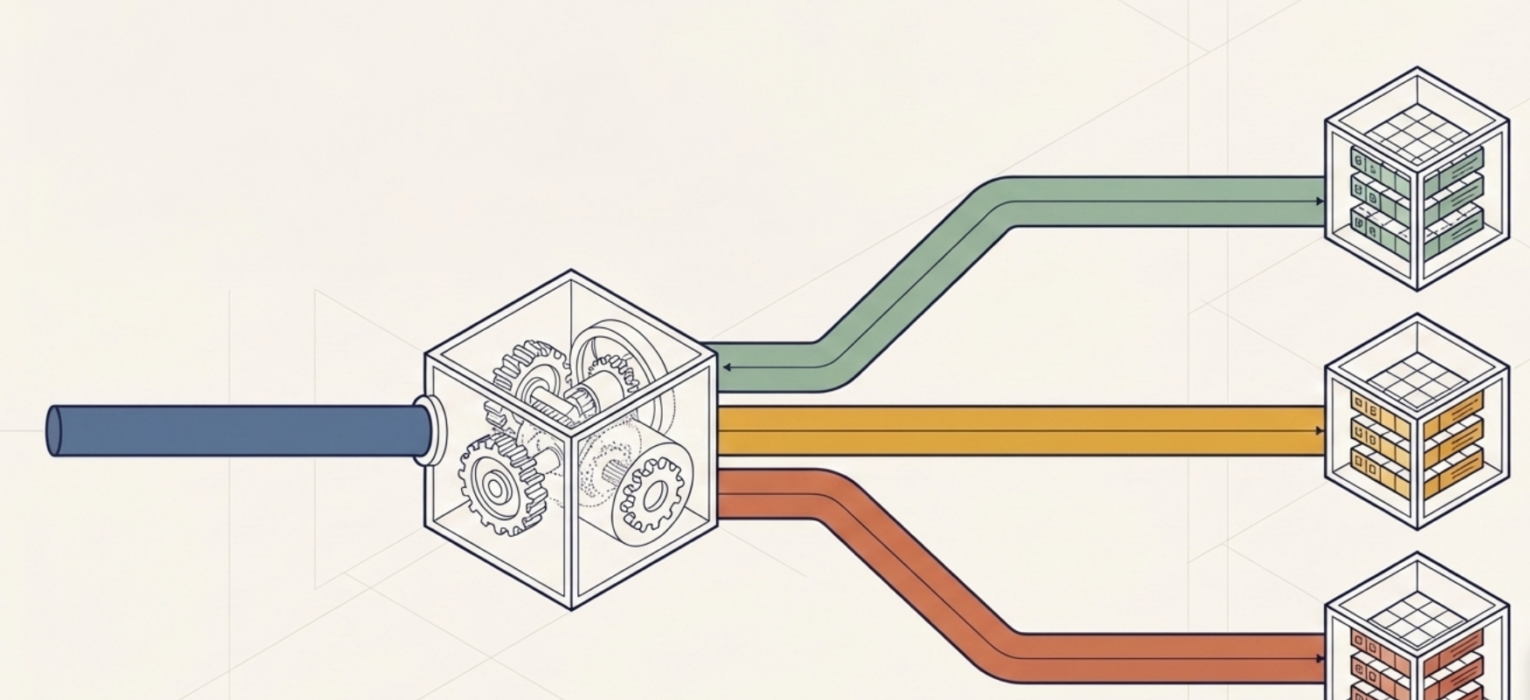
Before we dive into the nitty-gritty details, let me explain the concept in plain English. Think of a post office sorting facility. Letters arrive in bulk, all mixed up, different sizes, different destinations. Now, imagine that instead of having workers manually sort them later, there was a mechanism built into the facility that automatically sorts each letter the moment it arrives. A letter addressed to Vienna? Boom, goes straight to the Austria bin. A package for New York? Lands in the USA bin. No delay, no separate sorting shift, no one has to remember to “run the sorting job at 3 AM.”
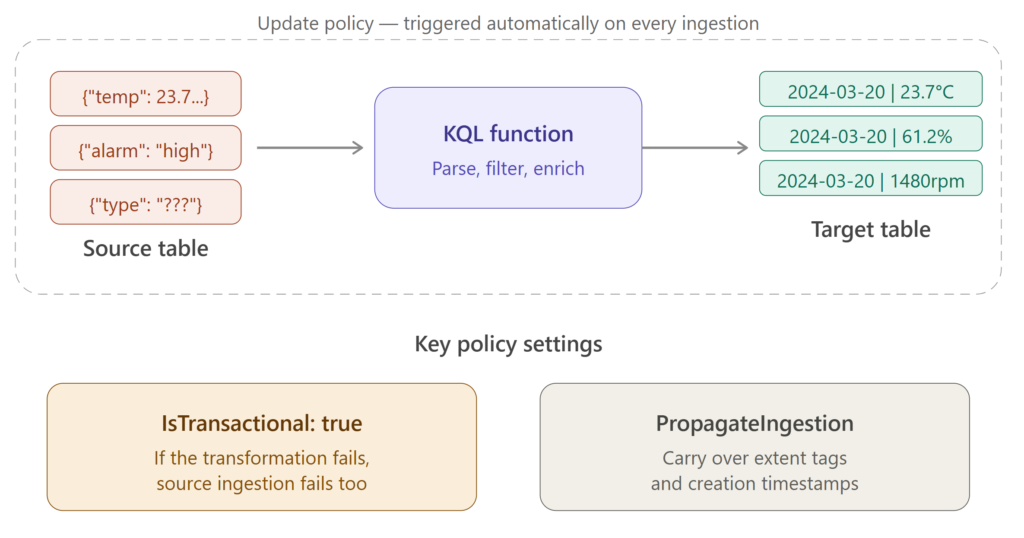
That’s essentially what an update policy does in Real-Time Intelligence. When data gets ingested into a source table, the update policy automatically kicks in. It runs a transformation query and routes the result into one or more target tables. No external orchestration required. The data arrives, the policy fires, the transformed data appears in the destination. Done.
So, the update policy is kind of a lightweight, near-real-time ETL within the KQL database.
You can also define multiple update policies on a single source table. So, from one stream of incoming raw data, you can simultaneously feed several target tables, each with its own transformation logic. One policy parses the data into a structured schema, another routes error records to a log table, and a third enriches the data by joining it with a lookup table. All happening in the background, all triggered by a single ingestion event.
Ok, sounds cool. But, why should I care?
Fair question. Let me give you a concrete scenario.
Imagine you’re working with IoT sensor data. Devices are sending telemetry messages every few seconds: temperature readings, humidity levels, pressure values, all bundled together in a semi-structured JSON format. This raw data lands in your source table as a single text column. Not exactly useful for analysis, right?
Without update policies, you’d need to build some kind of processing layer, be it a pipeline, a notebook, or a scheduled job, that periodically picks up the raw data, parses it, and writes the structured output to another table. This means additional infrastructure, additional monitoring, and (in most cases) additional headaches.
With an update policy, you define a KQL function that parses the raw text into strongly-typed columns (timestamp, device ID, temperature, humidity, pressure…), point the policy at that function, and you’re done. Every time a new batch of sensor data arrives in the source table, the policy automatically executes the function and writes the clean, structured output to the target table.
No pipeline. No scheduler. No monitoring.
How does it actually work?
Now that we’ve covered the “why”, let’s look at the “how.” An update policy consists of a few key components:
- Source table – the table where raw data gets ingested. This is the trigger. The moment new data lands here, the policy wakes up.
- Target table – the table where the transformed data gets written. This table can have a completely different schema from the source table: different columns, different data types, different retention policies.
- Query (function) – the KQL function that performs the transformation. This is where the magic happens. Your function reads from the source table, applies whatever logic you need (parsing, filtering, joining with lookup tables, calculating new columns…), and the output gets written to the target table.
- IsTransactional – this is important, so pay attention. When set to true, it means: if the transformation fails for any reason, the data won’t be ingested into the source table either. In other words, both tables stay consistent, either both get the data, or neither does. When set to false (the default), the source table gets the data regardless of whether the transformation succeeds or fails. My advice is to set this to true in production systems. You don’t want a situation where raw data happily piles up in your source table while the target table is silently missing records because the transformation query broke.
- PropagateIngestionProperties – this one determines whether properties like extent tags and creation time from the source ingestion get carried over to the target table. In most scenarios, you’ll want this set to false, but there are edge cases where propagating these properties makes sense.
Can it get better than this? Yes, with cascading policies!
I know what you’re thinking: “Ok, Nikola, transforming data from one table to another is nice. But what about more complex scenarios?”
Glad you asked:)
Update policies support cascading, which means that a policy on table A writes to table B, and another policy on table B writes to table C. This opens the door to implementing a medallion design pattern (who said that Medallion is an architecture?!) directly within your Eventhouse!
Here’s how this could look in practice:
Raw data lands in the Bronze table (your source table). An update policy fires, applies some initial cleanup and parsing, and writes the result to the Silver table. Then, another update policy on the Silver table kicks in. It enriches the data (maybe by joining with a dimension table), applies business logic, and writes the final, analysis-ready output to the Gold table.
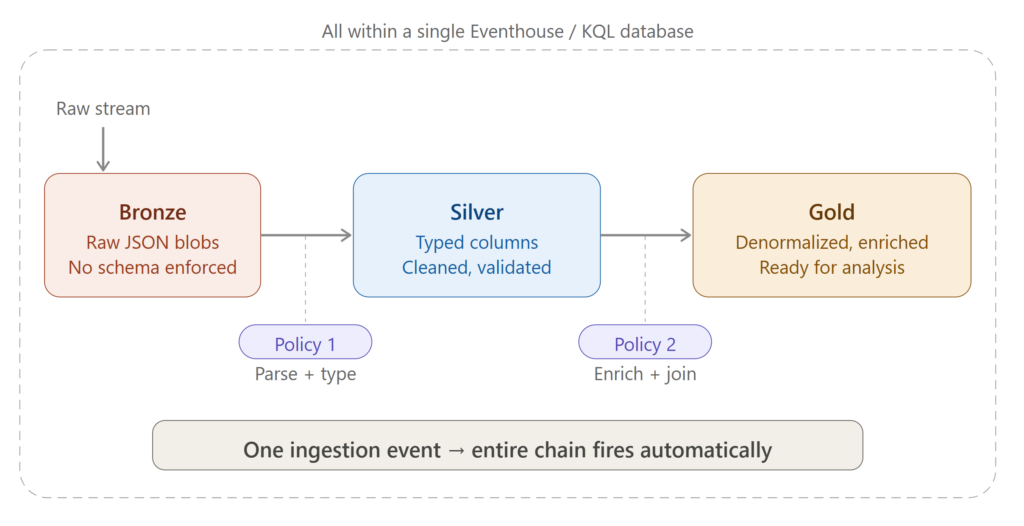
All of this happens automatically, triggered by a single ingestion event into the Bronze table. No pipelines, no orchestration, no scheduling. The data cascades through your layers like a waterfall.
One important caveat though – circular policies are not allowed. If you try to set up a chain where table C has an update policy that writes back to table A, the engine will detect this at runtime and cut the chain. Makes sense – you don’t want an infinite loop eating up your capacity:)
Can it get better than THAT?! Yes, with data routing!
Another powerful pattern is using update policies for data routing, and this is where things get really practical for real-world scenarios.
Let’s say your source table receives different types of messages: telemetry readings, device alarms, and error logs. All three message types arrive in the same raw table, but you want them separated into dedicated tables for downstream consumption.
Simple. Define three update policies on the source table:
- The first policy filters for telemetry messages, parses them, and writes to a Device_Telemetry table
- The second policy filters for alarm messages and writes to a Device_Alarms table
- The third policy catches everything else and routes it to an Error_Log table
All three policies execute independently every time data lands in the source table. Your consumers don’t need to know about the raw format. They just query the clean, purpose-built tables.
Enough theory, let’s actually build this!
3, 2, 1…Action!
I’ll walk you through a full, end-to-end demo of the data routing scenario we just described. We’ll create a source table, define transformation functions, set up target tables with update policies, ingest sample data, and verify the results. All of this happens inside your KQL database in Real-Time Intelligence.
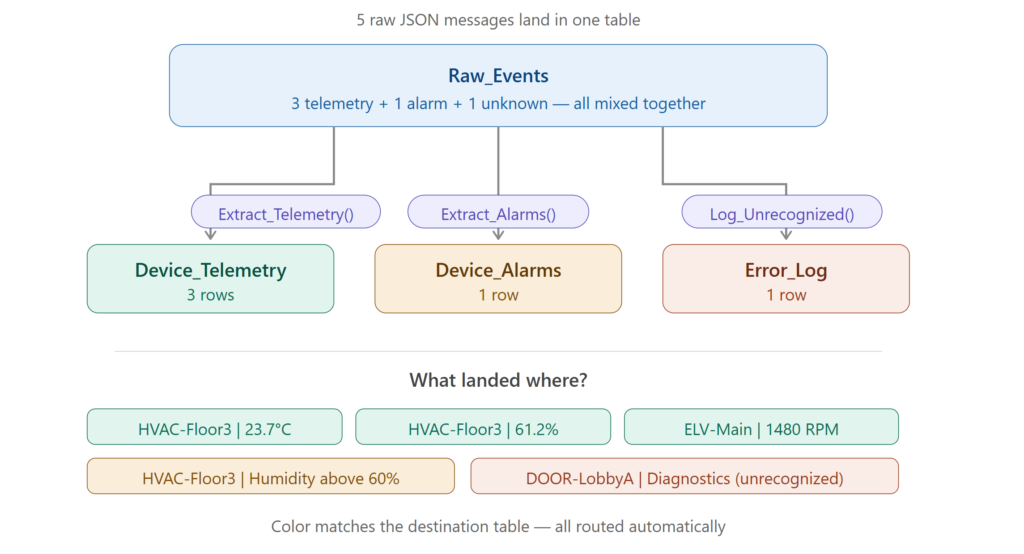
Here is our scenario: a smart building system sends various types of messages from its devices. Some are regular sensor readings (telemetry), some are alerts when thresholds are breached (alarms), and occasionally, there’s a message type the system doesn’t recognize (which we want to log as an error). All these messages arrive as raw JSON in a single table.
Step 1: Create the source table
First, we need a landing zone: a table that accepts the raw data as it arrives. Since the incoming data is JSON and we don’t want to enforce a rigid schema at this point, we’ll use a single column of the dynamic type:
.create table Raw_Events (RawData: dynamic)
This table is our “front door.” Everything comes in through here.
Step 2: Create the transformation functions
Now, the core of the update policy, and these are the functions that will transform and route our data. We need three of them: one for telemetry messages, one for alarms, and one catch-all for anything unexpected.
.execute database script <|
  .create-or-alter function Extract_Telemetry() {
    Raw_Events
    | where todynamic(RawData).MessageType == 'Telemetry'
    | extend
      Timestamp = unixtime_seconds_todatetime(tolong(RawData.Timestamp)),
      DeviceId = tostring(RawData.DeviceId),
      DeviceType = tostring(RawData.DeviceType),
      SensorName = tostring(RawData.SensorName),
      SensorValue = toreal(RawData.SensorValue),
      SensorUnit = tostring(RawData.SensorUnit)
    | project-away RawData
  }
  .create-or-alter function Extract_Alarms() {
    Raw_Events
    | where RawData.MessageType == 'Alarms'
    | extend
      Timestamp = unixtime_seconds_todatetime(tolong(RawData.Timestamp)),
      DeviceId = tostring(RawData.DeviceId),
      DeviceType = tostring(RawData.DeviceType),
      AlarmType = tostring(RawData.AlarmType)
    | project-away RawData
  }
  .create-or-alter function Log_Unrecognized() {
    Raw_Events
    | where RawData.MessageType !in ('Telemetry', 'Alarms')
    | extend
      LoggedAt = datetime(now),
      ErrorType = 'Unknown MessageType'
    | project LoggedAt, RawData, ErrorType
  }
Let’s break down what’s happening here. The Extract_Telemetry function filters for telemetry messages, then uses the extend operator to pull individual fields out of the raw JSON and cast them to proper data types: datetime, string, real. The project-away at the end drops the original raw column since we no longer need it.
Extract_Alarms does the same thing, but for alarm messages. It extracts a different set of fields (notice AlarmType instead of SensorName/SensorValue).
Log_Unrecognized is our safety net. Anything that doesn’t match “Telemetry” or “Alarms” gets caught here and logged with a timestamp and an error description. This is incredibly useful for detecting malformed messages or unexpected schema changes in your data source.
Step 3: Create the target tables
Now we need the destination tables. There are two ways to do this: you can either manually define the schema with a .create table command, or (and this is the approach I prefer) let KQL figure out the schema from the function output using .set-or-append with take 0:
.execute database script <|
  .create table Device_Telemetry (Timestamp: datetime, DeviceId: string, DeviceType: string, SensorName: string, SensorValue: real, SensorUnit: string)
  .set-or-append Device_Alarms <| Extract_Alarms | take 0
  .set-or-append Error_Log <| Log_Unrecognized | take 0
I intentionally used both approaches here so you can see the difference. For the Device_Telemetry table, I spelled out the entire schema manually. For Device_Alarms and Error_Log, I let KQL infer the schema from the function output. The take 0 trick is neat, because it executes the function but returns zero rows, so the table gets created with the correct schema without actually ingesting any data.
Why do I prefer the second approach? Because it guarantees that the target table schema matches the function output. If you manually define the schema and make a typo or get the column order wrong, the update policy will fail at runtime. With .set-or-append, this mismatch simply can’t happen.
Step 4: Define the update policies
It’s time to connect the dots. We need to tell the engine: “When new data arrives in Raw_Events, run these functions and write the results to the corresponding target tables.”
.execute database script <|
  .alter table Device_Telemetry policy update
    "[{\"IsEnabled\":true,\"Source\":\"Raw_Events\",\"Query\":\"Extract_Telemetry\",\"IsTransactional\":true,\"PropagateIngestionProperties\":true,\"ManagedIdentity\":null}]"
  .alter table Device_Alarms policy update
    "[{\"IsEnabled\":true,\"Source\":\"Raw_Events\",\"Query\":\"Extract_Alarms\",\"IsTransactional\":true,\"PropagateIngestionProperties\":true,\"ManagedIdentity\":null}]"
  .alter table Error_Log policy update
    "[{\"IsEnabled\":true,\"Source\":\"Raw_Events\",\"Query\":\"Log_Unrecognized\",\"IsTransactional\":true,\"PropagateIngestionProperties\":true,\"ManagedIdentity\":null}]"
Notice that each policy is defined on the target table (Device_Telemetry, Device_Alarms, Error_Log), not the source. The Source property points to Raw_Events, and the Query property references the corresponding function. I’ve set IsTransactional to true for all three, which means that if any transformation fails, the data won’t be ingested into the source table either, keeping everything consistent.
At this point, our setup is complete. We have a source table, three transformation functions, three target tables, and three update policies connecting them. Now, let’s see if it actually works!
Step 5: Ingest sample data
Let’s simulate some real-world data. We’ll ingest five records into our source table: three telemetry readings from sensors in a smart building, one alarm, and one unrecognized message type:
.set-or-append Raw_Events <|
  let EventStream = datatable(RawData: dynamic)
    [
    dynamic({"Timestamp": 1710936000, "DeviceId": "HVAC-Floor3", "MessageType": "Telemetry", "DeviceType": "HVAC Unit", "SensorName": "Temperature", "SensorValue": 23.7, "SensorUnit": "Celsius"}),
    dynamic({"Timestamp": 1710936060, "DeviceId": "HVAC-Floor3", "MessageType": "Telemetry", "DeviceType": "HVAC Unit", "SensorName": "Humidity", "SensorValue": 61.2, "SensorUnit": "Percent"}),
    dynamic({"Timestamp": 1710936120, "DeviceId": "ELV-Main", "MessageType": "Telemetry", "DeviceType": "Elevator", "SensorName": "MotorRPM", "SensorValue": 1480.0, "SensorUnit": "RPM"}),
    dynamic({"Timestamp": 1710936180, "DeviceId": "HVAC-Floor3", "MessageType": "Alarms", "DeviceType": "HVAC Unit", "AlarmType": "Humidity above 60% threshold"}),
    dynamic({"Timestamp": 1710936240, "DeviceId": "DOOR-LobbyA", "MessageType": "Diagnostics", "DeviceType": "Access Panel", "Status": "FirmwareUpdatePending"})
  ];
  EventStream
We’ve got a nice mix here: the HVAC unit on Floor 3 is reporting temperature and humidity readings, the main elevator is sending motor RPM telemetry, the same HVAC unit triggers a humidity alarm, and a lobby door access panel sends a “Diagnostics” message, which our system doesn’t recognize as either Telemetry or Alarms.
The moment this data lands in Raw_Events, all three update policies should fire simultaneously. Let’s verify.
Step 6: Verify the results
First, let’s check the overall distribution across tables:
Raw_Events | summarize Rows = count() by TableName = "Raw_Events"
| union (Device_Telemetry | summarize Rows = count() by TableName = "Device_Telemetry")
| union (Device_Alarms | summarize Rows = count() by TableName = "Device_Alarms")
| union (Error_Log | summarize Rows = count() by TableName = "Error_Log")
| sort by Rows desc
If everything worked correctly, you should see the following output:
| TableName | Rows |
| Raw_Events | 5 |
| Device_Telemetry | 3 |
| Device_Alarms | 1 |
| Error_Log | 1 |
Five records in the source table, three telemetry readings routed to Device_Telemetry, one alarm in Device_Alarms, and the unrecognized Diagnostics message caught by our safety net in Error_Log. Exactly as expected!
But let’s not stop at just counting rows. Let’s peek into the target tables to make sure the data was actually transformed properly:
Device_Telemetry
| project Timestamp, DeviceId, DeviceType, SensorName, SensorValue, SensorUnit
| Timestamp | DeviceId | DeviceType | SensorName | SensorValue | SensorUnit |
|---|---|---|---|---|---|
| 2024-03-20 12:00:00 | HVAC-Floor3 | HVAC Unit | Temperature | 23.7 | Celsius |
| 2024-03-20 12:01:00 | HVAC-Floor3 | HVAC Unit | Humidity | 61.2 | Percent |
| 2024-03-20 12:02:00 | ELV-Main | Elevator | MotorRPM | 1480 | RPM |
The raw JSON has been parsed into strongly-typed columns: the Unix timestamps are now proper datetime values, the sensor readings are real numbers, and everything is neatly structured. Compare this with the raw data that arrived as a single JSON blob, and you can see the value immediately.
Device_Alarms
| project Timestamp, DeviceId, DeviceType, AlarmType
| Timestamp | DeviceId | DeviceType | AlarmType |
|---|---|---|---|
| 2024-03-20 12:03:00 | HVAC-Floor3 | HVAC Unit | Humidity above 60% threshold |
And finally:
Error_Log
| project LoggedAt, ErrorType, RawData
The Error_Log table contains the full raw JSON of the unrecognized message, along with a timestamp and error description. This gives your operations team everything they need to investigate: the original payload is preserved, so you can figure out what went wrong and adjust your policies accordingly.
Cleanup
If you want to clean up after the demo, here’s the script to drop everything we created:
.execute database script <|
  .drop table Raw_Events
  .drop table Device_Telemetry
  .drop table Device_Alarms
  .drop table Error_Log
  .drop function Extract_Telemetry
  .drop function Extract_Alarms
  .drop function Log_Unrecognized
Things to watch out for
Before you rush to implement update policies everywhere (I know the temptation is real after reading this article:)), there are a few things you should keep in mind.
The source and target table must be in the same database. You can’t have a policy that writes across databases, at least not at the moment of writing.
The function’s output schema must match the target table schema. This means the same column types, same order. If there’s a mismatch, the policy will fail, and depending on your IsTransactional setting, you might either lose data in the target table or block ingestion to the source table entirely. So, test your function thoroughly before deploying. And, by the way, this is exactly why I showed you the .set-or-append trick with take 0 earlier. It eliminates this risk entirely.
An incorrect transformation query can prevent data ingestion into the source table. Let me repeat that, because it’s important: a broken update policy can stop your entire ingestion pipeline. This is especially risky when you update a stored function that’s referenced by an existing policy. The policy itself doesn’t get revalidated when you change the function. Be careful with changes, and always test in a non-production environment first.
If you’re using streaming ingestion (which is enabled by default in Fabric Eventhouses) and your update policy function uses the join operator, you’ll need to disable the streaming ingestion policy on the relevant table. This is a gotcha that can catch you off guard if you’re not aware of it.
In any case, you can always troubleshoot any issues with the update policy by running the following KQL command:
.show ingestion failures
Before we wrap it up, I’ll give you another tip: if you don’t need the raw data in the source table after the transformation, you can set the retention policy on the source table to have a soft-delete period of 0 seconds. This effectively removes the raw data from the source table right after the update policy processes it, saving you storage costs. Just make sure the update policy is set to transactional (IsTransactional: true), otherwise you risk losing data if the transformation fails.
.alter-merge table Raw_Events policy retention softdelete = 0s
Conclusion
Update policies are one of those features that don’t get enough spotlight (look at the beginning of this article and check what Christopher Schmidt said), but once you start using them, you’ll wonder how you ever lived without them. They let you automate data transformation right at the point of ingestion: no pipelines, no schedulers, no manual orchestration. Whether you’re parsing raw logs, routing different message types to dedicated tables, or building a full medallion inside your Eventhouse, update policies have you covered.
The data doesn’t wait. It gets transformed the moment it arrives.
Thanks for reading!
P.S. Thanks to Claude for generating these nice diagrams:)
Last Updated on March 23, 2026 by Nikola