Most Fabric projects start with the same question: which SKU? F2, F8, F64? Basically, you had to pick a capacity before you knew your workload, and then live with that guess (or scale up/down if you chose the pay-as-you-go model).
On-demand billing, announced at FabCon Barcelona a few weeks ago and now in preview, changes the order. You can create an F0 capacity with zero provisioned CUs and pay only for what runs! You can also keep your existing capacity and move a single workload, such as Data Warehouse, to on-demand.
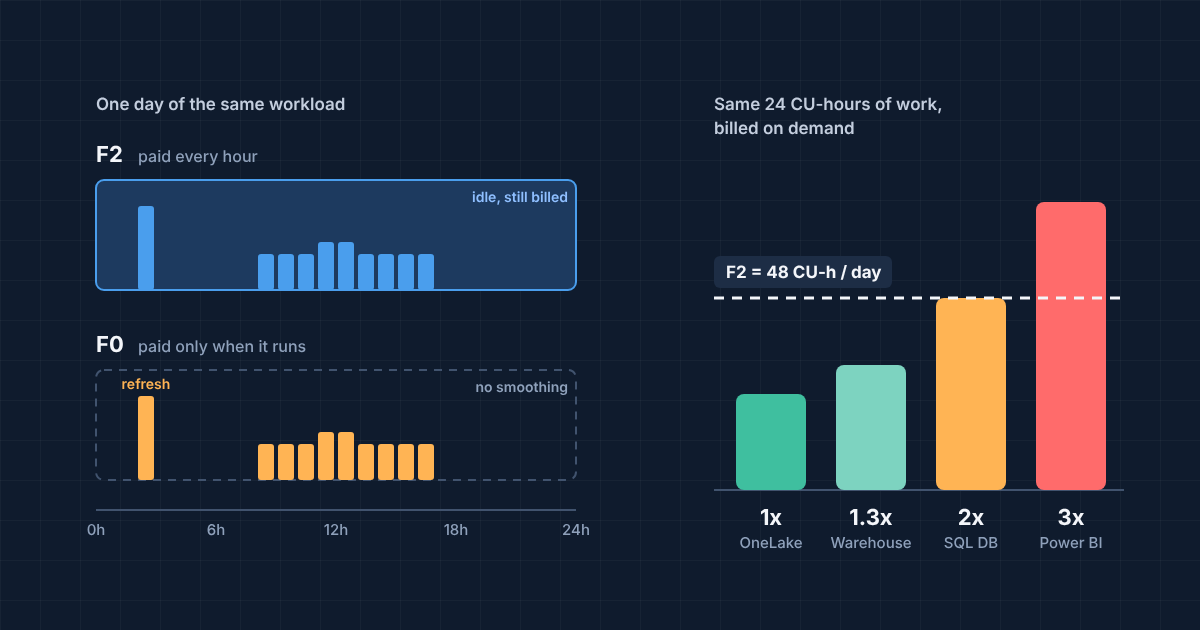
Instead of paying for a capacity whether you use it or not, you pay for the CU-hours you consume, at a rate that depends on the workload.
Two things work differently from provisioned capacity: there is no smoothing, and the rate ranges from 1x to 3x the pay-as-you-go price. Below are the mechanics, four real-life examples, and where on-demand saves money and where it costs more.
What is changing?
On-demand billing moves consumption for a billing category out of your capacity’s shared CU pool and onto its own Azure meter. Operations in that category no longer draw from your capacity, so they can’t be throttled by it, and they can’t throttle anything else.
There are two possible ways to use it:
- Hybrid capacity: you keep your F2 or larger capacity and enable on-demand for one or more categories. Everything else keeps running on the provisioned CUs.
- F0 capacity: a capacity with zero provisioned CUs. Every supported category runs on demand, and you can’t switch that off. To get provisioned CUs back, you upgrade to a paid SKU.
In a hybrid capacity, disabling a category and setting its limit to 0 are not the same thing. Disabled means the category runs on the capacity again. Enabled with a limit of 0 means it’s blocked, and it doesn’t fall back to the capacity. Also, consumption that was already reported and smoothed before you enabled a category stays on the capacity.
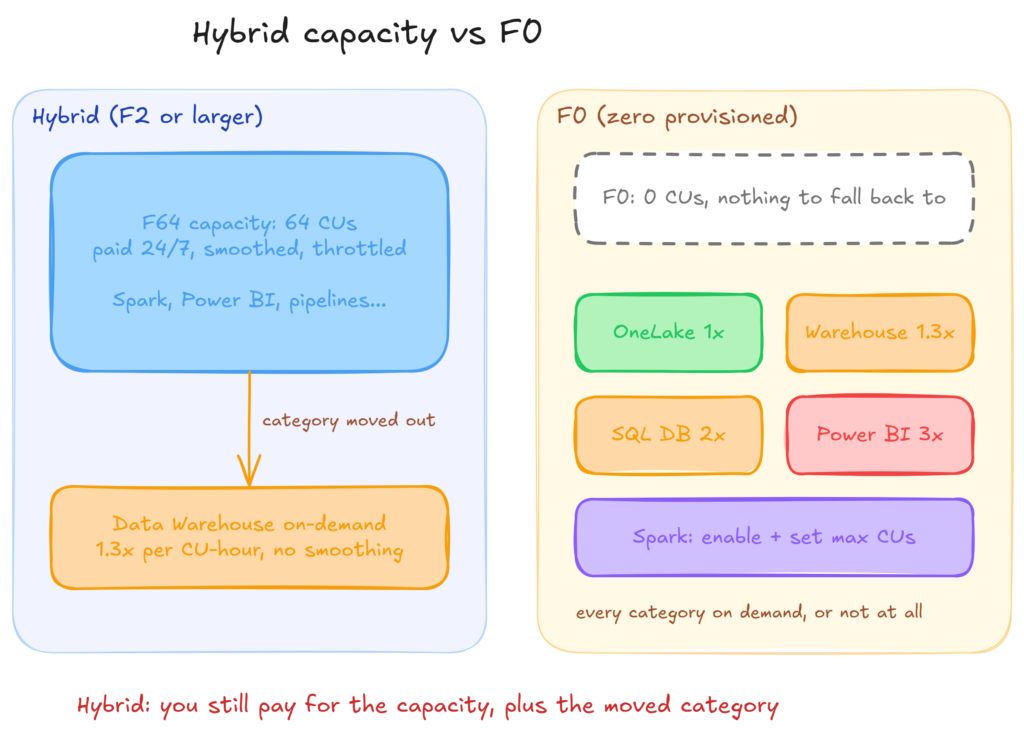
The categories map to workloads, not to items. For example, Data Warehouse covers warehouse queries, SQL analytics endpoint queries, snapshot queries, and T-SQL notebooks. Power BI Semantic Models covers refresh, queries, XMLA read and write, and web modeling. There are 17 categories, from OneLake to Cosmos DB to Fabric IQ.
You enable a category at the capacity level, not per workspace. Data Warehouse is the exception that adds workspace-level controls on top, which I’ll come back to.
How is this different from capacity overage?
Fabric now has three ways to pay for compute beyond a fixed capacity:
- Capacity overage: still your provisioned capacity, but when smoothed usage would cause throttling, Fabric bills the excess at 3x the pay-as-you-go rate instead of throttling you.
- Autoscale Billing for Spark: Spark jobs run on separate serverless compute and are billed pay-as-you-go. Spark has its own on-demand model: it uses the shared capacity quota instead of a category spend limit. On an F0 capacity, Spark runs only after you explicitly enable it and set its maximum CUs.
- On-demand billing: a whole category leaves the capacity and is billed per CU-hour at its own multiplier, from 1x to 3x.
Overage keeps your capacity from throttling. On-demand takes a workload off the capacity entirely.
How is it metered?
Every on-demand operation is billed in CU-hours. The price per CU-hour is the regional pay-as-you-go rate times a category multiplier:

The PAYG price per CU-hour is the F2 hourly price divided by 2. Matthew Farrow, in his great article (the link is at the end of this post), calculated it at about $0.19 in North Europe at list price, which puts a 3x category at about $0.57 per CU-hour. The multiplier applies to the price, not to the usage, so a query reports the same CU-hours whichever way you pay for it.
The multipliers differ by category:
| Category | Multiplier | Break-even vs. F2 (CU-hours per day) |
|---|---|---|
| OneLake, Copilot, Data agents, Mirroring | 1x | 48 |
| Dataflow Gen2 (in Data Factory) | 1.2x | 40 |
| Data Warehouse | 1.3x | 36.9 |
| Eventhouse | 1.36x | 35.3 |
| VNet data gateway, Apache Airflow jobs | 1.5x | 32 |
| SQL Database, Cosmos DB, User Data Functions, GraphQL | 2x | 24 |
| Power BI Semantic Models, Power BI Core Services, Eventstream, Activator | 3x | 16 |
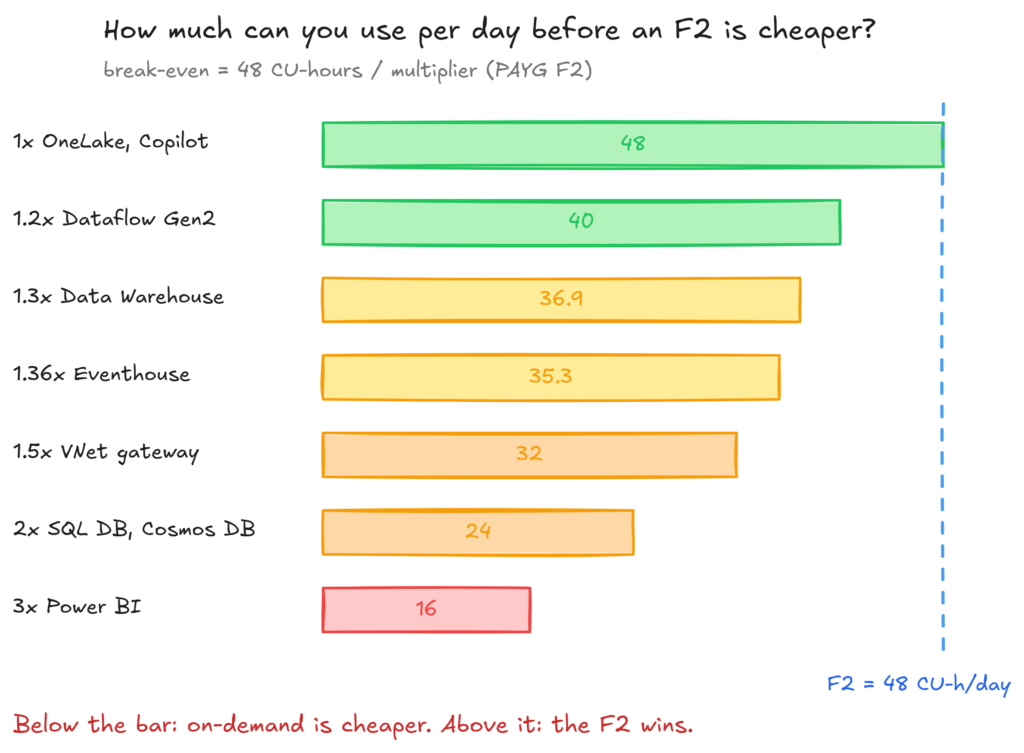
Just to be clear: the last column in the table above is my own math, not Microsoft’s:) An F2 gives you 2 CUs around the clock, which is 48 CU-hours a day at 1x. Divide 48 by the multiplier, and you get the daily consumption at which on-demand costs the same as a pay-as-you-go F2. Below that line, on-demand is cheaper. Above it, the F2 would have been cheaper. A reserved F2 moves every break-even point lower still.
Some categories mix several multipliers depending on the operation: Data Factory ranges from 1x for pipeline activities to 3x for Dataflow refresh. Look up the operation, not only the category.
No smoothing
On provisioned capacity, a heavy refresh or Spark job is smoothed over 24 hours, so a small SKU can absorb a big spike. On-demand billing doesn’t support bursting or smoothing. Every CU-hour is billed as it happens.
So the question you ask about a spike changes. It’s no longer whether it will throttle the capacity, but how many CU-hours it costs, and at which multiplier.
Spend limits, not hard caps
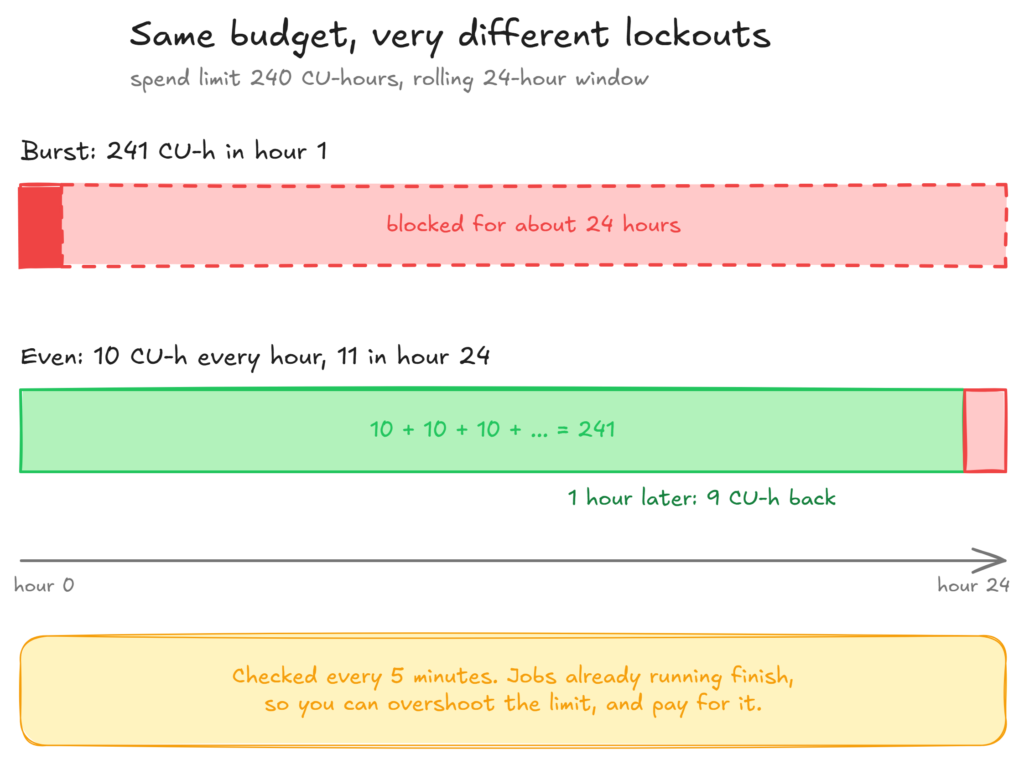
Each category gets a spend limit in CU-hours over a rolling 24-hour window. When it’s reached, new operations are rejected. Operations already in progress keep running, so Microsoft is explicit that a spend limit isn’t a hard consumption or billing cap. The limit is checked every 5 minutes, so jobs that start between two checks also run to completion. The three stages of throttling you know from provisioned capacity become a single state: rejected. How long you stay there depends on your consumption pattern. Burn the whole budget in the first hour, and you’re blocked for almost a day. Spread it evenly, and you get a little back every hour as old consumption leaves the window.
The ceiling for that limit comes from quota: by default, capacity quota in CUs × 24 hours, per category, per capacity. A 16-CU quota gives each category 384 CU-hours a day. OneLake is the exception, with a 100,000 CU-hour daily quota.
This is what it looks like in the Capacity settings. Every category has its own toggle and its own 24-hour compute limit. Here, in my F0 capacity provisioned in West Europe, each one is set to 32 CU-hours, except OneLake at 100,000. Spark isn’t in the list because it has its own on-demand setting.
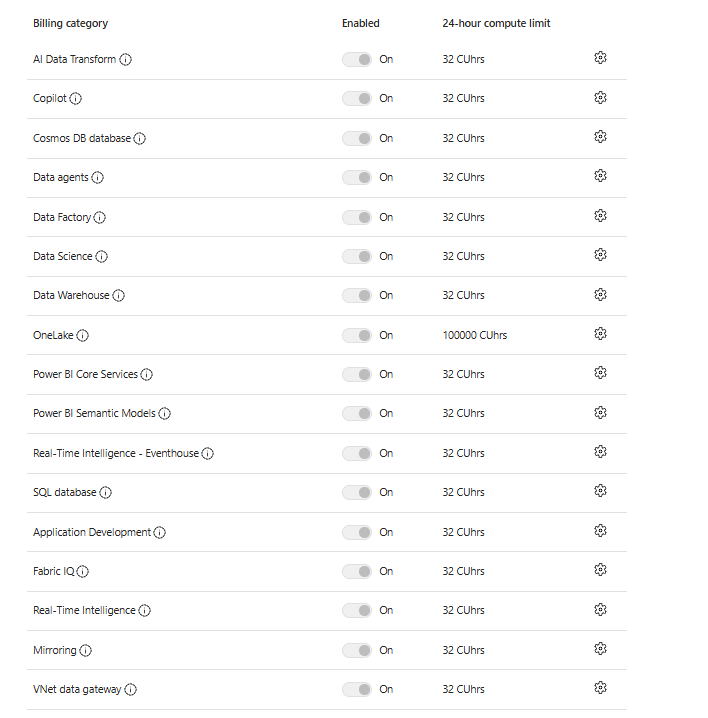
I tried to increase the 24-hour compute limit for some of the workloads, but wasn’t able to do it (trying to increase quotas in Azure Portal also ended unsuccessfully) – I assume that my region is overloaded, so Microsoft tries to prevent resource over-allocation.
Four examples
Now, some real-life use cases and how they might affect the on-demand billing model.
The examples below are not price estimates. They are mechanical calculations in billed CU-hours: CU-hours consumed times the multiplier, so the result is directly comparable to the CU-hours a capacity gives you. Multiply by your regional PAYG price per CU-hour to get money. They also use daily totals, which ignores the timing effects of smoothing on provisioned capacity.
Example 1: a small warehouse on F0
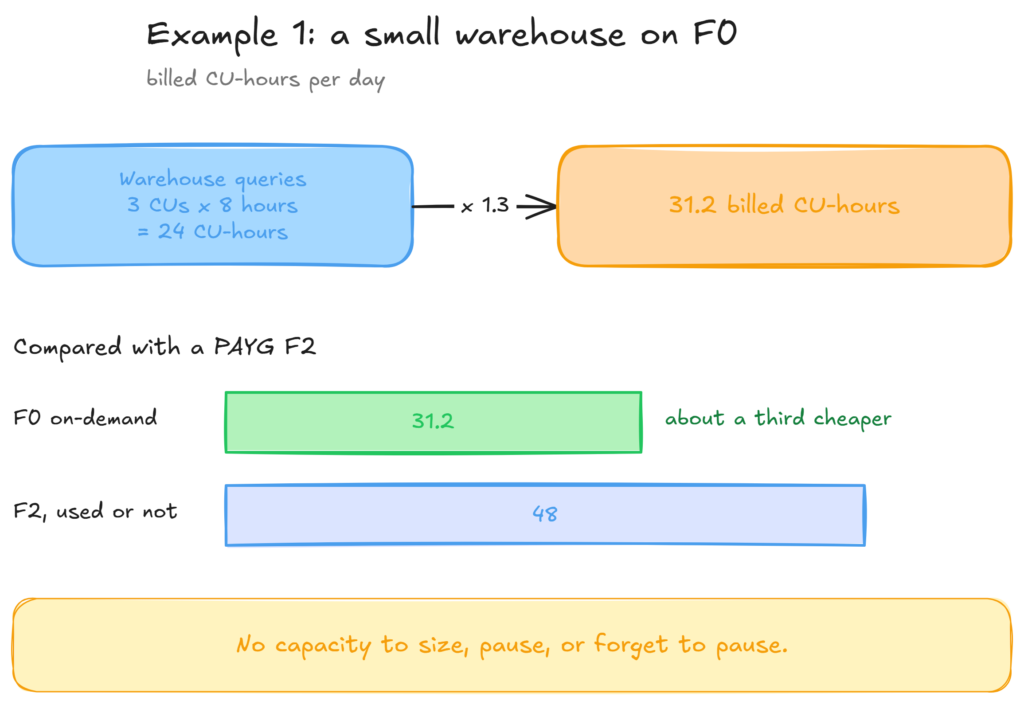
A team queries a warehouse during business hours. It consumes 3 CUs on average for 8 hours a day.
3 CUs × 8 hours = 24 CU-hours × 1.3 = 31.2 billed CU-hours per day
A PAYG F2 costs 48 CU-hours per day, used or not. On-demand wins by about a third, and there’s no capacity to size, pause, or forget to pause.
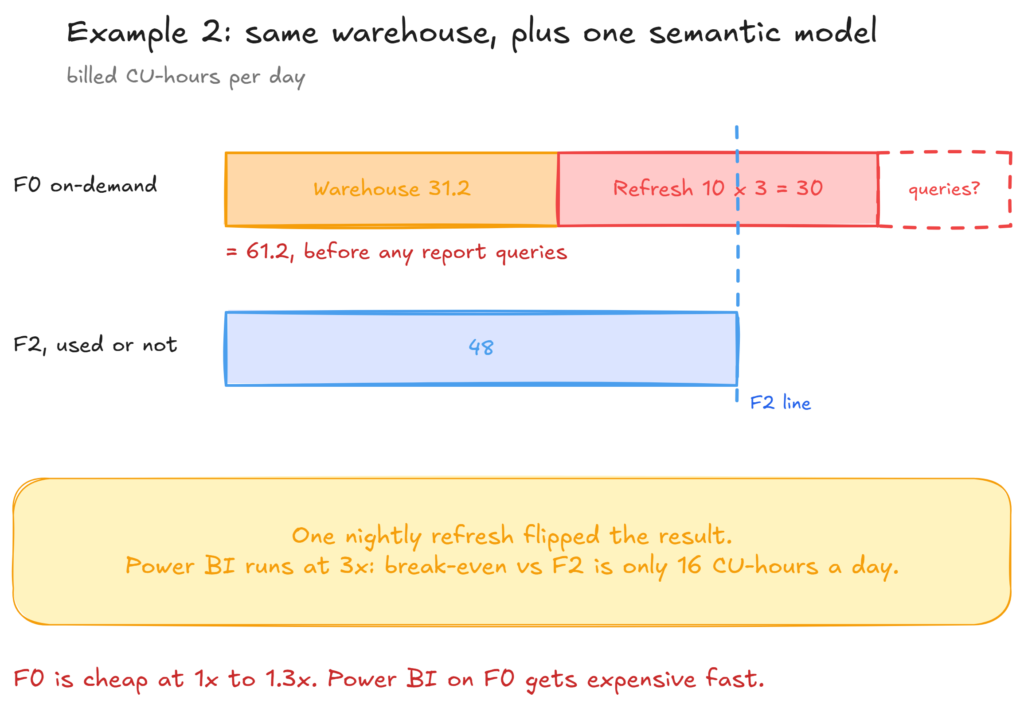
Example 2: same warehouse, plus one semantic model
Now, let’s add an Import semantic model to the mix, with a nightly refresh that consumes 10 CU-hours, plus report queries during the day.
Warehouse: 31.2 + refresh: 10 × 3 = 30 → 61.2 billed CU-hours per day
One refresh flipped the result! The F2 is now cheaper, and the report queries haven’t even been counted yet. Power BI categories carry a 3x multiplier, so their break-even against F2 is only 16 CU-hours a day.
F0 is cheap for the workloads at 1x to 1.3x. Power BI on F0 gets expensive fast.
Example 3: hybrid F64 during a sales promotion
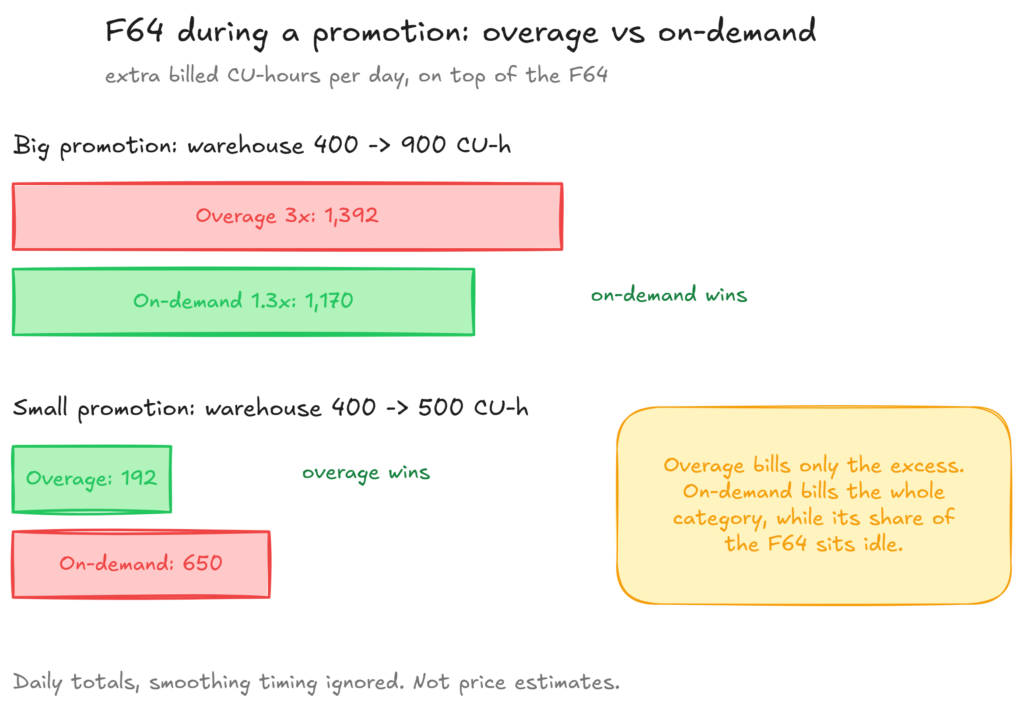
This is Microsoft’s own scenario, with numbers added. An F64 gives 1.536 CU-hours a day. Normally the warehouse uses 400 of them and everything else uses 1.100. During a promotion, the warehouse grows.
Option A, capacity overage at 3x. Only the excess over 1.536 is billed.
- Warehouse grows to 900: total 2.000, excess 464 × 3 = 1.392 billed CU-hours
- Warehouse grows to 500: total 1.600, excess 64 × 3 = 192 billed CU-hours
Option B, on-demand for Data Warehouse at 1.3x. All warehouse consumption leaves the capacity, not just the excess.
- Warehouse at 900: 900 × 1.3 = 1.170 billed CU-hours
- Warehouse at 500: 500 × 1.3 = 650 billed CU-hours
On-demand wins the big promotion and loses the small one badly. In both cases you keep paying for the full F64, while the 400 CU-hours the warehouse used to consume there sit idle. Overage bills only the extra load. On-demand bills the whole category.
Example 4: the runaway query
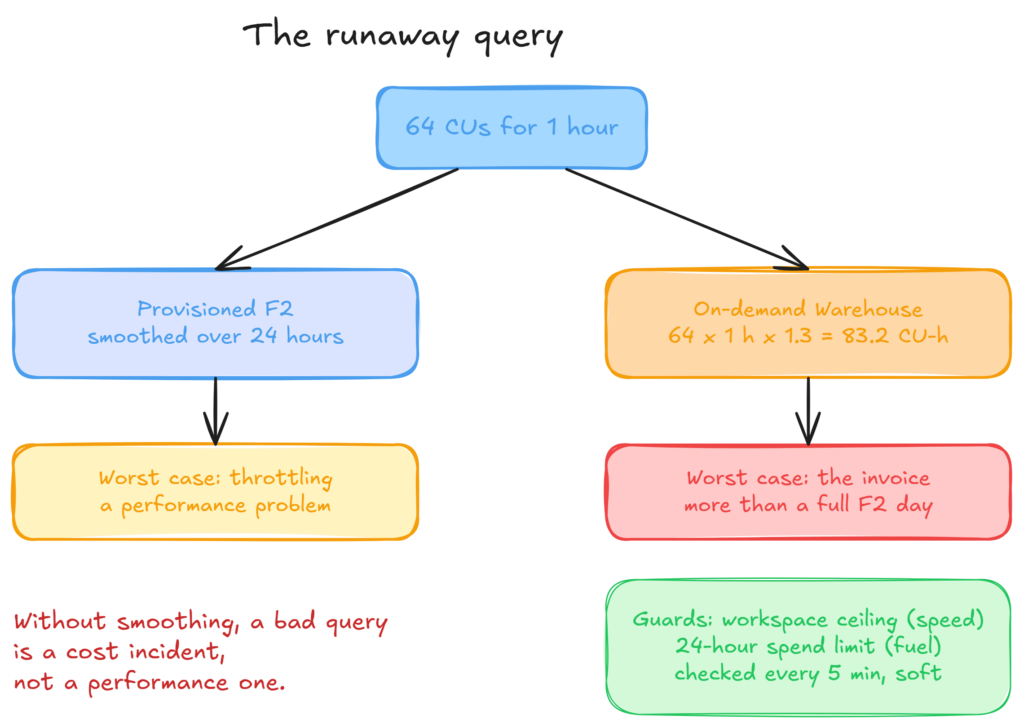
A new warehouse workspace on on-demand billing gets the default compute ceiling of 64 CUs. Someone runs a query that keeps the warehouse at that ceiling for one hour.
64 CUs × 1 hour × 1.3 = 83.2 billed CU-hours
That’s more than a full day of a PAYG F2, spent in one hour. On a provisioned F2, the same query would have been smoothed and, at worst, throttled your capacity. On demand, the worst case is a bill.
Two settings protect you: the workspace compute ceiling (minimum 25 CUs) caps how fast you can burn, and the 24-hour spend limit caps how long. When you migrate a capacity that used bursting, Fabric sets smart default ceilings that match the burst you had: 620 CUs for an F64, and 51 CUs for an F2 or F4. Check those numbers against your budget, because on demand, every one of those CUs is billed. Neither is perfect. A query already running when the spend limit is reached finishes anyway. And if you enable query acceleration, which can use roughly up to seven times more compute, all queries go through the acceleration meter, including the ones that aren’t accelerated.
What about F0 itself?
A word of warning (or disappointment if you want)…F0 is the least documented part of this release. Here is what Microsoft says about it:
- An F0 capacity has zero provisioned CUs. A category on F0 either runs on demand or doesn’t run at all, because there’s no capacity to fall back to. Be careful with what you disable: operations depend on each other, so disabling OneLake can break reads and writes in other workloads.
- Spark doesn’t run on F0 until you explicitly enable on-demand billing for Spark and set the maximum CUs it can use. That maximum is capped by your subscription’s capacity quota in that region, not by a SKU size.
- Workspace monitoring isn’t supported for workspaces on an F0 capacity.
- When you pause an F0 capacity, its categories stop accepting requests.
- You can have 20 on-demand-enabled capacities (F0 and hybrid together) per subscription and region by default.
- Upgrading from F0 to a paid SKU disables on-demand billing for all categories. Your subscription needs enough regular capacity quota for the target SKU, because on-demand quota doesn’t count.
- VNet data gateways don’t enforce the 24-hour on-demand limit yet. Microsoft’s workaround is to run the gateway on an F2 or larger capacity.
What the docs don’t cover are the engine limits. Every Fabric SKU comes with limits that are derived from its CU count, such as semantic model max memory, memory per query, DirectQuery parallelism, and the Spark vCores per CU. F0 has no CUs, so none of these formulas produce a number. The on-demand billing docs don’t publish F0 values for any of them.
Off the record (and that’s what was mentioned at FabCon Barcelona in the hallways), F0 limits are around F2 level. But, please, take this with a grain of salt, as this is a non-official statement, so hopefully we will get more transparency soon.
Hence, until that’s documented, don’t assume an F0 behaves like an F2 for anything except the price comparison. For Spark it definitely doesn’t: an F0 can run far bigger Spark jobs than an F2 if your quota allows it.
My thoughts
On-demand billing removes the need to pick a SKU before you know your workload, and it lets a spiky workload run without throttling everything else. It also brings its own mistakes: a 3x category on F0, a whole category moved for a small spike, or a runaway query with no smoothing to absorb it.
Where I’d use it:
- F0 for evaluation, dev and small projects that are mostly Warehouse, OneLake, pipelines and AI functions, the categories at 1x to 1.3x.
- Hybrid on-demand for a workload that spikes hard, so it stops throttling the rest of the capacity. Warehouse is the obvious candidate, with workspace ceilings as an extra brake.
- F0 for Spark-heavy experiments, where you want more Spark than a small SKU gives you without buying a big one.
Where I’d be careful:
- Power BI on F0. At 3x, a busy semantic model passes the F2 break-even early.
- Hybrid for small spikes. On-demand moves the whole category, so if the spike is small, capacity overage or scaling up for a few days is cheaper.
- Steady 24/7 workloads. Provisioned capacity, and especially a reservation, wins when the load is constant.
- Production without spend limits. Set a limit per category on day one. Without smoothing, a bad query is a cost incident, not a performance issue.
And whatever you choose, review the On-demand compute page in the Capacity Metrics app weekly during the preview. For Data Warehouse, Microsoft states there’s no alerting on spend or ceiling limits in the preview.
Before you enable a category, decide which of your workloads are worth a multiplier, and which belong on a capacity you’ve already paid for.
Thanks for reading!
Sources
- On-demand billing in Microsoft Fabric
- Set up on-demand billing
- Understand on-demand billing meters and multipliers
- View and increase on-demand billing quotas
- On-demand billing for Fabric Data Warehouse
- Capacity overage overview
- Understand capacity throttling and smoothing
- On-Demand Billing, part 1: introduction (Matthew Farrow)
Last Updated on November 24, 2026 by Nikola